
TL;DR:
- AI PDF summarizer tools quickly condense complex documents into brief summaries using natural language processing. They offer various formats, including key points and interactive chat functions, to enhance productivity. However, their accuracy depends on document format and the need for human oversight remains essential.
A PDF summarizer AI is a tool that automatically reads a PDF document and generates a concise summary of its key content, typically in under 30 seconds. For professionals reviewing research reports and students working through dense academic papers, this technology cuts hours of reading into minutes of focused review. The underlying process uses natural language processing algorithms to identify the most relevant sentences, arguments, and data points in a document. Tools in this category range from simple web-based PDF summarizer online options to fully integrated enterprise platforms with export and collaboration features.
How does a PDF summarizer AI work?
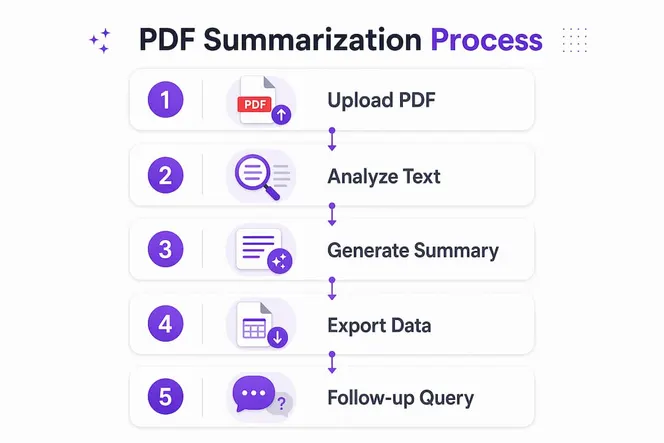
A PDF summarizer AI follows a three-step workflow: upload, analysis, and output. You upload the document, the AI scans its text layer, and within seconds you receive a structured summary. Processing time is typically under 30 seconds for standard document lengths. That speed alone changes how professionals and students approach large reading queues.
The output formats vary by tool and use case. Most automated PDF summarizer platforms generate at least three types of output:
- One-sentence summary: A single distilled claim capturing the document’s core argument or finding.
- Abstract-style summary: A short paragraph covering the main points, methodology, and conclusions.
- Bulleted key points: A scannable list of the most important facts, figures, or recommendations.
Advanced AI summarizers export structured data to productivity apps including Notion, Airtable, and Google Sheets. That integration matters because it lets you move from reading to acting without switching tools or reformatting notes manually.
One feature that separates stronger tools from basic ones is conversational summarization. Conversational summarization lets you ask follow-up questions about a PDF for deeper insights beyond a static summary. Instead of receiving one fixed output, you interact with the document as if it were a knowledgeable colleague.

Pro Tip: Before uploading, confirm whether your PDF contains a real text layer or is a scanned image. Scanned PDFs require OCR processing to be readable by AI. If your tool does not include OCR, the summary will be incomplete or empty.
What should you consider when choosing an AI PDF summarization tool?
The right tool depends on how often you use it, what you do with the output, and how sensitive your documents are. Not every PDF summary generator fits every workflow.
Simple web tools vs. integrated platforms
Free, no-login web tools work well for occasional use. You paste a link or upload a file, get a summary, and move on. Options range from free no-login tools to integrated premium enterprise software, so the market covers both ends of the spectrum. For professionals who summarize documents daily, an integrated platform with export options and team sharing is a better fit.
Key factors to evaluate
| Factor | What to look for |
|---|---|
| Speed | Summary delivered in under 30 seconds |
| OCR support | Handles scanned PDFs, not just text-layer files |
| Output formats | One-sentence, abstract, bullets, and exportable formats |
| Security | Automatic file deletion after processing |
| Usage limits | Free tier restrictions vs. subscription access |
| Interactivity | Static summary only vs. chat-with-PDF capability |
Data security is a real concern when uploading confidential reports or client documents. Files uploaded to AI summarizer platforms are typically deleted automatically within 24 hours to protect user privacy. That said, you should always read the platform’s privacy policy to confirm the exact deletion interval and data handling practices.
Free tiers commonly have usage limits, and daily upload caps make pro subscriptions attractive for frequent users. If you are a student summarizing five papers a week or a professional processing a dozen reports monthly, a paid plan pays for itself quickly.
The distinction between static summaries and interactive chat matters more than most people realize. A static summary gives you one fixed output. A chat-with-PDF interface lets you ask specific questions, request clarifications, and extract data points that a generic summary might miss. Distinguishing between static summary tools and chat-with-PDF interfaces is the single most important factor in matching a tool to your actual workflow.
How can you use AI summaries to improve productivity and learning?
Knowing how to summarize PDF using AI is one thing. Knowing where to apply that skill in your daily workflow is what actually saves time. Here are four practical use cases with clear steps.
-
Literature review for research. Upload five to ten academic papers to your AI tool. Request a bulleted key points summary for each. Paste the outputs into a shared Notion page. You now have a comparative overview without reading every paper in full. This approach cuts a two-hour literature review to under 30 minutes.
-
Business report analysis. Before a client meeting, upload the quarterly report and ask the AI to summarize the top three risks and the key financial metrics. You walk into the meeting informed without spending an hour on a 40-page document. AI-generated abstracts and key points help decision-makers prioritize reading, which directly reduces preparation time.
-
Study note generation. Students can upload lecture slides or textbook chapters and request a structured summary with definitions and key arguments. Export the output to Google Sheets or Airtable for organized revision. This method works especially well for subjects with high reading volumes, like law, medicine, or business.
-
Contract and policy review. Upload a vendor contract or internal policy document and ask the AI to flag the key obligations, deadlines, and penalties. This is not a substitute for legal review, but it gives you a fast orientation before involving a specialist.
For Gammatica users, the process is direct. Upload your PDF to the Gammatica AI chat and ask it to analyze the document. You can request a summary, ask specific questions, or pull out data points. The interface is built for professionals who need fast answers, not just a block of summarized text. Pairing AI summaries with business growth automation workflows lets you move insights from documents into action without manual data entry.
Pro Tip: After receiving your initial summary, ask the AI at least two follow-up questions. Ask “What evidence supports the main claim?” and “What risks or counterarguments are mentioned?” These two questions consistently surface information that a standard summary leaves out.
Some AI PDF tools allow saving the entire chat or summary in multiple formats including PDF for future reference. Save your AI conversation alongside the original document so your team can review both the source and the analysis together.
What are the common limitations of AI PDF summarization?
AI summarization is fast and useful, but it is not perfect. Understanding where it falls short helps you use it more effectively rather than being caught off guard.
The most common limitations include:
- Poor handling of scanned documents. AI summarization accuracy depends on document structure, and OCR is vital for scanned PDFs. If a document is a photographed page rather than a digital text file, the AI reads nothing and returns an empty or inaccurate summary.
- Loss of nuance in complex arguments. AI tools compress information. A 60-page legal brief or a nuanced academic argument may lose critical qualifications in a short summary. Always verify the summary against the original for high-stakes decisions.
- Table and chart blindness. Most AI summarizers read text. They do not interpret embedded charts, graphs, or data tables. If the key insight in a report lives in a figure, the summary will miss it.
- Formatting artifacts. PDFs with unusual layouts, multi-column text, or heavy formatting can confuse the AI’s text extraction. The output may be fragmented or out of sequence.
- Language and domain limitations. General-purpose AI summarizers perform best on standard business and academic English. Highly technical documents in specialized fields like pharmacology or patent law may produce summaries that miss domain-specific meaning.
The practical fix for most of these issues is human oversight. Use the AI summary as a first pass, not a final answer. If a summary feels incomplete, ask a follow-up question or scan the original document’s introduction and conclusion yourself. AI tools act as filters to help you prioritize documents for deep reading. They do not replace the judgment you bring to what you read.
For AI consulting on document workflows, working with a specialist can help teams build reliable summarization processes that account for these limitations from the start.
Why I think most people are using these tools wrong
I have watched professionals adopt AI PDF summarization and immediately treat the output as final. They copy the summary into a report, share it with a team, and move on. That is the wrong approach, and it misses the real value of the technology.
The shift these tools enable is not from reading to not reading. It is from reading everything to reading the right things. AI filters the volume and surfaces what matters. Your job is to decide what to do with that signal.
The best use I have seen is interactive querying. A static summary tells you what the document says. A follow-up question tells you what the document means for your specific situation. Ask “What does this mean for our Q3 budget?” and the AI gives you a targeted answer that a generic summary never would.
Quick summaries genuinely reduce cognitive load and speed up decisions. I have seen teams cut their document review cycles significantly just by adding a summarization step before meetings. The future of these tools is deeper integration with project management and CRM workflows, so insights from documents flow directly into tasks and client records without manual copying.
The accuracy of AI summarization is improving fast. But the professionals who get the most value are not the ones waiting for perfect AI. They are the ones who learned to ask better questions.
— Viktor
Gammatica AI chat for fast PDF analysis
Gammatica’s AI chat lets you upload a PDF and immediately ask questions about its content. You get a structured summary, targeted answers, and the ability to dig deeper with follow-up queries, all within the same platform you use for task management and team collaboration.

For founders and team leaders who process reports, proposals, and research documents regularly, this removes the context-switching between reading tools and work tools. Everything stays in one place. Visit Gammatica for Founders to see how AI-driven document analysis fits into a full productivity workflow. Fast analysis, secure file handling, and immediate output make it a practical next step for any professional who wants to spend less time reading and more time deciding.
FAQ
What is a PDF summarizer AI?
A PDF summarizer AI is a tool that uses natural language processing to automatically extract and condense the key information from a PDF document into a shorter, structured summary.
How fast does AI PDF summarization work?
Most AI PDF summarizers deliver results in under 30 seconds for standard document lengths, making them practical for high-volume document workflows.
Are uploaded PDFs kept securely?
Files uploaded to most AI summarizer platforms are automatically deleted within 24 hours. Always check the platform’s privacy policy to confirm the exact data retention and deletion practices.
What is the difference between a static summary and a chat-with-PDF tool?
A static summary gives you one fixed output based on the full document. A chat-with-PDF tool lets you ask specific follow-up questions, making it far more useful for targeted research or decision-making.
Do free AI PDF summarization tools have limits?
Free tiers commonly restrict daily uploads and interactions. Upgrading to a paid plan unlocks more usage and additional features, which is worth it for professionals who summarize documents regularly.