Planning corporate events in Hungary means juggling endless vendor emails, budget spreadsheets, and team coordination chaos. Most business leaders waste hours on repetitive administrative tasks that could be automated. AI event management templates eliminate this friction by automating scheduling, budgeting, and communication, freeing you to focus on strategic decisions that actually move the needle.
Key takeaways
| Point | Details |
|---|---|
| AI templates automate repetitive event planning tasks | Scheduling, vendor comparisons, and content creation happen automatically, saving hours weekly |
| Setup requires centralized platform and clear roles | Choose software with AI automation, define team permissions, and pilot test before full rollout |
| Follow stepwise workflow for maximum efficiency | Set workspace, assign roles, use AI for agendas, track tasks, monitor budgets, and analyze reports |
| Avoid common mistakes like overcomplication | Keep workflows simple, always pilot test, train your team, and use phased rollouts |
| Expect measurable improvements in time and ROI | Save up to 16 hours weekly, reduce budget overruns by 25%, and boost efficiency by 35% |
Introduction to AI event management templates
AI event management templates are digital frameworks that use artificial intelligence to handle repetitive planning tasks automatically. Instead of manually creating schedules or comparing vendor quotes, these templates automate scheduling, vendor comparisons, and content creation, letting you focus on complex decisions that require human judgment.
The core benefits center on time savings and accuracy. Traditional event planning drowns you in spreadsheets, email threads, and version control nightmares. AI templates centralize everything in one workspace where team members see real-time updates, automated reminders trigger at the right moments, and budget tracking happens continuously without manual entry.
Key advantages include:
- Automated task assignment and intelligent reminders that adapt to project changes
- Real-time collaboration across teams with permission controls for data security
- Budget monitoring that alerts you before overspending occurs
- Vendor comparison tools that surface the best options based on your criteria
- Reporting dashboards that show progress and bottlenecks instantly
Pro Tip: Many planners worry AI will replace their expertise. The reality is different. AI handles the grunt work while you apply strategic thinking to creative concepts, stakeholder management, and crisis resolution. You become more valuable, not less.
Think of AI templates as your administrative assistant who never sleeps, never forgets a deadline, and never makes calculation errors. The technology augments your capabilities rather than competing with them.
Prerequisites and setup requirements
Before implementing AI event management templates, you need the right foundation. Rushing into adoption without proper setup creates confusion and undermines user confidence.
Start with a centralized digital platform that supports AI automation features. Look for software offering task management, calendar integration, budget tracking, and team collaboration tools in one interface. Fragmented systems where event data lives across multiple apps defeats the purpose of automation.
Define clear team roles and permission levels from day one. Who creates tasks? Who approves budget changes? Who communicates with vendors? Ambiguous responsibilities lead to duplicated work and missed deadlines. Set permissions so team members access only what they need, protecting sensitive financial data while enabling collaboration.
Your team needs baseline project management knowledge. If people don’t understand concepts like task dependencies, milestone tracking, or critical path planning, AI tools won’t magically fix that gap. Consider brief training sessions covering project management fundamentals before introducing AI features.
Prerequisite training and platform setup rank as critical factors for 70% of successful AI adopters. Organizations that skip this groundwork face higher failure rates and wasted implementation costs.
Pro Tip: Start with a pilot project rather than rolling out AI templates across all events simultaneously. Choose a medium-complexity event where stakes are manageable but meaningful. This approach lets you identify workflow issues, adjust configurations, and build team confidence before scaling up.
Additional setup considerations:
- Integration with existing tools like email, calendar apps, and financial software
- Data migration plan if moving from legacy systems
- Clear documentation of standard operating procedures for AI features
- Designated power users who can troubleshoot common issues
Step by step workflow using AI event management templates
Implementing AI templates effectively requires following a structured sequence. This workflow guides you from initial setup through post-event analysis.
-
Set up a centralized workspace for your event. Create a project in your AI-powered platform containing all relevant details: event objectives, target audience, budget parameters, timeline, and deliverables. This becomes the single source of truth everyone references.
-
Define team roles and assign permissions. Specify who manages budget approvals, who coordinates vendors, who handles attendee communication, and who oversees content creation. Configure permission levels so each role accesses appropriate features without overwhelming users with unnecessary options.
-
Use AI to generate event ideas and draft agendas. Input your event objectives and let AI suggest themes, session topics, and scheduling frameworks. Review suggestions critically and refine based on your audience knowledge. AI provides the starting point, you add the strategic polish.
-
Assign tasks using automated reminders. Break the event into manageable tasks with clear owners and deadlines. Configure the system to send intelligent reminders that escalate if deadlines approach without progress updates. Task automation like smart reminders improves workflow efficiency by up to 35%.
-
Monitor budgets with real-time cost control. Input estimated costs for each expense category. As team members log actual spending, the AI dashboard updates automatically, flagging potential overruns before they become crises. Set threshold alerts at 80% and 95% of budget limits.
-
Manage attendees and communication efficiently. Use AI templates to generate personalized invitations, confirmation emails, and reminder sequences. Track RSVPs automatically and segment attendees by role or interest for targeted communications.
-
Pilot test your AI workflow with a small team segment before full deployment. Run through the complete process from task creation to completion tracking. Gather feedback on usability issues and configuration problems. Adjust settings based on real user experience rather than assumptions.
-
Analyze AI-generated reports for continuous improvement. After your event, review the performance dashboard showing which tasks ran late, where budget variances occurred, and which communication sequences performed best. Apply these insights to optimize future event templates.
Pro Tip: Automating repetitive tasks frees planners to focus on complex decision-making. Don’t automate everything just because you can. Reserve human judgment for vendor negotiations, creative direction, and stakeholder relationship management where emotional intelligence matters.
Common mistakes and troubleshooting in AI event management
Even well-planned AI implementations hit obstacles. Recognizing frequent errors helps you avoid expensive failures.
Overcomplicated workflows kill user adoption faster than any technical limitation. When you create 47 custom fields, 15 approval stages, and byzantine permission structures, team members give up and return to email and spreadsheets. Up to 40% of AI implementations fail due to neglecting automation testing and overcomplicating workflows. Keep it simple. Start with essential features and add complexity only when users master the basics.
Skipping pilot testing before full deployment creates preventable disasters. What works in theory often breaks when real users interact with the system under time pressure. Testing with a small pilot group reduces implementation failure and increases adoption success by 60%. Budget time for this validation phase.
Inadequate training guarantees resistance and workarounds. Don’t assume people will figure out AI tools through experimentation. Provide structured training covering core workflows, troubleshooting common issues, and where to get help. Record training sessions so new team members can onboard quickly.
Common troubleshooting issues include:
- Duplicate tasks appearing when multiple users create similar items: Establish clear ownership rules and use search before creating new tasks
- Automation triggers firing incorrectly: Review conditional logic carefully and test with realistic scenarios
- Permission errors blocking legitimate work: Audit permission settings quarterly and adjust as roles evolve
- Integration failures with external tools: Verify API credentials remain current and monitor error logs
- Users bypassing the system due to perceived complexity: Simplify interfaces and remove unused features cluttering the experience
When problems arise, resist the urge to abandon AI templates entirely. Most issues stem from configuration choices rather than fundamental technology limitations. Work with your platform’s support team to identify root causes and implement targeted fixes.
Phased rollouts minimize risk by exposing problems gradually. Launch AI templates for one event type, refine based on feedback, then expand to additional scenarios. This approach builds organizational confidence while containing potential failures.
Budget management and cost control with AI templates
Event budgets spiral out of control when visibility lags behind spending. By the time you discover overruns in traditional spreadsheets, options for correction have evaporated.
AI templates provide real-time budget tracking that eliminates surprises. As team members log expenses or commit to vendor contracts, the system updates immediately. You see current spending against projections at a glance, not after reconciling receipts weeks later.

Research shows AI templates reduce budget overruns by approximately 25% through continuous cost oversight throughout the event lifecycle. This improvement comes from early warning systems that flag potential problems while you still have time to adjust.
Automated vendor price comparisons save both time and money. Instead of manually requesting quotes from multiple suppliers, AI tools aggregate options based on your requirements and highlight cost differentials. You make informed decisions faster without sacrificing due diligence.
Integration with financial approval workflows ensures proper authorization before commitments. Configure multi-level approvals for expenses exceeding thresholds, creating audit trails that satisfy finance department requirements while maintaining planning velocity.
Key budget management features:
- Category-level tracking showing spending patterns across venue, catering, marketing, and other areas
- Variance analysis highlighting where actuals diverge from estimates
- Forecasting tools projecting final costs based on current burn rates
- Automated alerts when categories approach or exceed budget allocations
| Budget Category | Estimated Cost | Current Spending | Variance | Status |
|---|---|---|---|---|
| Venue | $15,000 | $14,200 | -$800 | Under budget |
| Catering | $8,000 | $8,600 | +$600 | Over budget |
| Marketing | $5,000 | $3,200 | -$1,800 | Under budget |
| Technology | $3,000 | $3,000 | $0 | On budget |
| Contingency | $2,000 | $500 | -$1,500 | Reserve available |
Pro Tip: Build contingency buffers into your initial budget rather than hoping everything goes perfectly. AI templates help you track contingency usage so reserves don’t disappear into uncontrolled scope creep.
Enhancing collaboration and communication with AI tools
Fragmented communication destroys event execution. When critical information lives in someone’s email inbox rather than shared workspaces, team alignment suffers and mistakes multiply.
AI event management templates centralize information so everyone accesses the same current data. Task assignments, deadline changes, vendor contact details, and budget updates appear in one location. Team members stop wasting time hunting for information scattered across email threads, chat apps, and personal notes.
Automated status updates keep stakeholders informed without manual reporting. Configure the system to send daily or weekly digests showing completed tasks, upcoming deadlines, and blocking issues. Intelligent notifications alert relevant people when actions require their attention, reducing information overload from constant updates about irrelevant items.
Centralizing event details and task assignments on a shared digital platform enhances team alignment and accountability. When everyone sees who owns what and when deliverables are due, social pressure reinforces individual responsibility.
Role-based permission controls balance transparency with security. Marketing team members access attendee communication tools without seeing sensitive budget negotiations. Vendors view their specific task lists without browsing unrelated event details. This selective visibility maintains focus while protecting confidential information.
Shared digital workspaces foster better team alignment by:
- Providing comment threads on specific tasks for contextual discussion
- Maintaining version history so changes are traceable and reversible
- Enabling file attachments directly on relevant tasks rather than scattered across email
- Supporting @mentions to pull specific people into conversations requiring their input
Real-time collaboration becomes possible when multiple team members work simultaneously without conflicts. One person updates the venue layout while another adjusts the catering headcount and a third refines the marketing timeline. Changes sync instantly so nobody works from outdated information.
Pro Tip: Establish communication norms about when to use the AI platform versus email or chat. Reserve the platform for project-critical information requiring documentation and traceability. Use informal channels for quick questions that don’t need permanent records.
Alternative approaches and tradeoffs
AI event management templates aren’t the only option for planning events. Understanding alternatives helps you make informed decisions about the right approach for your situation.
Manual spreadsheet-based planning remains common despite significant limitations. You create Excel files tracking tasks, budgets, and timelines, sharing via email or cloud storage. This approach costs almost nothing beyond existing software licenses, making it attractive for very small events or organizations with tight budgets.
However, manual methods suffer from high error risk due to data entry mistakes, version control chaos when multiple people edit simultaneously, and lack of automated reminders causing missed deadlines. Collaboration becomes difficult as file size grows and complexity increases. Budget tracking requires constant manual updates prone to calculation errors.
Semi-automated tools like basic project management software improve some workflows while missing others. These platforms offer task lists, simple calendars, and basic collaboration features without AI-powered automation. They cost less than full AI solutions and provide structure beyond pure spreadsheets.
The tradeoff is limited intelligence. Semi-automated tools won’t suggest optimal schedules, flag budget risks automatically, or adapt workflows based on past performance. You still handle much of the analytical work manually. Real-time collaboration may be limited compared to AI platforms.
| Approach | Cost | Time Savings | Collaboration | Budget Control | Complexity | Best For |
|---|---|---|---|---|---|---|
| Manual spreadsheets | Very low | Minimal | Poor | Manual tracking | Low | Very small events, tight budgets |
| Semi-automated tools | Low to medium | Moderate | Good | Basic tracking | Medium | Mid-size events, growing teams |
| AI templates | Medium to high | High (16+ hours weekly) | Excellent | Real-time automated | Medium to high | Complex events, multiple stakeholders |
AI templates provide superior time savings and budget control for complex events requiring coordination across multiple teams, vendors, and deliverables. The investment pays off through efficiency gains and reduced overrun risk. For a small internal team lunch with 20 people and minimal logistics, manual methods may suffice given the low stakes.
Consider your event’s complexity, team size, budget scale, and frequency when choosing an approach. Organizations running multiple events quarterly gain more ROI from AI templates than those planning one annual gathering. Higher budget events justify the software investment more easily than low-cost affairs.
Scalability matters too. Manual methods break down as event complexity grows. Migrating from spreadsheets to AI templates mid-project creates disruption. Choose the approach matching not just your current event but your growth trajectory.
Expected results and outcomes using AI event management templates
Adopting AI event management templates delivers measurable improvements across time, cost, and quality dimensions. Understanding realistic outcomes helps set appropriate expectations and build stakeholder support.
Time savings rank as the most immediate benefit. Implementing AI in event management shows organizations save up to 16 hours weekly on administrative tasks like scheduling, data entry, and status reporting. These hours shift to strategic work including stakeholder relationship building, creative development, and problem solving that actually differentiates your events.
Budget performance improves through continuous oversight and early warning systems. Organizations report approximately 25% reduction in budget overruns when using AI templates with integrated financial tracking. Real-time visibility into spending patterns enables course corrections before small variances become major problems.
Workflow efficiency gains appear across the event lifecycle. AI-powered task automation boosts team productivity by 30-35% through intelligent reminders, automated status updates, and streamlined approval processes. Tasks that previously required multiple emails and follow-ups complete faster with less friction.
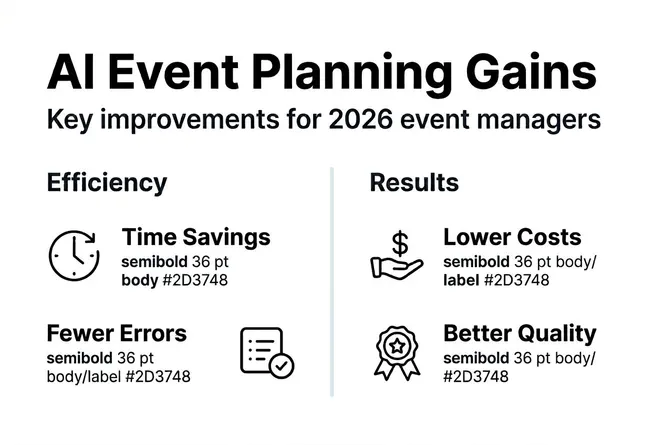
Event ROI increases by at least 25% for organizations implementing AI templates systematically. This improvement stems from better resource allocation, reduced waste from last-minute changes, and higher attendee satisfaction due to smoother execution.
Key measurable outcomes include:
- 16 hours weekly saved on repetitive administrative tasks
- 25% reduction in budget overruns through real-time tracking
- 30-35% improvement in team workflow efficiency
- 25% increase in overall event ROI
- 60% higher implementation success rates when using pilot testing
Organizations using AI-driven templates free planners to focus on complex decision-making rather than administrative busy work, fundamentally changing how teams allocate talent.
Adoption success correlates strongly with proper training and phased rollouts. Teams that invest in user education and pilot testing before full deployment achieve significantly better results than those forcing rapid adoption without preparation.
Timeline for seeing results varies by implementation approach. Basic time savings from task automation appear within the first event cycle. Budget improvements and efficiency gains compound over multiple events as teams refine their workflows and leverage historical data.
Pro Tip: Track baseline metrics before implementing AI templates so you can quantify improvements objectively. Measure current time spent on administrative tasks, budget variance rates, and team satisfaction scores. Compare these numbers after three months of AI template usage to demonstrate ROI to stakeholders.
Discover Gammatica’s AI-powered event management solutions
Applying these AI event management strategies becomes straightforward with the right platform. Gammatica delivers integrated AI tools designed specifically for streamlined project and event management, combining task automation, team collaboration, and budget control in one intuitive interface.

Enhance your team’s collaboration and eliminate repetitive administrative tasks that drain productivity. Gammatica’s AI-driven templates automate scheduling, budget tracking, and communication workflows, giving you complete visibility into team activities while reducing manual overhead. Business leaders across Hungary use Gammatica to transform complex event planning into organized, predictable processes that consistently deliver results.
Founders and project managers gain powerful dashboards showing real-time progress across all events and projects. Stop juggling multiple tools and spreadsheets. Experience how AI-driven insights can revolutionize your event management workflow and free your team to focus on strategic work that actually moves your business forward.
Frequently asked questions
What is an AI event management template?
AI event management templates are digital frameworks using artificial intelligence to automate and optimize event planning tasks including scheduling, budgeting, vendor management, and team communication. They reduce manual work and improve accuracy by handling repetitive administrative functions automatically.
How do I start using AI templates for event management?
Begin by selecting a digital platform supporting AI automation and team collaboration features. Define clear team roles and permission levels, then pilot test workflows with a medium-complexity event before full deployment. Provide adequate training so your team understands core features and troubleshooting procedures.
What are common mistakes to avoid when using AI event management templates?
Avoid creating overly complex workflows that confuse users and reduce adoption rates. Never skip pilot testing of automation features before rolling out across all events. Provide sufficient training and ongoing support to build user confidence. Use phased rollouts to identify and fix configuration issues early before they impact critical events.
Can AI templates help control event budgets?
Yes, AI templates provide real-time budget tracking with automated alerts preventing overspending before it occurs. They enable instant vendor price comparisons and integrate with financial approval workflows to maintain oversight. Organizations typically see approximately 25% reduction in budget overruns through continuous cost monitoring.
Are AI event management templates suitable for small events?
Manual tools or basic spreadsheets may suffice for very small, low-budget events with minimal logistics and few stakeholders. AI templates deliver greatest ROI for larger, complex events requiring multi-team coordination, substantial budgets, and sophisticated workflows where automation creates significant time savings and risk reduction.