
What does it actually mean to streamline processes?
Streamlining is a systematic effort to simplify or remove unnecessary tasks so you achieve better outcomes with less time, effort, and friction. It is not about working harder or adding more tools. It is about cutting what does not need to be there and making what remains as clear and repeatable as possible.
The benefits show up fast when you get this right:
- Consistency: When everyone follows the same optimized workflow, results stop varying based on who happens to be doing the work that day.
- Delegation: You cannot hand off what you cannot explain clearly. Documented, simplified processes make delegation straightforward.
- Onboarding speed: New team members ramp up in days rather than months when clear guides exist.
- Scalability: Simplified processes are the foundation of growth that does not create chaos.
- Time recovery: Explaining the same thing repeatedly is one of the biggest hidden time drains in any team.
Where do you start? Three moves matter most. First, identify which processes actually need attention: focus on workflows that happen repeatedly, involve multiple people or handoffs, generate mistakes, or block other work. Second, document what is currently happening, not the idealized version, but the real one including workarounds. Third, pinpoint the waste: unnecessary steps, bottlenecks, redundancies, and context switching between tools. Everything else builds from there.
How to identify and document inefficiencies in your processes
Most teams think they know how their processes work. They are usually wrong. The gap between the official procedure and what people actually do is where most inefficiency hides.
Start by observing real work in action. The Gemba Walk, a Lean practice where you go to the place where work is actually being done and watch it firsthand, surfaces “shadow steps” that never appear in any official documentation. These are the workarounds, the informal Slack messages, the spreadsheet someone built because the system does not do what they need. Documenting processes exactly as performed, including those workarounds, is how you locate where value is leaking.
Once you have observed, map what you found. Two techniques work particularly well:
- Swimlane diagrams: These divide a process map into lanes by role or department, making it immediately obvious when a task gets stuck between teams. Most friction does not happen during the work itself. It happens during handoffs.
- Value Stream Mapping (VSM): A Lean technique that maps the flow of materials and information while quantifying lead time versus active processing time. It is especially useful for identifying steps that consume time without adding value.
Beyond observation and mapping, gather both types of data. Quantitative data from system logs tells you cycle times and error rates. Qualitative input from team interviews tells you why people do what they do. Neither alone gives you the full picture.
Look specifically for these waste types:
- Unnecessary steps that exist because nobody removed them
- Bottlenecks where one person or one approval holds everything up
- Redundancies where the same task happens in multiple places
- Context switching where completing one task requires jumping between several tools
Setting clear, measurable goals and priorities for process improvement
Vague goals produce vague results. If your objective is “make things more efficient,” you will never know whether you got there. The goal needs to connect directly to a business outcome you can measure.
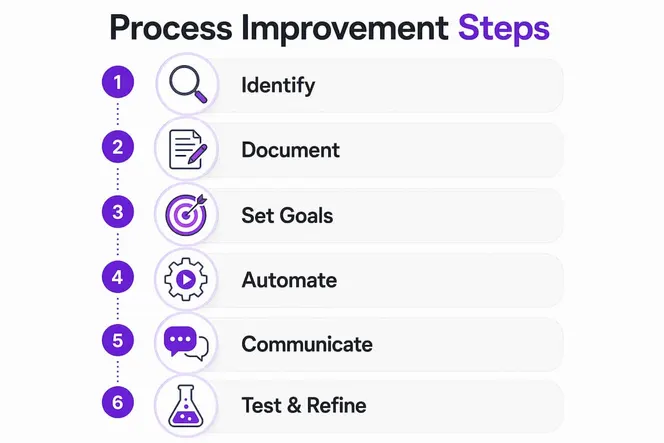
Useful Key Performance Indicators for process work include cycle time (how long a process takes from start to finish), error rate, on-time completion, and customer satisfaction scores. Pick one primary outcome measure and a small set of process measures that drive it. Tracking too many metrics at once dilutes focus.
Prioritization matters as much as goal setting. Not every process deserves your attention first. Rank by two factors:
- Impact: How much time, money, or quality does improving this process affect?
- Changeability: Can your team actually change it with the authority, time, and resources you have right now?
The sweet spot is a process that is both high-impact and realistically within your control. Trying to fix a process that requires executive sign-off on every change, when you do not have that access, is a fast way to kill momentum.
Transparency with your team is not optional here. When people understand what you are measuring and why, they are far more likely to support the change. Share the baseline metrics before you start, and share the results after. That visibility builds trust and keeps everyone aligned on what “better” actually looks like.
How to use automation and technology to improve workflow efficiency
Here is the rule that most teams get backwards: simplify before you automate. Automating a broken process does not fix it. It makes the mistakes happen faster and at greater scale. Get the workflow right first, then apply technology to remove the manual repetition.
Once a process is clean, automation becomes genuinely powerful. The tasks best suited for it share a few characteristics:
- They are repetitive and rule-based (the same inputs always produce the same outputs)
- They are high-volume (the time savings multiply quickly)
- They are low-judgment (a human does not need to make a decision each time)
Common candidates include data entry, approval routing, status notifications, report generation, and onboarding task sequences. Platforms that integrate with your existing tools via APIs, such as Make.com, let you connect systems without custom development.
Pro Tip: Before selecting any automation tool, map the workflow on paper first. If you cannot explain the process in plain steps, the tool will not save you. Clarity comes before configuration.

Advanced analytics dashboards give you real-time visibility into how processes are actually performing, which is different from how you think they are performing. The top-performing organizations use these tools to eliminate nonessential reporting and speed up decision-making. The goal is not more data. It is the right data, surfaced at the right moment.
Keep your toolset minimal. Every tool you add is another thing your team needs to learn, check, and maintain. A focused stack of two or three well-integrated tools beats a sprawling collection of apps that nobody fully uses.
How better communication reduces friction and speeds up your workflows
Poor communication is often the real bottleneck, even when teams blame the process itself. When people do not know where to find information, who owns a decision, or why a step exists, they slow down, ask questions, or skip steps entirely.
Centralized communication platforms break down barriers and accelerate collaboration by creating a single source of truth for conversations, files, and updates. Instead of information scattered across email threads, direct messages, and shared drives, everyone works from the same hub. That alone removes a surprising amount of daily friction.
Practical steps that make a real difference:
- Document the “why” alongside the “what.” When team members understand the purpose behind a step, they can make better decisions independently without needing to escalate every edge case. Effective documentation includes purpose, success criteria, and common mistakes, not just a list of steps.
- Involve your team in designing the new process. People resist changes that are imposed on them. They embrace changes they helped create. Asking for input early is not just good manners. It is the most reliable way to get consistent adoption.
- Replace unnecessary meetings with async alternatives. A status update that requires a 30-minute meeting is a process problem. Project management tools with visible task tracking, shared dashboards, and comment threads handle most of what meetings try to accomplish, without the scheduling overhead.
- Build regular feedback loops. A short weekly check-in or a simple feedback form gives your team a channel to flag confusion or suggest improvements before small issues compound into bigger ones.
The goal is a team that can execute without constant hand-holding. Clear communication structures make that possible.
Implementing, testing, and refining your improved processes
Designing a better process is only half the work. Getting it to stick is the other half, and that is where most improvement efforts fall apart.
Start with a pilot. Find someone who has never done this process before and have them follow your new documentation without any help from you. Watch where they hesitate, where they skip steps, and where they ask questions. Those moments are your documentation gaps, not their failures. A multi-step framework that moves from identification through testing to continuous improvement consistently outperforms one-shot redesigns.
When you roll out more broadly, compare your KPIs against the baseline you established before the change. Before-and-after comparisons are the only reliable way to distinguish real improvement from the feeling of improvement. Teams often confuse motion with progress.
Key practices for sustainable rollout:
- Document the new process with context. Include why each step exists, what success looks like, and who to ask when something goes wrong. Documentation without context creates compliance without understanding.
- Collect feedback actively in the first 30 days. The people doing the work will find gaps you missed. Make it easy for them to report confusion without it feeling like a complaint.
- Schedule quarterly reviews. Process improvement works best as an ongoing habit, not a one-time project. Businesses change, tools change, and people discover better approaches. A quarterly review cadence prevents regression into old habits.
- Automate the repetitive steps once the process is stable. Automation locks in the new behavior and removes the temptation to revert.
The teams that sustain efficiency gains are the ones that treat process refinement as part of how they work, not as a special project they do once a year.
Advanced frameworks and expert insights for lasting process efficiency
The most effective organizations do not approach process improvement as a series of one-off fixes. They build it into their operating rhythm. Several proven frameworks give structure to that habit.
Lean focuses on eliminating waste: waiting, overproduction, unnecessary motion, rework, and redundant approvals. The core question is simple: does this step directly add value for the customer or the outcome? If not, remove or simplify it.
Six Sigma uses the DMAIC model (Define, Measure, Analyze, Improve, Control) to reduce variation and defects through data. It is methodical and works best for processes where consistency and error reduction are the primary goals.
PDCA (Plan-Do-Check-Act) is a low-risk loop for testing improvements before full rollout. You plan a change, try it on a small scale, measure the results, and then decide whether to adopt, adjust, or scrap it. It is the fastest way to learn without betting the whole operation on an untested idea.
Business Process Management (BPM) treats process improvement as an enterprise-wide discipline, not a departmental task. BPM software gives visibility into process flows, facilitates collaboration, and automates repetitive tasks across functions.
Insight: Prioritizing decision-relevant work increases organizational speed and impact by removing unnecessary steps and meetings. The best-performing organizations reduce backward-looking reporting and focus data collection on what actually informs decisions.
AI is changing what is possible here. Beyond basic automation, AI tools can identify patterns in process data, flag bottlenecks before they become critical, and suggest workflow adjustments based on actual usage. Research on AI-driven productivity gains shows that agencies and professional teams adopting AI tools see meaningful output increases without proportional increases in headcount.
The practical takeaway from these frameworks is consistent: map regularly, measure what matters, and refine in small iterations rather than waiting for a big overhaul. The teams that treat process improvement as a continuous discipline, not a quarterly event, are the ones that compound their efficiency gains over time. For a deeper look at how AI specifically reshapes agency-level workflows, the 2026 guide on AI in agency productivity covers the current state of the technology and where it is heading.
The case for gradual, deliberate process improvement
There is a temptation, especially after reading about Lean, Six Sigma, and BPM, to want to redesign everything at once. Resist it. The organizations that make the most lasting gains do the opposite: they pick one high-friction process, fix it properly, measure the result, and then move to the next one.
The reason wholesale overhauls usually fail is not technical. It is human. When too many things change at once, people cannot tell what is working and what is not. Feedback becomes noise. Adoption drops. And within a few months, the team has quietly reverted to the old way because the new way was never fully understood.
What actually works is documenting not just what to do, but why. A process that includes the reasoning behind each step gives team members the context to adapt when something unexpected happens, without needing to escalate or guess. That autonomy is what separates a team that executes well from one that requires constant supervision.
The automation warning deserves repeating: do not automate a process you have not yet simplified. The instinct to reach for a tool is understandable, especially when the tool promises to solve the problem. But technology applied to a flawed workflow amplifies the flaw. Simplify the logic first. Reduce the handoffs. Then automate what remains.
Finally, buy-in is not a soft concern. It is a hard operational requirement. Teams that are told about a new process after it has been designed will find ways around it. Teams that helped shape it will defend it. The difference in adoption rates between those two scenarios is not marginal. Involve your people early, explain the specific problem the change solves, and make it easy for them to flag issues after rollout. That combination is what turns a process improvement project into a lasting operational upgrade.
Gammatica gives your team a single place to run every workflow
Putting these principles into practice is much easier when your tools are built for it. Gammatica is an AI-driven project and team management platform that brings task management, CRM, automation, calendar coordination, checklists, and team collaboration into one place, so your team stops switching between five apps to complete one workflow.
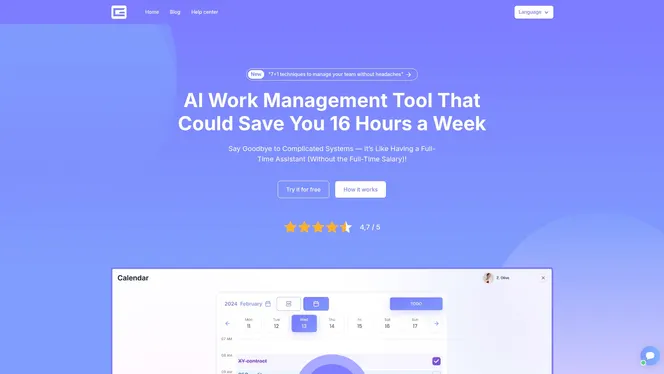
The platform’s AI suggestions and pre-made templates handle the setup work that usually slows adoption, and its Make.com integration means you can connect your existing tools without custom development. Gammatica claims users free up significant hours weekly by reducing the administrative overhead that fragments most teams’ days. Kanban boards, customer journey tracking, and permission controls give managers real visibility without micromanagement.
Whether you are running a five-person team or a multi-department operation, Gammatica for founders and managers is built to scale with you. If you want to see how it fits your specific workflows, book a demo call and walk through it with the team directly.