TL;DR:
- Having tools is not enough; teams need disciplined workflows and frameworks to succeed.
- Agile methods like Scrum and Kanban suit SaaS projects better than Waterfall.
- Process discipline and proper scaling strategies are key to long-term SaaS project management success.
Most teams using SaaS project management tools believe they’re already doing it right. They have the software, the logins, and the dashboards. But here’s the uncomfortable reality: having tools is not the same as having a system. Many mid-sized teams struggle with missed deadlines, duplicated work, and poor coordination not because they lack software, but because they’ve skipped the fundamentals. SaaS project management is about mastering frameworks, building disciplined workflows, and choosing tools that actually fit your team’s needs. This guide breaks down exactly how to do that, from Agile basics to scaling across departments.
Key Takeaways
| Point | Details |
|---|---|
| Agile is key | Adopting Agile frameworks like Scrum and Kanban is crucial for SaaS project management success. |
| Choose tools wisely | Select SaaS tools based on your team’s size, workflow, and collaboration needs, not just feature lists. |
| Hybrid scaling is vital | Combine multiple frameworks and tools to solve collaboration and scaling challenges in mid-sized organizations. |
| Process trumps tools | Disciplined processes and team culture are more important for long-term project success than any single software tool. |
What makes SaaS project management unique?
If you’ve ever managed a project using a traditional Waterfall approach, you know how it works: define everything upfront, execute in phases, deliver at the end. It’s predictable. But for SaaS teams, it’s often too slow and too rigid.
SaaS products evolve constantly. Customer feedback reshapes priorities mid-sprint. Features get deprioritized overnight. That’s why Agile methodologies like Scrum, Kanban, and Lean have become the standard for SaaS project management. They emphasize continuous iteration, customer feedback, and flexibility—qualities that suit SaaS’s fast-moving requirements far better than Waterfall’s fixed structure.
“SaaS project management primarily uses Agile methodologies like Scrum, Kanban, and Lean, differing from traditional Waterfall by emphasizing continuous iteration, customer feedback, and flexibility suitable for SaaS’s evolving requirements.”
Here’s what each core Agile method brings to the table:
- Scrum: Organizes work into time-boxed sprints (usually two weeks), with defined roles like product owner, scrum master, and development team. Best for teams shipping features frequently.
- Kanban: Visualizes work in progress on a board with columns like “To Do,” “In Progress,” and “Done.” Ideal for ongoing workflows without fixed release cycles.
- Lean: Focuses on eliminating waste and maximizing value delivery. Works well when efficiency and speed are top priorities.
What separates high-performing SaaS teams from struggling ones isn’t which Agile method they choose. It’s whether they actually commit to it. Many mid-sized teams fall into a “tool-first” trap: they buy a platform, set it up, and assume the methodology will follow naturally. It won’t. The framework has to come first, and the tool should support it, not define it.
For project managers and team leaders, this means having an honest conversation about how your team actually works before selecting or switching any software. What’s your release cadence? How often do priorities shift? How many teams need to coordinate? Answering these questions puts you in a much stronger position to choose the right Agile approach and the right tools to support it.
Essential mechanics and frameworks for SaaS teams
Knowing that Agile is the right approach is a good start. But knowing how Agile actually runs day to day is what makes the difference in practice.
Here are the core mechanics every SaaS project management team should have in place:
- Sprint planning: At the start of each sprint, your team selects items from the backlog and commits to completing them within the sprint window. This keeps focus tight and priorities visible.
- Daily standups: Short, structured check-ins (15 minutes max) where each team member shares what they did yesterday, what they’re doing today, and what’s blocking them.
- Retrospectives: After each sprint, the team reviews what went well, what didn’t, and what to change. This is where real process improvement happens.
- Backlog prioritization: A living list of tasks, features, and bugs ranked by business value. The product owner owns this, but the whole team contributes.
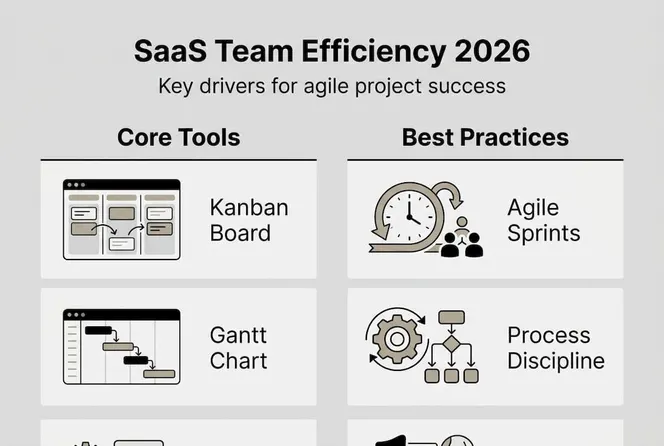
Tracking progress with visual tools like Kanban boards and Gantt charts helps teams see dependencies, spot bottlenecks, and communicate status without long meetings. Tools like Asana, Jira, and Monday.com all support these structures, though they organize them slightly differently.

To give you a quick reference, here’s how common SaaS project management tools structure their work hierarchy:
| Tool | Top level | Mid level | Task level |
|---|---|---|---|
| Asana | Organization | Teams / Projects | Tasks / Subtasks |
| Jira | Company | Projects / Boards | Issues / Subtasks |
| Monday.com | Account | Workspaces / Boards | Items / Subitems |
Understanding this hierarchy matters because it affects how you set up your workflows, permissions, and reporting from day one. Getting it wrong early creates messy data and frustrated teams later.
Pro Tip: Don’t rely on your project management tool alone. Pair it with a communication app like Slack and an automation tool like Make.com to handle repetitive handoffs. This combination reduces manual work and keeps your team focused on actual project delivery.
Choosing the right SaaS project management tools
With so many platforms available, choosing the right one can feel overwhelming. The honest answer is that there’s no single best tool. There’s only the best tool for your team.
The three most widely used platforms in mid-sized SaaS organizations are ClickUp, Monday.com, and Asana. Each has real strengths and real trade-offs. G2 ratings for all three sit between 4.5 and 4.7, so reviews alone won’t make the decision for you.
| Platform | Ease of use | Collaboration | Learning curve | Best for |
|---|---|---|---|---|
| ClickUp | Moderate | Strong | Steep | Feature-heavy needs |
| Monday.com | High | Strong | Low | Intuitive team workflows |
| Asana | High | Moderate | Low to moderate | Structured project tracking |
ClickUp is feature-rich, which is both its strength and its challenge. Teams that want granular control over task types, custom fields, and automation will love it. Teams that just want to get started quickly may feel lost. Monday.com is the most intuitive of the three, making it a strong choice for teams with mixed technical backgrounds. Asana sits in the middle: structured and reliable, with a clean interface that scales well as teams grow. For tool choice nuances across these platforms, the differences in automation depth and reporting flexibility matter more at scale.
When evaluating tools for your mid-sized team, consider these criteria:
- Team size and structure: Does the tool support multiple teams with different workflows?
- Integration needs: Does it connect with your existing communication, CRM, or automation tools?
- Onboarding speed: How quickly can a new team member become productive?
- Reporting and visibility: Can leadership get a clear view of project status without digging?
- Pricing transparency: Are the features you actually need available at a reasonable tier?
The goal isn’t to find the most powerful tool. It’s to find the one your team will actually use consistently.
Scaling project management in mid-sized organizations
Scaling project management is where most mid-sized SaaS teams hit a wall. What works for one team of eight people breaks down fast when you have four teams of eight people all working on interconnected projects.
The core challenges at this stage are cross-team coordination and shifting priorities. When two teams depend on each other’s outputs, delays cascade. When leadership changes direction mid-quarter, every team has to re-prioritize, and without a clear system, that creates chaos.
Hybrid methodologies that blend Agile and Scrum with Kanban are increasingly common in mid-sized organizations for exactly this reason. Scrum gives you structure and cadence. Kanban gives you flexibility for ongoing work that doesn’t fit neatly into sprints. Together, they handle the complexity of multi-team environments better than either alone.
Here’s a practical step-by-step for integrating a scalable tool stack:
- Start with task management: Choose your primary platform (Asana, Monday.com, or ClickUp) and standardize how all teams create, assign, and track tasks.
- Add communication structure: Layer in Slack or Microsoft Teams with dedicated channels per project and per team. Avoid letting project conversations live in email.
- Automate repetitive handoffs: Use Make.com or a similar automation tool to trigger task updates, notifications, and status changes automatically.
- Build visibility dashboards: Create cross-team dashboards so leadership can see project health without interrupting team leads for updates.
“In SaaS, workflow breakdowns in small to mid-sized teams often stem from interdependencies; using tool stacks like Asana for tasks and Slack for communications helps avoid single-tool overload.”
Pro Tip: Resist the urge to add a new tool every time a coordination problem surfaces. Scaling workflow efficiency usually comes from using your existing tools better, not from adding more. Tool sprawl creates confusion, increases onboarding time, and fragments your data.
Why process discipline—more than tools—drives long-term SaaS success
Here’s something most SaaS vendors won’t tell you: the tool is rarely the problem. We’ve seen teams switch platforms three times in two years, each time convinced the new software would fix their coordination issues. It never did. The issues followed them because the real problem was process discipline, not the software.
Most teams over-index on features when evaluating tools. They want the most powerful platform, the most integrations, the most customization. But what actually drives results is whether your team runs consistent standups, maintains a clean backlog, and follows through on retrospective action items.
Agile and Scrum require discipline to deliver results. Kanban without clear WIP (work in progress) limits becomes a dumping ground. Waterfall suits fixed scopes but breaks under SaaS’s constant change. The methodology only works when people commit to it.
Experienced project leaders know this. They invest in process training before tool onboarding. They define what “done” means before starting a sprint. They hold retrospectives even when the sprint went well. That’s the difference between teams that scale and teams that stall.
Drive your SaaS team’s performance with the right partner
Understanding these fundamentals is a strong first step. But putting them into practice across a growing team takes more than good intentions. It takes the right infrastructure.

Gammatica is built for exactly this challenge. The platform combines task management, Kanban boards, automation, CRM, and team collaboration into one AI-driven workspace, so your team spends less time managing tools and more time delivering results. Project managers and team leaders at mid-sized organizations use Gammatica for Founders to gain visibility, reduce administrative overhead, and coordinate across teams without the tool sprawl. If you’re ready to move from scattered workflows to a system that actually scales, Gammatica is worth exploring.
Frequently asked questions
What are the most important SaaS project management frameworks?
Agile methodologies like Scrum and Kanban are the most widely used, offering the flexibility, continuous iteration, and team collaboration that SaaS environments demand.
How do I pick the best SaaS project management tool?
Evaluate tools based on team size, ease of use, and integration needs. Asana and Monday.com are strong choices for intuitive collaboration in mid-sized teams, while ClickUp suits teams needing advanced customization.
What scaling pitfalls should mid-sized SaaS organizations avoid?
The most common pitfalls are ignoring cross-team coordination, relying on a single tool for everything, and skipping hybrid frameworks that handle growing complexity across multiple teams.
Is process or tooling more important for long-term SaaS project management success?
Tooling matters, but disciplined processes drive long-term results. Teams that invest in consistent frameworks and process habits consistently outperform those that just upgrade their software.