
TL;DR:
- Free AI email generators instantly create professional drafts from brief prompts, with many requiring no registration. They allow users to customize tone and style, but often lack features like draft storage and direct email client integration. Paid tools offer advanced formatting, CRM integration, and higher volume use, making them suitable for larger or more complex needs.
An AI email generator free tool is defined as a web-based platform that creates complete, professional email drafts instantly from a short user prompt. You describe the purpose, tone, and recipient, and the AI writes the subject line, body, and sign-off in seconds. Platforms like Kuse offer up to 1,800 free credits with no account required, while others allow unlimited generation with no signup at all. For individuals and small business owners, this kind of free email drafting software is a genuine productivity shift. The industry term for the underlying technology is “natural language generation,” and understanding that helps you set realistic expectations for what these tools can and cannot do.
How does a free AI email generator work?
A free AI email generator takes your written prompt and converts it into a full email draft using natural language processing. You tell the tool what you need: the email’s purpose (cold outreach, follow-up, meeting request), the desired tone (formal, casual, friendly), the recipient type, and the approximate length. The AI then generates a subject line, a structured body, and a closing in seconds.
All of this happens in the cloud. Prompts are sent to remote servers for processing, which means no local computation occurs on your device. That also means these tools require an active internet connection and do not work offline.
Privacy is a reasonable concern. Most free tools process and immediately discard input, which protects your data but also means you get no draft history or saved templates. If you close the tab, the draft is gone.
Here is what typically happens step by step:
- You enter a prompt describing your email goal and audience.
- You select tone, length, and any style preferences.
- The AI generates a subject line, body paragraphs, and a sign-off.
- You review, edit, and personalize the draft.
- You copy it into your email client or send it directly if integration is available.
The output is a first draft, not a finished product. Grammarly advises treating AI drafts as strong starting points that still require user edits before sending. That framing is exactly right.
Pro Tip: Write your prompt in one clear sentence. Include the recipient’s role, the email’s goal, and the tone you want. Vague prompts produce generic drafts.
What are the top features to look for in a free AI email generator?
Not all free email writing tools are equal. The best free email generator for your needs depends on a handful of specific features that separate genuinely useful tools from ones that waste your time.
Tone and style customization
The ability to select tone is the single most useful feature in any AI email assistant free tool. Formal, casual, and friendly tones produce very different outputs. Standardizing tone across your team is one of the clearest productivity gains these tools offer, especially for small businesses where multiple people handle customer communication.
Ease of use and access
The best tools require no login and generate output instantly. Some platforms, like GuinRank, limit free users to 3 templates per hour, which is worth knowing before you build a workflow around a tool. Check volume limits before committing to any free plan.

Output quality
Grammatical accuracy and natural tone are non-negotiable. Run a few test prompts before relying on any tool for client-facing emails. A tool that produces awkward phrasing or factual errors costs you more time than it saves.
Integration with email clients
The ability to connect directly to Gmail or Outlook and send emails without copying and pasting is a major time saver. Most basic free tools skip this feature entirely.
Privacy practices
Confirm how the tool handles your input. Tools that discard data immediately protect your privacy but offer no history. If you need to track sent drafts, you will need a tool with storage or a connected CRM.
Here is a quick comparison of what free versus more advanced tools typically offer:
| Feature | Free tools | Advanced tools |
|---|---|---|
| Tone selection | Yes | Yes |
| No signup required | Often | Rarely |
| Draft history | No | Yes |
| Gmail/Outlook integration | Rare | Common |
| HTML email builder | No | Yes |
| CRM-based AI replies | No | Yes |
| Volume limits | Yes | Higher or unlimited |
Pro Tip: Test any free tool with a real email scenario before using it for client communication. A cold outreach email is a good benchmark because it requires both clarity and the right tone.
How can individuals and small businesses use free AI email generators?
The practical value of automated email creation free tools shows up most clearly in daily workflows. Here are the highest-impact use cases for individuals and small business owners.
-
Cold outreach. Write a prompt describing your offer and your target recipient. The AI produces a professional introduction email in seconds. You personalize the name, company, and one specific detail before sending.
-
Follow-up emails. After a meeting or proposal, a follow-up email often gets delayed because writing it feels tedious. An AI email template generator removes that friction entirely.
-
Customer service replies. For common questions, you can generate a polished, on-brand response in seconds. This keeps your tone consistent even when you are tired or rushed.
-
Meeting requests. Scheduling emails are repetitive by nature. AI handles the structure so you only fill in the specifics.
-
Newsletters and announcements. A short prompt about your update produces a readable draft. You add your brand voice and specific details on top.
The right workflow is generate, then personalize. Never send an AI draft without reading it first. AI tools standardize tone effectively, but they cannot know the specific context of your relationship with a client. That personal layer is always your job.
One underused feature in more advanced tools is AI reply generation based on CRM history. If a tool can read your contact’s past interactions and generate a contextually aware reply, that is a significant upgrade over a generic draft. It turns a free email writing tool into something closer to a personal assistant.
Avoid two common mistakes. First, do not send AI drafts without editing them. Generic phrasing signals automation to your recipients, and that erodes trust. Second, do not use AI for sensitive communications like complaints, negotiations, or apologies without heavy personalization. The stakes are too high for a first draft.
Pro Tip: Keep a short personal notes file on your top clients. Paste one or two context sentences into your AI prompt. The output will be far more relevant and require less editing.
What are the differences between free and paid AI email tools?
Free tools cover the basics well. Paid and advanced tools go further in ways that matter as your volume and complexity grow.
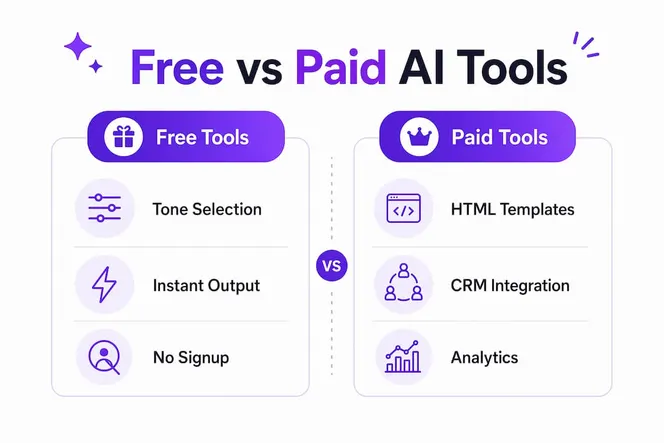
Free AI email generators typically offer:
- Text-only output with no visual formatting
- Limited or no draft history
- Basic tone selection
- No email client integration
- Volume caps on generation
Advanced paid tools add features that free versions cannot match. HTML email building with AI coding assistance is one clear example. Paid tools can generate branded email templates with CSS styling, mobile rendering previews, and hex color control. That capability is out of reach for standard free text generators.
AI tools for marketers also help generate visually appealing, on-brand templates without design skills, which is a real advantage for small businesses competing in crowded inboxes.
Other paid advantages include deeper CRM integration, analytics on open and click rates, team collaboration features, and dedicated customer support. For a solo user sending 10 emails a day, free tools are more than enough. For a small business managing hundreds of client touchpoints monthly, the upgrade pays for itself quickly.
The decision point is simple. If you need visual templates, CRM-connected replies, or high-volume generation, a paid tool is worth the cost. If you need fast, clean text drafts for everyday communication, a free AI email assistant covers you well.
What I have learned from using AI email tools every day
The most common mistake people make with AI email generators is expecting perfection on the first output. That expectation leads to frustration and abandonment of a genuinely useful tool. The right mental model is this: the AI writes the skeleton, and you add the muscle.
What I find most valuable is not the speed, though that is real. It is the consistency. When you are running a small business and switching between five different tasks before lunch, your email tone drifts. You write a rushed follow-up that sounds curt. You write a proposal that sounds overly formal. AI levels that out. You set the tone once, and every draft starts from the same baseline.
The feature I recommend most to small business owners is CRM-connected AI replies. If your tool can pull context from a contact’s history and generate a reply that references past conversations, you are no longer writing generic emails. You are writing personalized ones at scale. That is where the real productivity gain lives. Platforms like ClickCoach have shown how AI-assisted communication tools can meaningfully reduce administrative load in professional services, and the same logic applies to email.
My honest advice: spend five minutes learning your tool’s prompt structure. A well-written prompt cuts your editing time in half. Treat AI as a first-draft partner, not a replacement for your voice. Review every draft before it leaves your outbox. That habit alone will keep your communication sharp and authentic.
— Viktor
Gammatica AI’s free email generator for small businesses
Gammatica offers a free AI email generator that produces professional drafts instantly from your prompts, with no complicated setup required.

What sets Gammatica apart is the integration depth. You can connect your Gmail or Outlook account and send emails directly from the platform without copying and pasting. You can also generate AI replies based on your contact’s CRM history, so your responses are context-aware and personalized from the start. For small business owners managing client relationships and outreach at the same time, that combination saves real hours every week. Book a demo call to see how Gammatica’s AI tools fit your specific workflow and communication needs.
FAQ
What is a free AI email generator?
A free AI email generator is a web-based tool that creates complete email drafts instantly from a short user prompt. Most require no account registration and produce output within seconds.
Are free AI email generators safe to use?
Most free tools process and discard input immediately, which limits data retention risk. Always review a tool’s privacy policy before entering sensitive client or business information.
How do I generate emails with AI effectively?
Write a clear, specific prompt that includes the email’s purpose, recipient type, desired tone, and approximate length. Then review and personalize the output before sending.
What is the difference between free and paid AI email tools?
Free tools generate text drafts with basic tone options and no email client integration. Paid tools add HTML template building, CRM integration, draft history, and higher generation volumes.
Can I send AI-generated emails directly from Gmail or Outlook?
Basic free tools require you to copy drafts manually into your email client. Gammatica connects directly to Gmail and Outlook, letting you send AI-generated emails without leaving the platform.