TL;DR:
- AI slides generators automate the creation of presentation decks from data or prompts, saving significant time. Connecting these tools to CRM systems ensures accurate, deal-specific decks that update automatically as the pipeline changes. The most reliable approach combines AI for structure with human verification of vital data points.
An AI slides generator is a tool that automatically builds professional presentation decks from deal data, CRM records, or short prompts, cutting hours of manual slide work down to minutes. Generic presentation makers start from a blank page. The best AI presentation software for sales teams starts from what you already know: who you’re pitching, what they objected to, and where the deal stands. Tools like Microsoft PowerPoint Copilot, Presentations.AI, Karaf.ai, and Gammatica each take a different approach to this problem. The right choice depends on whether you need one-off generation or a live, deal-connected deck that updates as your pipeline moves.
What is an AI slides generator and how does it work?
An AI slides generator is software that converts text input, documents, or structured data into formatted slide decks without manual design work. The industry term for the broader category is “AI presentation software,” and it covers everything from simple prompt-to-slide tools to fully automated slideshow creators connected to live CRM data.

The core workflow varies by tool. Prompt-based generators like Karaf.ai let you describe your topic in plain language, then generate a deck in 30–90 seconds with editable slides and downloadable PPTX or PDF output. That speed is real. Five slides take roughly 30–45 seconds; ten slides take around 60–90 seconds. For a one-off pitch or internal update, that’s a genuine time saver.
Data-grounded generators go further. Instead of describing your deal from scratch, you connect the tool to your CRM, and the deck pulls from what’s already recorded. Deal stage, contact history, objections, contract value — all of it feeds the slides directly. This approach produces more accurate output because the AI is not guessing at your numbers. It’s reading them.
The distinction matters for sales teams. A generic automated slideshow creator gives you a polished starting point. A CRM-connected slide design tool gives you a deck that’s already specific to the deal before you type a single word.
How CRM data powers more accurate sales presentations
The most reliable AI-powered presentation tools for sales teams ground every slide in source data rather than probabilistic generation. Prompt-only tools without grounding carry a higher risk of hallucination, meaning the AI invents figures, names, or claims that sound plausible but are wrong. In a sales deck, a fabricated number destroys credibility instantly.
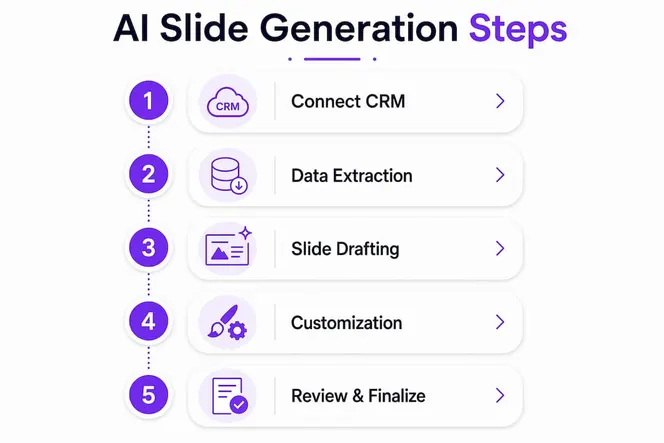
The fix is data grounding. When your slide design tool reads directly from Salesforce or HubSpot records, it builds slides from verified facts. Presentations.AI uses this model: you link a master deck to a live data source, and the platform schedules automatic updates so the deck stays accurate as deal details change. That’s a fundamentally different workflow from typing a prompt and hoping the output is correct.
Here’s what that looks like in practice:
- Master deck model: One branded template connects to your CRM. Each deal gets its own version, auto-populated with the right contact, stage, and metrics.
- Scheduled refresh: As the deal progresses, the deck updates automatically. No manual edits needed when a contract value changes or a new stakeholder joins.
- Branding consistency: Fixed design elements stay locked. Only the deal-specific content changes. This keeps every rep’s deck on-brand without a design review.
- Reduced hallucination risk: Separating slide structure from metric insertion using CRM data improves accuracy. The AI builds the skeleton; verified numbers fill the cells.
Pro Tip: Build your master deck with placeholder fields mapped directly to CRM properties. When the AI populates those fields, it reads from your records, not from its own inference. This single step eliminates most numeric errors in AI-generated sales decks.
Comparing the top AI presentation makers for business teams
Not every smart slide builder fits every workflow. Here’s how the leading tools compare on the features that matter most to sales professionals.
| Tool | Best for | Generation speed | CRM integration | Output format | Editing style |
|---|---|---|---|---|---|
| Microsoft PowerPoint Copilot | Enterprise teams already in Microsoft 365 | Under 90 seconds | Via SharePoint/OneDrive | PPTX | In-app, conversational |
| Presentations.AI | Sales teams needing live deck refresh | Fast initial build | Salesforce, HubSpot | PPTX, PDF | Master deck model |
| Karaf.ai | Quick one-off decks | 30–90 seconds | Not listed publicly | PPTX, PDF | Conversational chat |
| SlideMaker | Document-to-slides conversion | Seconds | Not listed publicly | PPTX, PDF | Prompt-based |
| Gammatica | Deal-based sales decks | Not listed publicly | Built-in CRM memory | Not listed publicly | CRM-native |
Microsoft PowerPoint Copilot generates slide text, titles, speaker notes, and visuals from short prompts or pasted text, then lets you edit results directly in PowerPoint. The workflow requires files stored in OneDrive or SharePoint, and drafts take up to 90 seconds. That’s fast enough for most use cases, and the output lands in a format every stakeholder already knows how to open.
Karaf.ai takes a conversational approach. You describe your topic, review the AI-generated slides through a natural language chat interface, and download a polished deck. The speed is its strongest selling point. SlideMaker focuses on document conversion: paste in a large PDF or report, and it structures the content into logical slide titles with supporting text and layouts automatically.
The key differentiator across all these tools is whether they connect to your deal data or require you to describe it. For sales teams with active pipelines, that difference determines whether the deck is accurate on day one or needs a full manual review before it goes to a prospect.
Best practices for accurate, professional AI-generated slides
AI-generated slides are only as trustworthy as the workflow behind them. LLMs are probabilistic, meaning they produce statistically likely output, not guaranteed facts. For high-stakes sales decks, that distinction is critical.
The most reliable practitioners use a two-step method. First, they generate the slide structure with AI: headings, layout, talking points, and narrative flow. Second, they manually verify or replace every numeric data point using figures pulled directly from CRM reports. This approach uses AI for what it does well (structure and language) while keeping humans in control of what matters most (numbers and claims).
“Zero-hallucination AI slide generation links every claim or data point directly to its source passage or figure, avoiding fabricated information.” — Zero-Hallucination AI Slides Guide
A few practices make a real difference:
- Apply your corporate template before generating. Microsoft Copilot workflows recommend saving your template first, then generating, so the output inherits your branding automatically.
- Use Agent Mode for refinement. PowerPoint’s Agent Mode enables multi-step, interactive editing including rewriting, adding images, and translating within a conversational workflow. It feels like iterative drafting rather than one-shot generation.
- Review every slide before sharing. AI tools produce polished output fast, but a wrong figure in a prospect deck costs more than the time you saved.
- Keep source files accessible. In Copilot workflows, re-anchoring agent commands to the source document preserves context during refinement and reduces drift.
Pro Tip: Never let AI insert revenue figures, growth percentages, or contract values without cross-checking against your CRM report. Generate the structure, then paste in the verified numbers yourself. This takes two minutes and prevents the kind of error that kills a deal.
How to integrate AI slide generation into your sales workflow
Sales teams get the most value from AI presentation tools when they treat deck generation as a repeatable process, not a one-off task. Here’s a workflow that works for deal-based selling.
- Set up your master deck. Create one branded template with placeholder fields for deal name, contact, stage, key metrics, and objections. Store it in your CRM or a connected cloud location.
- Link the master deck to live CRM data. Tools like Presentations.AI connect directly to Salesforce or HubSpot. Master decks linked to CRM data auto-refresh for deal-specific content updates while keeping branding fixed.
- Schedule deck refreshes at key deal stages. Trigger an automatic update when a deal moves from “proposal” to “negotiation.” The deck reflects the new stage without anyone touching it manually.
- Collaborate with version control. Assign editing permissions so reps can add context while managers lock the branded sections. This prevents off-brand slides from reaching prospects.
- Export in the format your prospect uses. PPTX for prospects who want to edit, PDF for final versions you want locked. Most tools including Karaf.ai and SlideMaker support both.
- Review before every send. Build a one-minute checklist: verify the contact name, confirm the deal value, check that the stage description matches your CRM. AI handles the 90%. You own the 10% that closes the deal.
The difference between a static deck and a dynamic one is compounding. A static deck is accurate once. A dynamic deck connected to your CRM is accurate every time a rep opens it, every time a deal updates, and every time a new stakeholder joins the call. AI-powered workflows cut research and prep time significantly for teams that commit to the setup. The upfront investment in a master deck pays back on every deal that follows.
Sales teams that use static decks spend time on manual updates that add no value to the prospect. Teams using dynamic, CRM-connected decks spend that time on the conversation instead.
My honest take on where AI slide tools actually deliver
I’ve watched sales teams adopt every major AI presentation tool over the past two years, and the pattern is consistent. The tools that generate the most enthusiasm in demos deliver the most disappointment in practice. The reason is almost always the same: the AI was generating from a prompt, not from the deal.
When a rep has to describe their own deal to a slide tool, they’re doing work twice. They already recorded that information in the CRM. The best AI presentation software reads the CRM and builds from it. That’s not a feature difference. It’s a workflow difference that determines whether the tool saves time or creates a new task.
The accuracy question is real and underappreciated. Think-cell’s observation that AI is probabilistic while slide generation must be deterministic is the most honest framing I’ve seen. A deck that looks polished but contains a fabricated figure is worse than a rough deck with correct numbers. Prospects notice. Deals stall.
What actually works is the combination: AI for structure and language, human verification for numbers, and CRM data as the source of truth. Gammatica takes this further by treating the CRM memory as the starting point, not the prompt. The deck isn’t the end product. The deal progression is. That’s the right mental model for sales teams evaluating these tools.
The teams that will win with AI slides are not the ones who generate the fastest decks. They’re the ones who send the most accurate decks, follow up the fastest, and keep the deal moving after the presentation lands.
— Viktor
Gammatica builds your sales deck from the deal, not the prompt
Most AI presentation tools ask you to describe your deal. Gammatica already knows it.

Gammatica’s built-in CRM memory is the source for every slide it generates. Who you’re pitching, what they pushed back on, where the deal stands — all of it feeds the deck automatically. You don’t start from a blank prompt. You start from the truth. And when the deck goes out, Gammatica doesn’t stop. It keeps the deal moving with follow-ups, reminders, and next steps built into the same platform. Sales teams using Gammatica report freeing up to 16 hours weekly by removing manual admin from their workflow. See how it works for your team at Gammatica for Founders.
FAQ
What is an AI slides generator?
An AI slides generator is software that automatically creates formatted presentation decks from text prompts, uploaded documents, or live CRM data. The output is typically an editable PPTX or PDF file ready for use in PowerPoint or Google Slides.
How do AI slide tools connect to CRM systems like Salesforce?
Platforms like Presentations.AI connect directly to Salesforce and HubSpot, pulling deal data into a master deck that refreshes automatically as records update. This keeps slide content accurate without manual edits.
Can AI-generated slides contain errors?
Yes. Prompt-only AI tools carry a higher hallucination risk because they generate statistically likely content rather than verified facts. Always review numeric data against your CRM before sending a deck to a prospect.
How fast do AI presentation tools generate slides?
Karaf.ai produces a five-slide deck in 30–45 seconds and a ten-slide deck in 60–90 seconds. Microsoft PowerPoint Copilot generates a full draft in under 90 seconds. Speed varies by tool and deck complexity.
What is the difference between a static and a dynamic sales deck?
A static deck is created once and updated manually. A dynamic deck links to live CRM data and refreshes automatically when deal details change, keeping every version accurate without rep involvement.