
What actually works for streamlining task tracking
The fastest way to get task tracking under control is to do three things at once: pick a prioritization framework, assign clear ownership to every task, and put a digital tool in place that your whole team actually uses. Most teams skip one of these, and that’s where the wheels fall off.
Here’s a quick-start checklist you can act on today:
- Choose a prioritization method. The 1/3/5 rule structures your daily list as 1 big task, 3 medium tasks, and 5 small tasks, totaling 9 tasks per day, which keeps priorities realistic and prevents the overplanning trap.
- Set clear deadlines and done criteria. A task without a finish line is just a wish. Define what “complete” looks like before work starts.
- Assign ownership. Every task needs one person responsible, not a team or a department.
- Use an integrated digital tool. Platforms like Jira, Confluence, Microsoft Planner, and Microsoft To Do connect task tracking to broader project workflows and team communication.
- Automate repetitive processes. Recurring tasks, status updates, and reminders should run without manual input.
- Schedule regular progress reviews. A weekly 30-minute review closes open loops and resets priorities before they drift.
- Batch notifications. Checking messages at set intervals, rather than reacting to every ping, protects deep work time.
These aren’t abstract best practices. They’re the specific moves that separate teams who feel on top of their work from those who are always catching up.
Key strategies that actually improve task management
Good task tracking isn’t about having more tasks on a list. It’s about having the right tasks in the right order, with the right people working on them.
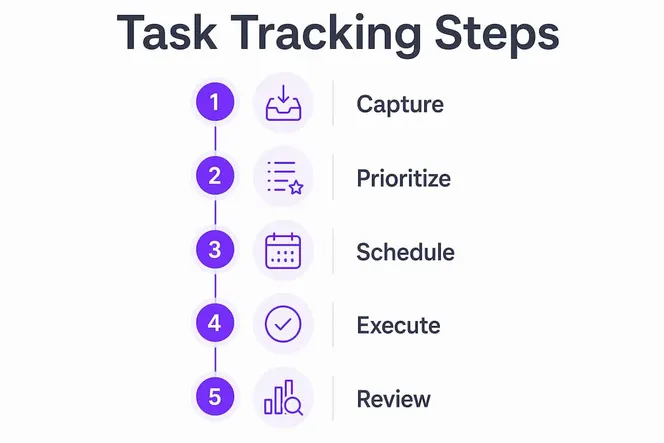
Task prioritization comes first. The Most Important Tasks (MITs) method asks you to identify your top three priorities before anything else touches your calendar. Pair that with the 1/3/5 rule—1 big, 3 medium, and 5 small tasks for a total of 9 per day—and you have a structure that’s both ambitious and achievable. Clear ownership and deadlines reduce task overlap and missed handoffs across the whole team.
Workflow assessment is the step most teams skip. Before you add a new tool or process, map how work actually moves through your team today. Where do tasks stall? Who is the bottleneck? Time blocking, where you schedule 60–90 minute focused work sessions, works best once you know which tasks deserve that protected time.
Here are the practices worth building into your system:
- Time blocking: Reserve 60–90 minute chunks for deep work, aligned with your peak cognitive hours.
- Notification batching: Check email and messages at scheduled intervals, no more than three times per day, to protect focus.
- The 2-Minute Rule: If a task takes less than two minutes, do it immediately rather than logging it. The overhead of tracking it costs more than the task itself.
- Real-time monitoring: Use dashboards and status views so the whole team sees progress without needing a status meeting.
- Regular review cycles: A 30-minute weekly review on Friday or Sunday is, according to productivity research, the highest-return 30 minutes of the week.
- Continuous adjustment: Task tracking systems need tuning. What works for a five-person team in January may not fit a twelve-person team in June.
The combination of these practices, rather than any single one, is what produces lasting improvement in team output.
Which digital tools give you the best task tracking?
The right tool depends on your team’s size, tech stack, and how complex your projects are. Four platforms come up consistently for good reason.
Jira is the standard for software and product teams managing complex, multi-sprint work. It supports Kanban boards, sprint planning, backlog management, and detailed reporting. Its strength is granularity: you can track subtasks, dependencies, and story points across large teams. The tradeoff is a steeper learning curve for non-technical users.
Confluence works alongside Jira as a team knowledge base and documentation hub. Where Jira tracks what needs to be done, Confluence captures why decisions were made, how processes work, and what the team has learned. Together, they create a closed loop between execution and institutional knowledge.
Microsoft Planner fits teams already inside the Microsoft 365 ecosystem. It offers visual Kanban-style boards, task assignment, due dates, and progress tracking, all connected to Microsoft Teams and Outlook. For organizations that live in Teams, Planner removes the friction of switching between apps. Microsoft Planner and To Do integrate directly, so individual to-do lists and team project boards stay in sync.
Microsoft To Do handles personal task management and daily planning. It pulls flagged emails from Outlook, supports recurring tasks, and includes a “My Day” view that helps individuals prioritize without getting buried in a long backlog. It’s the right choice for professionals who need a lightweight personal layer on top of a team-level tool.
Key features to look for across any platform:
- Task assignment with clear ownership
- Deadline tracking and automated reminders
- Integration with calendar, email, and communication tools
- Automation of recurring tasks and status updates
- Reporting and progress dashboards
Pro Tip: If your team uses Microsoft 365, start with Planner for team tasks and To Do for personal tasks before evaluating anything else. The built-in integrations alone will save hours of setup.
How to tailor task tracking to your team and use case
A tracking system built for a 50-person enterprise will frustrate a five-person startup, and vice versa. The goal is fit, not feature count.
Small teams benefit from lightweight setups: a shared Kanban board, weekly check-ins, and a simple naming convention for task status. Overhead kills small teams. Every process you add should save more time than it costs.
Large enterprises need structure: defined workflows, role-based permissions, escalation paths, and integration with HR and finance systems. Jira and Confluence handle this well. The risk at scale is over-engineering, where the tracking system becomes a job in itself.
Cross-functional projects require extra attention to handoffs. When a task moves from marketing to engineering to legal, the done criteria for each stage must be explicit. Ambiguity at handoff points is where projects stall.
Here’s how to adapt by use case:
- Product development teams: Use sprint-based tracking with backlog grooming, story points, and velocity reporting. Jira is purpose-built for this.
- Client services teams: Track tasks by client account, with SLA deadlines and escalation flags. CRM-integrated task tools work better here than pure project management apps.
- Administrative teams: Recurring task templates and checklist-based workflows reduce cognitive load. Microsoft To Do or Planner handles this without complexity.
- Remote or distributed teams: Prioritize tools with strong async communication features, real-time status visibility, and time zone awareness.
- Automation balance: Automate status updates, reminders, and recurring tasks. Keep human judgment in the loop for prioritization and escalation decisions.
The energy-based scheduling principle applies at the team level too. Schedule collaborative work, like planning meetings and reviews, during mid-energy windows, and protect high-energy hours for individual deep work.
How the 1/3/5 rule and energy management boost your productivity
Most productivity problems aren’t about effort. They’re about structure. Two research-backed approaches fix this at the root.
The 1/3/5 rule structures your daily task list as exactly 1 big task, 3 medium tasks, and 5 small tasks, totaling 9 items. This constraint forces you to make real choices about what matters today, rather than copying yesterday’s unfinished list onto a new page. It also gives you a realistic picture of capacity, which is the first step toward meeting your own deadlines.
The 1/3/5 rule: 1 big task + 3 medium tasks + 5 small tasks = 9 focused items per day. No more, no less.
Energy management is the other half of the equation. Research shows that aligning deep work with peak cognitive windows, typically 2–4 hours after waking, produces better output than simply blocking time on a calendar. Your brain isn’t equally capable all day. Fighting that biology costs you more than any inefficient process does.
Practical steps to apply both:
- Identify your personal peak energy window and protect it for your one big task.
- Schedule medium tasks for mid-morning or early afternoon, when focus is good but not at its peak.
- Handle small tasks, email, and admin during low-energy periods.
- Take microbreaks of up to 10 minutes between focused work sessions. Research confirms these short breaks significantly boost energy and reduce fatigue without breaking momentum.
- Use the Pomodoro Technique (25-minute focused blocks with 5-minute breaks) for tasks that need sustained attention but don’t require a full 90-minute deep work session.
- Review your task list at the end of each day, not the start of the next, so your subconscious can process priorities overnight.
The combination of a structured daily list and energy-aware scheduling is more effective than either approach alone.
A practitioner’s perspective on what really changes your workflow
Most articles on task tracking focus on the tools. The real leverage is in the habits that sit underneath the tools.
The single highest-impact change most teams can make is separating capture from execution. When you’re in a meeting or mid-task and an idea surfaces, you need a frictionless place to put it, a quick note, a voice memo, a shared inbox, without derailing what you’re doing. Separating capture from execution reduces both lost ideas and the decision fatigue that comes from trying to process everything in real time.
The second change is the nightly planning ritual. Spending 10 minutes the night before to identify tomorrow’s top priorities consistently outperforms reactive mornings. You wake up knowing exactly what the day is for, which means you spend the first hour doing your best work instead of figuring out what your best work should be.
Here’s what a sustainable system actually looks like in practice:
- Capture everything immediately into a trusted external system, whether that’s a notes app, a shared inbox, or a voice recorder.
- Process captures once a day, not in real time. Turn raw notes into tasks with owners, deadlines, and done criteria.
- Batch notifications to three scheduled check-ins per day. The rest of the time, notifications are off.
- Single-task deliberately. Working on one thing at a time with full attention outperforms splitting focus across three tasks simultaneously.
- Scale your system gradually. Add one new habit at a time. Research on habit formation suggests a median of 66 days for a new behavior to become automatic, so patience with the process pays off.
- Run a 30-minute weekly review to close open loops, reset priorities, and identify what the coming week actually needs.
The teams that get this right aren’t using fancier tools than everyone else. They’ve built the habits that make any tool work.
Gammatica gives your team a smarter way to manage work
If you’ve read this far, you know that effective task tracking requires more than a to-do list. It needs ownership, automation, real-time visibility, and a system your whole team will actually use. That’s exactly what Gammatica is built for.
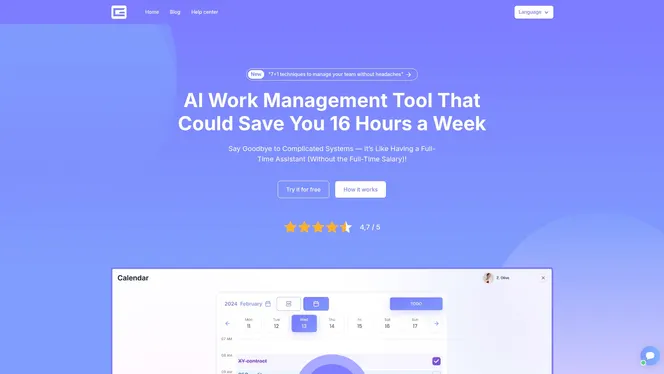
Gammatica is an AI-driven platform that brings task management, CRM, calendar coordination, checklists, and team collaboration into one place. Its AI suggestions and pre-made templates reduce the time you spend on setup and admin, with users reporting significant time freed per week. Kanban boards give your team a live view of who’s doing what, while Make.com integration handles the repetitive tasks that eat your day. Whether you’re running a five-person team or a cross-functional department, Gammatica scales to fit.
Key features worth knowing:
- AI-powered task suggestions and workflow templates
- Kanban boards with real-time status tracking
- Built-in CRM and customer journey management
- Calendar coordination with Zoom and Google Meet integration
- Permission controls and a company wiki for documentation
- Automation via Make.com for recurring tasks and updates
Ready to see it in action? Explore Gammatica for founders and find out how your team can get more done with less overhead.