TL;DR:
- Over 85% of new CRM deployments in 2024 are cloud-based, making on-premise systems the exception. Web-based CRMs offer remote access, automatic updates, lower costs, scalability, AI features, and better usability, driving their dominance. Successful implementation relies on clear goals, data cleaning, user training, and ongoing ownership to ensure high adoption and ROI.
Over 85% of new CRM deployments in 2024 were cloud-based, which means on-premise systems are no longer the norm. They are the exception. If you are leading a team and still wrestling with disconnected tools, missed follow-ups, or incomplete client histories, the right web-based CRM is not a luxury. It is your clearest path to fixing those problems fast. This guide walks you through why cloud CRM dominates, which features matter most, how to implement it without the usual headaches, and how to measure whether it is actually working for your team.
Key Takeaways
| Point | Details |
|---|---|
| Cloud CRM is dominant | Most new CRM solutions are web-based, offering flexibility and better scalability. |
| Features and usability matter | Choose CRM tools with strong integration, AI-driven automation, and simple interfaces for adoption. |
| Implementation determines success | Effective rollout relies on planning, phased adoption, team training, and ongoing tracking. |
| Adoption drives ROI | Teams that align on workflows and data usage see the greatest productivity and return. |
| Avoid early over-customization | Start simple and iterate based on real workflow needs. |
Why web-based CRM dominates in 2026
The shift to cloud-based CRM is not hype. It is backed by real money and real adoption numbers. The CRM market was valued at $62B in 2024 and is expected to exceed $144B by 2030, with cloud deployment as the predominant model. That kind of growth does not happen without clear, practical reasons.
“Cloud deployment is predominant in new CRM use, driven by the need for remote access, lower IT costs, and faster innovation cycles.” — Global CRM Market Analysis 2025
So what is actually pulling leaders toward web-based platforms? Here is a clear breakdown:
| Factor | On-premise CRM | Web-based CRM |
|---|---|---|
| Access | Office only | Any device, anywhere |
| Updates | Manual, costly | Automatic, included |
| IT overhead | High | Minimal |
| Scalability | Slow, expensive | Fast, flexible |
| AI features | Limited | Built-in and expanding |
| Upfront cost | High capital expense | Subscription-based |
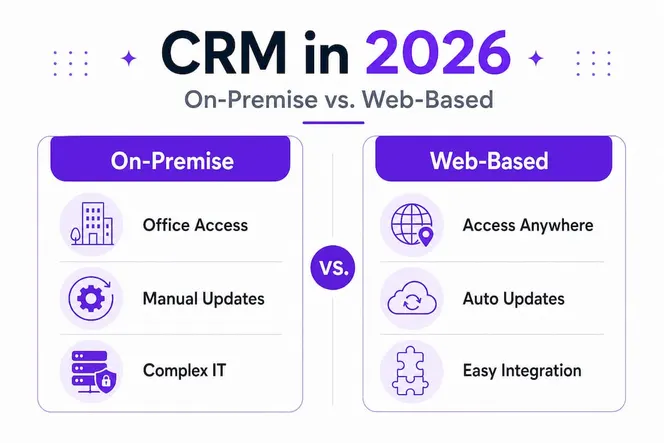
The numbers are compelling, but the day-to-day experience is what really seals it for most leaders. When your sales rep can update a deal from their phone between client meetings, or your project manager can pull a pipeline report from a hotel lobby, that is real operational advantage.
Web-based CRM also opens the door to powerful AI-driven features. Think automated lead scoring, smart follow-up reminders, and predictive deal insights. These are not science fiction. They are live features in modern platforms, and they depend on the cloud infrastructure that web-based CRM provides. See how AI workflow automation examples in sales and marketing are already reshaping what teams can accomplish.
Key benefits worth highlighting:
- Remote access: Your team logs in from anywhere, whether home, office, or on the road
- Automatic updates: New features and security patches roll out without your IT team lifting a finger
- Lower total cost: No servers to buy, no maintenance contracts to manage
- Better scaling: Add users or expand to new markets without a months-long infrastructure project
- AI-ready architecture: Cloud platforms support the machine-learning features that drive personalization and automation
The bottom line? If you are evaluating CRM options in 2026, web-based is not just a preference. It is the practical standard.
Core features and integrations that matter most
With the big-picture benefits in focus, it is critical to know what functionality and integrations actually drive value day to day. Not every web-based CRM is built the same, and a long feature list can distract from what your team actually needs to close deals and serve clients well.
Start with the essentials. Every serious web CRM tool should deliver:
- Contact and account management: A single, searchable record for every lead, client, and partner
- Pipeline and deal tracking: Visual stages that show exactly where every opportunity stands
- Automated follow-ups: Triggered emails, tasks, or reminders so nothing slips through
- Reporting and dashboards: Real-time data on revenue, activity, and team performance
- Role-based permissions: Control who sees what, protecting sensitive client and deal data
Beyond the core, AI and workflow integration have become the new baseline for 2026. Leaders in the SFA (Sales Force Automation) market including Creatio, Microsoft, Oracle, Salesforce, SugarCRM, and Zoho are all competing on usability and large-scale adoption, not just raw feature count. That is a meaningful signal: usability wins in the real world.
Here is a simplified comparison to help you cut through the noise:
| Feature | Basic CRM | Mid-tier CRM | Advanced CRM |
|---|---|---|---|
| Contact management | Yes | Yes | Yes |
| Pipeline tracking | Basic | Visual boards | AI-assisted |
| Automation | Limited | Workflow rules | AI-driven |
| Integrations | Few | Common apps | Open API + AI |
| Project management link | None | Partial | Full integration |
| Reporting | Standard | Custom | Predictive analytics |

One area that is often underestimated: integration with your project management tools. When your CRM and project management platform share data, your team stops duplicating work. A deal closed in the CRM automatically triggers a project kickoff checklist. Client notes flow directly into the delivery team’s workspace. This kind of connected workflow is where real time savings come from.
For context on connecting CRM outcomes to team performance, explore tracking work goals for seamless performance reviews and how goal alignment drives better results across your organization.
Pro Tip: Before you finalize a CRM choice, run a real-world pilot with three to five of your most active users for two weeks. Measure how many clicks it takes to complete their top five daily tasks. Usability in practice beats an impressive feature demo every time.
The right web CRM fits your team’s existing rhythm. It should reduce the steps between “I need to do this” and “it’s done,” not add new layers of complexity.
How to successfully implement a web-based CRM
Once the right features are identified, the real work begins. Success depends on implementation, and that is where most rollouts either take off or stall. The good news? You can stack the odds in your favor by following a clear process from day one.
“Web-based CRM implementations are best treated as change-management projects, not IT installations.”
That quote captures something most leaders underestimate. Buying the software is the easy part. Getting your team to actually use it, consistently and correctly, is the real challenge. Here is a proven step-by-step rollout process:
- Define your goals before you configure anything. What problem are you solving? Leaky pipeline? Missed follow-ups? Poor client visibility? Start with the problem, not the software.
- Clean your existing data. Importing messy contact lists or duplicate records will poison the new system from the start. Take the time to audit and clean your data first.
- Map your actual workflows. Sit with your salespeople, account managers, or service leads and document how they actually work today. Build the CRM around those workflows, not around a vendor’s default template.
- Start with a pilot group. Choose a small, enthusiastic team of five to ten people for the first four to six weeks. Get their feedback, fix friction points, and build internal champions before going company-wide.
- Integrate with the tools your team already uses. Email, calendar, project management, billing. Every disconnection is a reason for someone to skip the CRM and go back to their old habits.
- Train on the “why,” not just the “how.” When people understand how the CRM directly makes their job easier, adoption follows. Show them a concrete before-and-after scenario from their own workday.
- Iterate based on feedback. Hold a short monthly review for the first three months. What is working? What is being skipped? Adjust before bad habits become permanent.
Pro Tip: Resist the urge to over-customize your CRM in the first 90 days. Start with the simplest setup that solves your core problem. Customization can come once your team has built the habit of using the system consistently.
One more thing worth calling out: assign a named “CRM owner” inside your organization. This is not necessarily a technical role. It is someone who cares about data quality, follows up on adoption gaps, and keeps the system aligned with how the business is evolving. Without that ownership, CRM quality degrades over time, almost without anyone noticing.
Benchmarks and pitfalls: Measuring ROI and driving adoption
With your rollout plan in motion, here is how you ensure true success and avoid the traps that waste your CRM investment. Measuring the right things from the start makes all the difference between a system that transforms your team and one that becomes expensive digital clutter.
“CRM ROI and productivity gains depend on adoption, workflow fit, and data governance; otherwise, you risk shadow processes or low-value usage.”
That is a direct warning against the most common failure mode: teams that log into the CRM because they have to, not because it helps them. Here is how to track whether your web-based CRM is actually working:
Adoption KPIs to watch from day one:
- Daily login rate: Are users accessing the system every day? Low login rates are the first warning sign.
- Pipeline hygiene: Are deals being updated regularly? Stale records with no recent activity are a red flag.
- Task completion rate: Are follow-up tasks being logged and completed inside the CRM?
- Data entry completeness: What percentage of contact records have all key fields filled in? Incomplete records mean incomplete insights.
- Time on manual tasks: Is the CRM actually reducing the time your team spends on admin? Track this before and after rollout.
Common pitfalls to avoid:
- Skipping change management: Treating CRM as a software project instead of a people project is the number one cause of failed rollouts.
- Over-customizing too early: Building 40 custom fields before you know what data you actually need creates confusion and low adoption.
- No data governance: Without clear rules about who enters data and how, you end up with a system full of duplicates, gaps, and conflicting records.
- Ignoring lagging adoption: If a key user is not engaging with the system after week three, find out why immediately. One disengaged power user can pull others off the platform.
Pro Tip: Assign data ownership from day one. Every major data category (contacts, deals, accounts) should have a designated owner responsible for quality. This one step prevents most of the data governance problems that plague CRM systems at the six-month mark.
A pretty good return on investment is achievable when adoption is high and workflows are well-mapped. But the math only works if people are actually using the system the way it was designed. Track the KPIs above monthly for the first year, and you will catch problems early enough to fix them without losing momentum.
What most CRM rollouts miss—and why it matters
Stepping back, it is clear that the biggest CRM challenge is rarely technical. The platforms available today are powerful, well-documented, and easier than ever to set up. What separates a high-ROI implementation from a costly disappointment is almost always organizational, not technological.
Most teams spend enormous energy evaluating feature lists and negotiating contracts. They debate which platform has the best AI, the cleanest interface, or the most impressive integration catalog. And then they under-invest in the one thing that actually determines success: alignment between the CRM and how real people do real work every day.
Here is an uncomfortable truth: a simple CRM used consistently by a well-aligned team will outperform a sophisticated platform that people avoid. Every time. ROI depends on adoption, workflow fit, and data governance, not on how many features the vendor can demo. We have seen organizations spend months configuring elaborate systems, only to watch their teams revert to spreadsheets and sticky notes because the CRM felt like extra work rather than less work.
The mindset shift that changes everything? Stop asking “What can this CRM do?” and start asking “How does this fit into the way our team works on a Tuesday afternoon?” Map your actual customer journey, your real follow-up process, your specific deal stages. Then find a system that supports those workflows with minimal friction.
Accountability matters just as much as alignment. Someone in your organization needs to own the CRM, not just from a technical standpoint, but from a business results standpoint. They celebrate wins when pipeline data improves. They investigate when login rates drop. They keep the system honest.
The leaders who get the best results from web-based CRM are not the ones who chose the most powerful tool. They are the ones who invested equally in the technology and in the people, process, and discipline around it.
Bring CRM web based power to your team with Gammatica
If you are ready to turn these insights into results, Gammatica is built for exactly this challenge.

Gammatica is an AI-driven platform that gives leaders and project managers a unified workspace for CRM, task management, automation, and team collaboration. You can see what your team’s doing in real time, with full pipeline visibility and clear accountability across every deal and project. Need to cut the manual work? Automate everything with AI using Gammatica’s intelligent automation engine, freeing up to 16 hours per week for your team. And if closing more revenue is the priority, Gammatica’s tools help you close more deals by keeping your pipeline clean, your follow-ups on time, and your client data always current. One platform. Less admin. More results.
Frequently asked questions
What is a web-based CRM and how is it different from on-premise CRM?
A web-based CRM is hosted in the cloud and accessed via a web browser, requiring no local installation, while an on-premise CRM is installed on your own servers and managed by your internal IT team. Cloud deployment is now predominant for new CRM deployments globally.
How do I know if my team is ready for a web-based CRM?
If your team needs better collaboration, mobile access, and less IT overhead, and you are willing to adapt your workflows, you are ready. CRM implementations succeed when treated as change-management projects with clear ownership and user buy-in.
Which web-based CRM features are must-haves for 2026?
Essential features include contact and pipeline management, AI-powered automation, strong third-party integrations, and intuitive reporting dashboards. SFA market leaders now compete primarily on usability and adoption, not just raw functionality.
What KPIs show CRM adoption and success?
Daily login rates, pipeline update frequency, task completion inside the system, and reduced time on manual admin tasks are your strongest indicators. Tracking adoption KPIs like pipeline hygiene and login frequency reveals whether the system is truly embedded in your team’s workflow.
What’s the biggest mistake in CRM implementations?
Over-customizing the system too early and neglecting ongoing user adoption are the two most damaging mistakes. Resisting premature customization and focusing on habit formation in the first 90 days dramatically improves long-term success rates.