Over half of American businesses report lost productivity due to inefficient task tracking. For professionals juggling shifting priorities and tight deadlines, wasted time means missed opportunities. Task management software promises a better way, replacing fragmented communication and scattered lists with focused coordination. This guide explains the essentials, types, and must-have features so any American team can confidently choose tools that actually simplify work and supercharge results.
Table of Contents
- Defining Task Management Software Essentials
- Types and Deployment Options Explained
- Key Features Powering Productivity
- How Automation Streamlines Workflows
- Common Pitfalls and How to Avoid Them
Defining Task Management Software Essentials
Task management software represents a critical technological solution for modern businesses seeking streamlined workflow coordination. At its core, task management involves overseeing a task through its complete lifecycle, encompassing essential stages from initial planning through final execution and reporting.
These sophisticated digital platforms enable teams to transform complex work processes into manageable, trackable systems. Key functionalities typically include:
- Comprehensive task tracking and status monitoring
- Priority assignment and resource allocation
- Time management and deadline tracking
- Collaborative workspace features
- Detailed performance reporting
Effective task management software goes beyond simple checklist creation. It provides intelligent frameworks that help teams break down complex projects into granular, actionable steps. By centralizing communication, tracking progress, and providing real-time visibility, these tools eliminate traditional organizational bottlenecks and communication gaps.
The ultimate goal of task management software is empowering teams to work smarter, not harder. Whether managing small team projects or enterprise-wide initiatives, these platforms create structured environments where accountability, transparency, and efficiency become natural byproducts of intelligent digital coordination.
Types and Deployment Options Explained
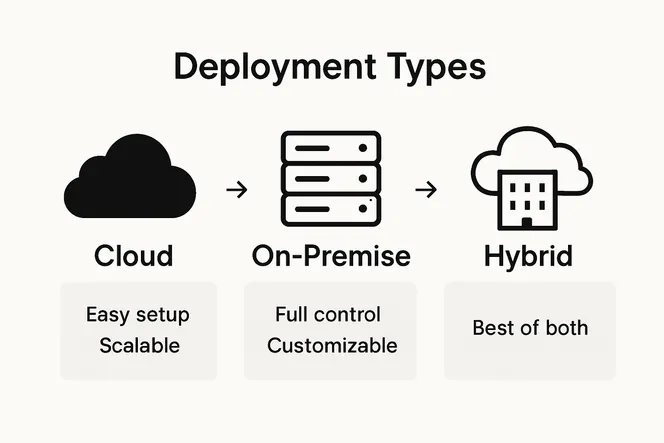
Task management software comes in diverse deployment configurations designed to meet the varying technological infrastructures and operational needs of different organizations. These deployment strategies range from cloud-based solutions to on-premise installations, each offering unique advantages for businesses seeking flexible workflow management.
Cloud-based platforms have become increasingly popular, providing scalable and accessible task management solutions. Web-based project management tools like Twproject demonstrate how modern software can offer comprehensive features such as:
- Real-time collaborative workspaces
- Integrated time tracking
- Resource planning capabilities
- Centralized project dashboards
- Flexible access across multiple devices
For organizations with specialized technical requirements, specialized software like TaskJuggler offers command-line driven project management that supports complex project constraints and reporting needs. These systems are particularly valuable for technical teams requiring granular control and advanced reporting mechanisms.
Deployment options typically fall into three primary categories: cloud-based Software as a Service (SaaS), on-premise installations, and hybrid models that blend both approaches. Each option provides distinct benefits depending on an organization’s security protocols, technological infrastructure, and specific operational demands. The key is selecting a solution that seamlessly integrates with existing workflows while providing the flexibility to adapt to evolving business requirements.
Key Features Powering Productivity
Task management software transforms how teams collaborate and execute projects by integrating powerful features that streamline workflow and enhance organizational efficiency. These digital platforms are designed to address the complex challenges of modern workplace communication and project coordination.
Task management software facilitates collaboration by serving as a universal storage hub, enabling teams to work more intelligently and transparently. Key productivity-enhancing features typically include:
- Centralized task assignment and tracking
- Real-time communication channels
- Automated progress notifications
- Integrated document sharing capabilities
- Customizable workflow templates
- Advanced reporting and analytics
- Cross-platform accessibility
The most sophisticated task management platforms go beyond basic tracking, offering intelligent features that anticipate team needs and proactively support workflow optimization. These systems leverage advanced algorithms to suggest task prioritization, identify potential bottlenecks, and provide actionable insights that help teams work more strategically.

Ultimately, the goal of these powerful tools is to transform how teams conceptualize and execute work. By breaking down complex projects into manageable components, providing transparent communication channels, and offering data-driven insights, task management software empowers organizations to achieve higher levels of productivity, collaboration, and strategic alignment.
How Automation Streamlines Workflows
Workflow automation represents a transformative approach to organizational efficiency, enabling teams to eliminate repetitive manual processes and focus on high-value strategic work. By leveraging intelligent software capabilities, businesses can dramatically reduce time-consuming administrative tasks and create more streamlined operational environments.
Continuous practices like integration, delivery, and deployment enable organizations to frequently and reliably release new features by automating build and test processes, fundamentally reshaping how teams approach productivity. Automation strategies in task management software typically encompass:
- Automatic task assignment based on team member skills
- Scheduled reminder and notification systems
- Integrated workflow trigger mechanisms
- Predictive scheduling and resource allocation
- Automatic progress tracking and reporting
- Dynamic workload balancing
- Performance metric generation
Advanced automation frameworks simplify complex service deployment by automating configuration and software dependencies, reducing manual intervention and minimizing human error. These intelligent systems can recognize patterns, anticipate potential bottlenecks, and proactively suggest optimizations that traditional management approaches might overlook.
The ultimate promise of workflow automation lies in its ability to transform organizational agility. By removing friction from routine processes, teams can redirect their creative energy toward innovation, strategic thinking, and solving complex challenges that truly require human intelligence and creativity.
Common Pitfalls and How to Avoid Them
Task management software implementation can be complex, with numerous potential obstacles that can derail organizational productivity if not carefully navigated. Understanding these challenges is the first critical step in ensuring successful digital workflow transformation.
Implementing continuous practices can face challenges such as testing effort and time, team awareness, and infrastructure issues. Organizations commonly encounter several recurring pitfalls that can compromise their task management strategies:
- Inadequate team training and adoption
- Overcomplicating workflow processes
- Neglecting user feedback and adaptation
- Inconsistent data management
- Poor integration with existing systems
- Insufficient security protocols
- Lack of scalability planning
Deployment technologies vary significantly in features and mechanisms, making tool selection particularly challenging. Smart organizations approach task management software implementation with a strategic mindset, conducting thorough assessments of their unique operational requirements and carefully evaluating potential solutions against comprehensive selection criteria.
Successful implementation requires a holistic approach that balances technological capabilities with human factors. By anticipating potential challenges, investing in comprehensive training, maintaining flexibility, and creating clear communication channels, teams can transform potential pitfalls into opportunities for organizational growth and improved operational efficiency.
Unlock Seamless Team Efficiency with AI-Driven Task Management
The article highlights common challenges teams face such as inadequate training, communication gaps, and overcomplicated workflows. If you are struggling with scattered processes or wasting hours on repetitive manual tasks, it is time for an intelligent solution that simplifies task management. Gammatica.com addresses these pain points by combining AI-powered automation, intuitive Kanban boards, and collaborative features that put you in control of your projects from start to finish.

Experience how Gammatica.com can help your team save up to 16 hours weekly and eliminate bottlenecks through smart task assignment, real-time progress tracking, and seamless calendar coordination. Take the next step toward transforming your team’s productivity by exploring our AI-driven project management platform. When you are ready to streamline workflows and maximize efficiency, discover why Gammatica is trusted by businesses aiming for organized, automated, and scalable results.
Frequently Asked Questions
What are the key benefits of using task management software for teams?
Task management software offers numerous benefits, including enhanced collaboration, streamlined workflow, improved task tracking, and better resource allocation. These tools help teams break down complex projects, increase accountability, and drive organizational efficiency.
How does automation improve task management in software tools?
Automation reduces manual, repetitive tasks and simplifies complex processes. It allows for automatic task assignment, progress tracking, and notifications, enabling teams to focus on strategic work rather than administrative duties.
What deployment options are available for task management software?
Task management software typically comes in three deployment options: cloud-based Software as a Service (SaaS), on-premise installations, and hybrid models that combine both approaches. Each option offers unique advantages depending on your organization’s needs and infrastructure.
What common challenges should teams be aware of when implementing task management software?
Common challenges include inadequate training, overcomplicating workflows, neglecting user feedback, and poor integration with existing systems. Addressing these issues proactively is essential for successful implementation and maximizing productivity.