TL;DR:
- Effective project management begins with clearly defining scope, stakeholders, and work breakdown structures to prevent chaos. Using the right tools, tailored processes, and continuous review enables teams to stay organized and adaptable throughout execution. Flexibility and judgment are key, as rigid adherence to processes can hinder project success.
Project chaos is expensive. Missed deadlines, scope creep, and budget overruns aren’t just frustrating—they erode team trust, drain resources, and cost real money. The good news? These problems are almost always preventable. Whether you’re leading a five-person sprint or coordinating a multi-department rollout, the difference between a smooth project and a derailed one comes down to structure, the right tools, and a willingness to adapt. This guide walks you through exactly how to build that structure, step by step.
Key Takeaways
| Point | Details |
|---|---|
| Start with a solid foundation | Defining scope, stakeholders, and work breakdown structure prevents confusion and missed objectives. |
| Leverage the right tools | Using centralized project management software and templates improves communication and reduces errors. |
| Prioritize process adaptation | Deliberately tailoring your approach ensures project success in diverse real-world environments. |
| Verification ensures improvement | Regularly review and update your project organization strategy based on outcomes and lessons learned. |
Understand the foundation: Defining scope, stakeholders, and work breakdown
Once you recognize the importance of an organized approach, the first step is laying the right foundation. You simply cannot plan what you haven’t defined. Skipping this stage is one of the most common reasons projects spin out of control within the first few weeks.
According to PMI’s PM training educator guide, you should explicitly define scope, stakeholders, and work decomposition like a WBS as the very first move in organizing any project. That’s not just good advice—it’s the difference between a team that rows together and one that rows in circles.

Defining scope means writing down what the project includes AND what it does not include. Both parts matter equally. When scope is fuzzy, teams make assumptions, and assumptions breed conflict.
Identifying stakeholders goes beyond listing who’s involved. You need to clarify each person’s role, level of authority, and what they need from the project. A stakeholder map usually includes:
- Project sponsor (decision-maker, budget holder)
- Core team members (daily contributors)
- Subject matter experts (consulted but not always daily contributors)
- End users or customers (affected by the output)
- External vendors or partners
Building a Work Breakdown Structure (WBS) means taking the project goal and breaking it into smaller, manageable deliverables—like a tree of work. Each branch gets broken down further until individual tasks are clear and assignable. Think of it as the skeleton of your plan.
| Element | Example in a software launch project |
|---|---|
| Project scope | Build and release a client portal by Q3 |
| Out of scope | Mobile app version, third-party integrations |
| Key stakeholders | CTO, Product Manager, Dev Lead, End Users |
| WBS Level 1 | Design, Development, Testing, Deployment |
| WBS Level 2 (under Testing) | Unit testing, UAT, bug fixes, sign-off |
For practical guidance on structuring office projects across departments, this breakdown model adapts remarkably well beyond software into operations, marketing, and facilities work.
Pro Tip: Involve stakeholders during the scope-definition stage, not after it. Conflicting priorities surface early when stakeholders help shape the WBS, and it’s far cheaper to resolve them at the start than mid-execution.
Assemble your tools: Project management essentials checklist
With the foundation set, it’s critical to gather the right resources before planning further. Having a great scope document doesn’t help much if your team is juggling three different apps, sharing updates via email chains, and tracking tasks in personal spreadsheets. Standardization is everything here.
Connecting schedule logic, including dependencies and constraints, is key to a realistic and updateable plan—and that requires tools that support it. Here’s the core toolkit you need before you build your plan:
Must-have tools and resources:
- A centralized project management platform (Kanban boards, task assignment, deadlines)
- A communication tool with searchable history (Slack, Teams, or built-in messaging)
- A document repository for plans, briefs, and deliverables
- A scheduling tool with dependency mapping
- Templates for status reports, meeting agendas, and risk logs
- A calendar integration for milestone visibility
Ensuring your team holds productive project meetings is just as critical as the software you use. Even the best tool won’t save you from poorly structured check-ins.
| Tool category | Popular options | Best for |
|---|---|---|
| Project planning | Asana, Monday.com, Gammatica | Task tracking, timelines |
| Communication | Slack, Microsoft Teams | Daily updates, quick questions |
| Document management | Google Drive, Notion, Confluence | Storing briefs, wikis, files |
| Time tracking | Toggl, Harvest, built-in platform features | Budget monitoring, reporting |
| Automation | Make.com, Zapier | Reducing repetitive admin tasks |
Pro Tip: Pick one primary platform and commit to it. When teams split between two or more tools, information gets fragmented, accountability drops, and onboarding new members takes twice as long. Standardizing saves more time than it costs.
Readiness checklist before you plan:
- [ ] Scope document reviewed and signed off
- [ ] Stakeholder list finalized with roles and responsibilities
- [ ] WBS drafted at least two levels deep
- [ ] Project platform selected and team onboarded
- [ ] Templates loaded and ready
- [ ] Communication norms agreed upon
Step-by-step: Creating a robust project plan
Once you have tools and requirements prepared, it’s time to build the project plan itself. Many teams rush this phase. Don’t. A solid plan built in two days saves two weeks of firefighting later.
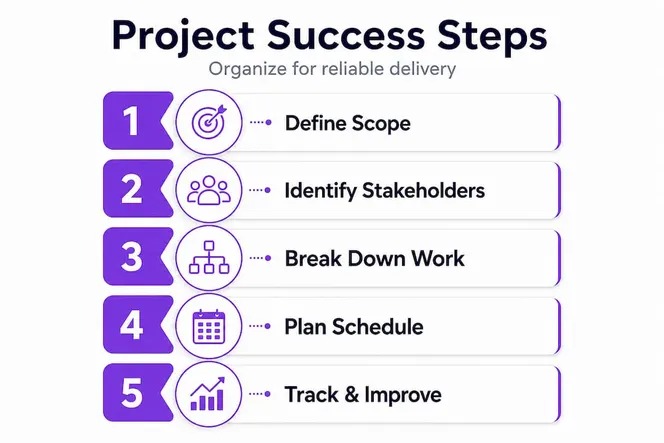
Establishing schedule logic, including dependencies and realistic time estimates, ensures the plan can be relied on and updated as the project moves forward. Here’s how to build it:
1. Draft a project charter. This is a one-page document that formally authorizes the project. It names the sponsor, states the goal, lists key deliverables, identifies major constraints, and outlines the budget range. It gives everyone a single source of truth from day one.
2. Define milestones. Milestones are meaningful checkpoints—not just dates. Good milestones mark completed phases: “Design approved,” “Beta launched,” “Client sign-off received.” They make progress visible and give the team real moments to celebrate.
3. Map dependencies. Some tasks can only begin after others are done. Map these relationships explicitly. For example, you can’t write test scripts before the feature is built. Visualizing dependencies prevents the painful situation where one delayed task holds up ten others.
4. Estimate time realistically. Involve the people doing the work in estimation, not just managers. Use examples of efficient project management from past projects to calibrate your estimates. Add buffer for review cycles and approvals—those almost always take longer than expected.
5. Assign responsibilities clearly. Every task needs one owner, not a group. Use the RACI model (Responsible, Accountable, Consulted, Informed) to assign roles without overlap or ambiguity.
6. Set a baseline and lock it. Once the plan is approved, baseline it. This preserves the original schedule so you can measure actual progress against the original plan throughout execution.
Pro Tip: Use rolling-wave planning for longer projects. Plan the next four to six weeks in detail, and keep future phases at a high level. As you learn more, you refine the next wave. This balances structure with real-world flexibility.
Avoid common mistakes: Tailoring and adaptation aren’t optional
Even the best project plans fall short if not customized for context. Here’s what leaders often miss.
Treating tailoring as optional is a major organizational error. According to the PMBOK Guide, deliberate adaptation is crucial when choosing processes. Copy-pasting a process that worked for a software team onto a marketing campaign, or applying an enterprise framework to a small internal initiative, is a recipe for unnecessary overhead and frustrated teams.
“Tailoring considers the many variables that exist within and across projects to find the most appropriate approach for each project.” — A Guide to the Project Management Body of Knowledge (PMBOK Guide)
Top mistakes project leaders make when it comes to tailoring:
- Over-relying on templates without adapting them. Templates are starting points, not final answers. A risk log template built for construction projects needs significant adjustment before it works for a digital product team.
- Ignoring the organizational environment. Culture, reporting structures, and existing tools all shape what’s realistic. A method that works beautifully in a startup may fail in a highly regulated enterprise.
- Failing to communicate adaptations. When leaders change the approach mid-project without explaining why, teams feel confused and resistant. Document your tailoring decisions and share them.
- Applying heavy governance to small projects. Not every initiative needs weekly steering committee reviews and 40-page status reports. Match the rigor to the risk.
Here’s a real example worth sharing. A mid-sized retail company tried to roll out a new inventory system using a full waterfall methodology. Six months in, market conditions shifted and the original requirements were already outdated. When they switched to a lightweight iterative approach, trimming the governance overhead and running two-week cycles, they recovered the project and launched within the revised timeline. The process didn’t fail them—their rigidity with the process did. For further insights on tailoring project management approaches to fit different contexts, the lesson applies across industries.
Review success: Verification and continuous improvement
With work completed, the final and often skipped step is reviewing and enhancing your process for the next project. It feels counterintuitive to slow down and reflect when everyone is eager to move to the next thing. But skipping this step means you repeat the same mistakes, and that compounds over time.
Updating and verifying your project plan ensures it remains relevant and effective throughout execution and beyond. Treat your retrospective as seriously as your kickoff.
How to collect feedback and surface lessons learned:
- Run a post-mortem session with the core team within two weeks of project completion, while details are still fresh. Use a simple format: what went well, what didn’t, and what you’d do differently.
- Survey stakeholders separately. Team members and stakeholders often have very different perspectives. A brief anonymous survey captures honest input that people might not share in a group setting.
- Review your plan vs. actuals. Compare the original baseline to what actually happened. Where did estimates miss? Which dependencies caused delays? This data is invaluable for future planning.
- Update your templates. If a particular checklist item saved you three days of rework, add it to your standard template. If a meeting format didn’t work, retire it.
- Document decisions and their outcomes. Future project managers will thank you. A simple decision log showing what choices were made and what resulted is one of the most underused assets in project organizations.
Continuous improvement isn’t a one-time event—it’s a habit. Teams that build reflection into every project cycle consistently outperform those that don’t. Over twelve to eighteen months, the compounding effect of small improvements is dramatic.
The uncomfortable truth about project organization: Flexibility over perfection
Here’s something most project management guides won’t tell you: obsessing over a perfect plan can be just as damaging as having no plan at all. We’ve watched teams spend three weeks perfecting a Gantt chart that was obsolete before the ink dried. The plan became the goal instead of the project outcome.
The best project leaders we’ve seen use frameworks as a starting point, not a destination. They know when to follow the process and when to step around it. A rigid methodology gives you confidence. Flexibility gives you results.
Think about agile adoption. Many organizations adopted agile frameworks and then rigidly enforced every ceremony—daily standups, sprint reviews, retrospectives—regardless of whether they were adding value. The irony? They were applying an inflexible structure to a methodology built on adaptability. True agility means questioning the framework itself when context demands it.
The uncomfortable truth is that no certification, no methodology, and no template can substitute for judgment. Frameworks exist to guide decisions, not make them for you. The leaders who consistently deliver reliable projects aren’t the ones who follow process most strictly. They’re the ones who understand why the process exists and adapt it intelligently.
This is why verification and continuous improvement aren’t just nice-to-have checkboxes. They’re the feedback loop that builds judgment over time. Every retrospective you run teaches you something no framework can. Use that knowledge. Your next project depends on it.
Take your project organization further with Gammatica
Whether you need a framework or a flexible tool, here’s where to go next.
The strategies covered in this guide—scope definition, stakeholder alignment, WBS planning, schedule logic, and tailoring—work even better when supported by a platform designed for exactly this kind of work.

Gammatica is an AI-driven project and team management platform built for business leaders who need structure without rigidity. From Kanban boards and automated task assignments to built-in checklists, calendar coordination, and time tracking, Gammatica gives your team everything in one place. You can automate repetitive admin, use pre-built templates tailored to your industry, and integrate with tools like Make.com to cut manual overhead. Teams report freeing up to 16 hours per week. Explore the Gammatica Sales platform to see how it fits your team’s workflow and take your project organization to the next level.
Frequently asked questions
What is the first step in organizing a project?
Explicitly define the project’s scope, stakeholders, and overall work structure before planning tasks or setting deadlines. This foundation prevents confusion and misaligned expectations later in execution.
Why is schedule logic important in project management?
Schedule logic ensures dependencies and constraints are clearly mapped, which keeps the plan realistic and makes updates far easier when conditions change during execution.
What does tailoring mean in project management?
Tailoring is adapting standard processes and governance to fit your project’s unique context, and according to the PMBOK Guide on adaptation, this should always be deliberate and strategic rather than an afterthought.
What is a work breakdown structure (WBS)?
A WBS is a hierarchical decomposition of tasks and activities needed to complete a project, breaking large deliverables into smaller, assignable units of work that the team can actually execute.