Most American teams unknowingly lose hours each week to inefficient workflows and unclear responsibilities. Streamlining internal processes is not just about saving time, but also about reducing stress and improving outcomes for every team member. With nearly 40 percent of employees citing poor systems as a top barrier to productivity, understanding and refining your team’s operations can make all the difference. Discover practical steps that help any American organization transform chaotic systems into smooth, results-driven routines.
Table of Contents
- Step 1: Assess Current Processes And Needs
- Step 2: Map Out Workflow Stages And Roles
- Step 3: Configure Workflow Tools And Automations
- Step 4: Assign Responsibilities And Permissions
- Step 5: Test And Refine Internal Workflows
Step 1: Assess Current Processes and Needs
Understanding your team’s existing workflows is the foundation for creating seamless internal processes. This crucial first step involves a comprehensive review of how work currently moves through your organization, identifying bottlenecks, inefficiencies, and opportunities for improvement.
To effectively assess your current processes, start by mapping out each key workflow using visual documentation. Break down each workflow into distinct steps, noting who performs each task, how long it takes, and what tools are currently being used. Pay special attention to points where tasks get delayed or communication breaks down. Look for performance indicators that reveal process effectiveness, such as time spent on repetitive tasks, frequency of errors, or unnecessary handoffs between team members.
A pro tip: Involve your team directly in this assessment. No one knows the day-to-day workflow better than the people actually executing the work. Schedule brief interviews or use anonymous surveys to gather honest feedback about current process challenges. This collaborative approach not only provides deeper insights but also helps build team buy-in for upcoming process improvements. Once you have a clear picture of your current workflows, you’re ready to move on to designing more efficient internal systems that streamline your team’s productivity.
Ready to transform your team’s operational efficiency? The next step will guide you through creating strategic process improvements that align with your organizational goals.
Step 2: Map Out Workflow Stages and Roles
Creating a clear blueprint of your team’s workflow is essential for establishing seamless internal processes. This step will help you visualize exactly how work moves through your organization and identify who is responsible for each critical stage.
Begin by defining core roles within your workflow mapping process. Typically, these roles include a process facilitator who guides the mapping, key stakeholders who provide insights, team members who execute tasks, and a process lead responsible for overall coordination. For each workflow stage, document the specific responsibilities, expected outcomes, and potential decision points. Use visual documentation techniques to create a comprehensive workflow analysis that clearly shows how tasks transition between team members.
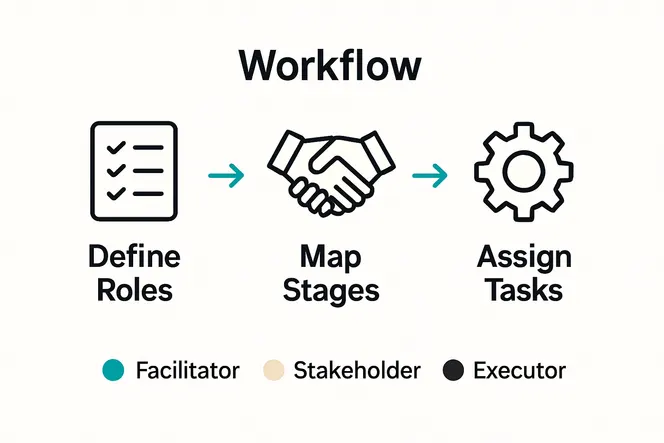
A strategic tip to enhance your workflow mapping: Be brutally honest about current processes. Encourage team members to share friction points, redundant steps, and communication breakdowns without fear of criticism. This transparent approach allows you to create a more accurate representation of how work actually happens versus how you think it happens. By meticulously documenting each stage and role, you will set the foundation for streamlining your team’s operational efficiency.
With your workflow stages and roles clearly defined, you are now prepared to move forward and design targeted improvements that will transform your team’s productivity.
Step 3: Configure Workflow Tools and Automations
Transforming your team’s operational efficiency requires strategic implementation of workflow tools and intelligent automation strategies. This crucial step will help you select and configure technologies that streamline your processes and eliminate repetitive manual work.
Start by exploring Business Process Management Systems that connect users directly with their tasks. These sophisticated platforms allow you to map out complex workflows, assign responsibilities, and create automated triggers that move work seamlessly between team members. When selecting tools, prioritize solutions that integrate easily with your existing technology stack and provide clear visibility into each workflow stage. Evaluate workflow management systems based on their demonstrated impact on organizational performance by looking for features like real time tracking, customizable automation rules, and comprehensive reporting capabilities.
A strategic tip for successful tool configuration: Start small and iterate. Choose 2 to 3 critical workflows to automate initially, rather than attempting to transform your entire operational ecosystem at once. This approach allows your team to gradually adapt to new systems, identify potential friction points, and build confidence in your automation strategy. Pay close attention to user feedback and be prepared to refine your configurations based on real world performance.
With your workflow tools and automations configured, you are now prepared to establish clear communication protocols that will further enhance your team’s operational efficiency.
Step 4: Assign Responsibilities and Permissions
Designing a robust internal workflow requires carefully defining who does what and establishing clear boundaries of access and accountability. This critical step ensures that every team member understands their exact role and has precisely the right level of system access to perform their responsibilities effectively.
Business process mapping demands clear standards for defining organizational responsibilities that create transparency and prevent confusion. Begin by creating a detailed responsibility matrix that maps each workflow stage to specific team members. For each role, clearly outline what actions they can take, what information they can view, and what decisions they can make. Use organizational design methodologies to structure permissions that support effective workflow management by implementing tiered access levels that balance operational needs with data security.
A strategic tip for permission assignment: Think granularly. Instead of broad access categories, create nuanced permission sets that give team members exactly what they need to complete their tasks without exposing sensitive information. This approach minimizes security risks while empowering employees to work efficiently. Regularly review and adjust these permissions as your team evolves and workflow requirements change.
With responsibilities and permissions thoughtfully configured, you are now prepared to establish communication protocols that will transform how your team collaborates and executes work.
Step 5: Test and Refine Internal Workflows
Validating and improving your newly designed workflows is a critical process that transforms theoretical plans into practical, high-performing systems. This stage ensures that your carefully mapped processes actually work in real world scenarios and can adapt to your team’s dynamic needs.
Begin by prototyping your workflow through comprehensive task sketching and identifying precise hand-off points. Implement a pilot version of your workflow with a small team or selected project, carefully tracking each step and documenting potential bottlenecks or inefficiencies. Develop structured feedback processes that capture learning outcomes and performance insights to understand how your workflow performs under actual working conditions. Create measurement criteria that go beyond simple completion rates and examine factors like team satisfaction, time saved, and quality of output.

A strategic tip for effective workflow testing: Embrace an iterative mindset. View your first workflow implementation as an experiment, not a final solution. Schedule regular review sessions where team members can openly discuss what works and what doesn’t. Be prepared to make incremental adjustments rather than expecting perfection from the start. This approach transforms workflow testing from a one time event into a continuous improvement process.
With your workflows tested and initially refined, you are now ready to establish robust communication protocols that will bring your operational vision to life.
Streamline Your Team’s Workflows for Maximum Success
Setting up internal workflows for seamless team success means tackling complex challenges such as process inefficiencies, unclear role assignments, and communication breakdowns. This article highlights critical steps like mapping workflows, assigning responsibilities, and refining processes to remove bottlenecks and boost productivity. If you are aiming to reduce administrative burdens while empowering your team with clear task management and automation, you are addressing exactly the pain points that many business leaders face.
Gammatica.com offers an AI-driven solution tailored to meet these challenges head-on. With powerful features including task management, permission controls, automation workflows, and integrated communication tools, it helps teams transform theoretical workflow designs into practical, day-to-day success. Our platform’s intuitive Kanban boards, checklist creation, and calendar coordination tools bring clarity and structure where it matters most. You can save valuable time and increase operational efficiency by leveraging our pre-made templates and AI suggestions.

Take control of your internal workflows today with Gammatica’s productivity platform. Experience how smart automation and clear role definitions can free you up to focus on what really matters. Visit Gammatica.com now and get started on creating streamlined workflows that will drive your team toward measurable success.
Frequently Asked Questions
How can I assess my team’s current workflows effectively?
To assess your team’s current workflows, map out each key workflow in detail. Break down tasks, identify who performs them, and note points where delays occur. Engage your team through brief interviews or anonymous surveys to gain insights on challenges, enhancing your assessment within a matter of weeks.
What steps should I take to map out workflow stages and roles?
Begin by defining core roles involved in your workflow mapping, such as facilitators and stakeholders. Document each stage, outlining responsibilities, expected outcomes, and decision points. This structured approach will create clarity and improve coordination across your team.
How do I choose and configure workflow tools for my team?
Select workflow tools that integrate with your existing systems and offer real-time tracking and automation features. Start by experimenting with a few critical workflows to automate initially, allowing your team to adapt steadily over one to two months.
What is the best way to assign responsibilities and permissions within a workflow?
Create a detailed responsibility matrix that aligns each workflow stage with specific team members and their access rights. This will eliminate confusion and ensure that everyone knows their role, allowing you to implement these changes effectively within a few weeks.
How can I test and refine my internal workflows for better performance?
Implement a pilot version of your workflow with a small team to track performance and identify bottlenecks. Collect feedback regularly and be open to making incremental adjustments, fostering a culture of continuous improvement that will enhance efficiency over time.
What should I focus on during the workflow improvement process?
Pay attention to clear communication protocols and team feedback throughout the workflow improvement process. Schedule regular review sessions to discuss what works and what needs refinement, ensuring your processes adapt effectively to your team’s needs.