TL;DR:
- CRM expands beyond contact storage to influence sales, marketing, and customer support workflows. AI-driven automation and data quality are essential for maximizing CRM effectiveness, especially for mid-sized organizations. A strategic approach focusing on people, processes, and ongoing management is critical for long-term success.
Most managers already know CRM stands for “Customer Relationship Management.” What many underestimate is how far beyond contact storage the role of CRM in business actually extends. A well-implemented CRM touches your sales pipeline, marketing campaigns, service workflows, and even how your team prioritizes their day. If you’re evaluating CRM systems for your mid-sized organization and wondering whether the investment pays off, this guide gives you the real picture: what CRM does, how AI is changing it, and what separates companies that get results from those that just pay for software they barely use.
Understanding the core role of CRM in business
CRM consolidates customer data, sales activities, and communications into one platform, making it far more than a glorified address book. Think of it as the central nervous system of your customer-facing operations. Every interaction, every follow-up, every deal stage lives in one place your whole team can access.
Here’s what CRM actually handles on a daily basis:
- Centralized customer records: Every contact, company, and deal is stored with full history so any team member can pick up a conversation without asking the customer to repeat themselves.
- Sales pipeline tracking: You see every lead at every stage. Who’s a hot lead, who needs a nudge, and who’s been sitting idle for three weeks.
- Communication history: Emails, calls, and notes are logged against each contact automatically, giving you a complete picture of the relationship.
- Task and follow-up management: Salespeople get reminders, managers get visibility, and nothing falls through the cracks.
- Cross-team support: Sales, marketing, and customer service all work from the same data, so your messaging stays consistent and your customer experience doesn’t fragment across departments.
This last point matters more than most managers realize. When your sales rep closes a deal but your support team has no context on what was promised, trust breaks down fast. CRM prevents that. It’s the connective tissue that keeps the customer journey coherent from first touch to renewal.

How CRM enables workflow automation and AI-driven personalization
Once your CRM has clean, rich customer data, it becomes the engine for automation. Modern CRM ecosystems combine customer records with AI to predict next-best actions and automate personalized communications at scale.
What does that look like in practice?
- Automated lead nurturing: A prospect downloads your pricing page. The CRM triggers a personalized email sequence, assigns a follow-up task to the right rep, and logs the activity without anyone lifting a finger.
- AI-generated responses and suggestions: Some CRMs now draft email replies based on prior conversation history and deal context, cutting the time your reps spend writing routine messages.
- Sales forecasting: AI analyzes your pipeline data and past deal patterns to predict which opportunities are most likely to close this quarter. That’s information your finance team can actually plan around.
- Marketing campaign automation: Segment your contacts by behavior, industry, or lifecycle stage, then trigger tailored campaigns without manual list-building every time.
- Real-time alerts: Get notified when a high-value contact visits your website, opens a proposal, or goes quiet for too long.
The catch? All of this depends on data quality. If your CRM records are incomplete, outdated, or inconsistently filled in, the AI is working with noise instead of signal. Garbage in, garbage out. That’s why getting clean data practices established early isn’t a “nice to have.” It’s the foundation everything else sits on.
Pro Tip: Before you turn on any AI features, run a data audit. Identify fields that are consistently empty, contacts with no activity in six-plus months, and duplicate records. A two-week cleanup effort can dramatically improve the reliability of every automated workflow you build afterward.
Comparing CRM types and selecting the right system for mid-sized organizations
Not all CRMs are built the same way. Most modern CRM systems blend operational, analytical, and collaborative features, but understanding what each type prioritizes helps you evaluate what your business actually needs.
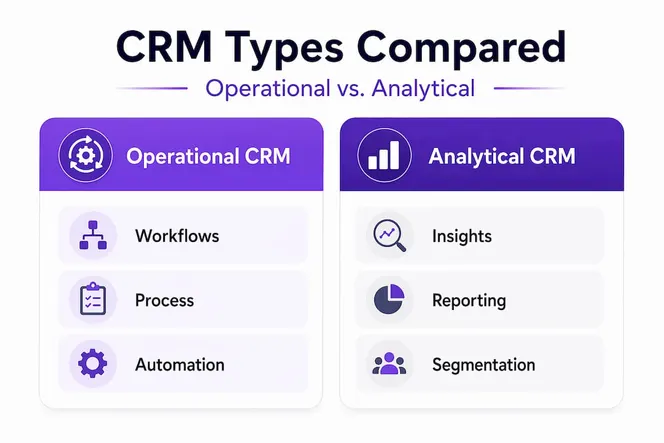
| CRM type | Primary focus | Best for | Example features |
|---|---|---|---|
| Operational | Daily workflows and process automation | Sales teams managing high lead volume | Pipeline tracking, email automation, task management |
| Analytical | Data insights and reporting | Marketing and strategy teams | Dashboards, revenue forecasting, customer segmentation |
| Collaborative | Cross-team information sharing | Multi-department customer service | Shared contact timelines, internal notes, handoff tools |
For most mid-sized organizations, you don’t need to pick one type. You need a platform that does all three reasonably well, with the depth to grow as your processes mature.
Here’s how to evaluate your options without getting lost in feature demos:
- Map your current gaps. Are deals falling through because of missed follow-ups? That’s an operational problem. Are you flying blind on revenue forecasting? That’s analytical. Start with your biggest pain point.
- Check integration compatibility. Your CRM should connect with your email client, calendar, marketing tools, and ideally your project management platform. Manual data re-entry defeats the purpose.
- Assess user adoption realistically. The most feature-rich CRM is worthless if your team won’t use it. Prioritize intuitive interfaces and short learning curves.
- Plan for scale. A system that works for 20 users should also work at 80. Ask vendors directly about pricing and performance at larger scales before you commit.
- Evaluate support and onboarding. Mid-sized businesses rarely have dedicated CRM admins. You need a vendor whose onboarding actually sets you up to succeed independently.
Pro Tip: Ask for a 30-day pilot with real data from your team, not a sandbox demo with fake records. How your actual salespeople interact with the system in their real workflow tells you far more than any feature checklist.
Building and executing a CRM strategy to maximize business impact
Buying CRM software is easy. Getting value from it is a different challenge entirely. A CRM strategy aligns marketing, sales, and support around shared goals and removes data silos for a consistent customer experience. Without that alignment, you end up with a system that’s technically implemented but strategically inert.
What does a real CRM strategy include?
- Clear ownership: Someone on your team needs to own CRM governance. Not just IT setup, but ongoing data quality, adoption tracking, and process updates. This person is often called a CRM Manager or CRM Champion, and their job is to be the translator between the tool and the teams using it.
- Defined data standards: What fields are required? What counts as a qualified lead? How should deal stages be named and defined? These decisions, made once at the start, prevent enormous confusion later.
- User onboarding and ongoing training: One launch-day training session isn’t enough. Plan quarterly check-ins, short how-to resources, and a clear place for your team to ask questions.
- Feedback loops: Your salespeople are closest to the workflow. Build a regular channel for them to flag what’s working and what’s slowing them down. CRM processes should evolve.
- Business outcome metrics: Don’t measure CRM success by how many records exist in the system. Measure it by pipeline velocity, win rates, average deal time, and customer retention rates.
“A CRM strategy is not a software project. It’s a business change program that happens to use software as its main tool.”
The most common reason CRM implementations disappoint is that leadership treats the software purchase as the finish line. It’s actually the starting line. The return on investment comes from disciplined execution over months, not weeks.
Future trends shaping CRM adoption and innovation
The CRM landscape is moving fast, and the decisions you make now will affect your competitive position in three to five years. The CRM market is projected to grow to over $600 billion by 2030, driven by AI, cloud platforms, automation, and deeper integrations.
| Trend | What it means for mid-sized businesses |
|---|---|
| AI-powered sales assistants | Real-time coaching and next-step suggestions directly inside the CRM interface |
| Omnichannel engagement | CRM unifies email, chat, social, and phone into a single customer timeline |
| Cloud-native platforms | Faster deployment, lower IT overhead, and easier access for remote teams |
| Deep workflow integrations | CRM connects directly to project management, billing, and customer success tools |
| Real-time pipeline visibility | Live dashboards replace weekly spreadsheet reviews, enabling faster decisions |
For mid-sized firms, the most important trend is the shift toward all-in-one platforms that combine CRM with project management, automation, and team collaboration. Standalone CRMs are still common, but the efficiency gains from having fewer disconnected tools are hard to ignore. When your CRM, task management, and client communication live in the same environment, your team spends less time switching between apps and more time actually working.
Rethinking CRM: why technology alone isn’t enough and what really drives success
Here’s an uncomfortable truth most CRM vendors won’t tell you: technology is the smallest part of a successful CRM implementation. The bigger challenges are human and organizational.
We’ve seen companies invest significantly in feature-rich platforms and still end up with chaotic pipelines, inconsistent records, and low adoption rates six months after launch. Why? Because they optimized for the demo, not for how their people actually work.
The CRM Manager role is consistently undervalued. This person isn’t just an admin who creates fields and runs reports. They’re the individual who understands both business processes and the platform well enough to bridge them. When that role is given to someone junior as an afterthought, the whole system suffers.
AI-driven CRM features depend heavily on the quality of your CRM data. Poor records reduce automation reliability and produce forecasts your team learns not to trust. Once your team loses confidence in the data, they stop maintaining it, and the system spirals downward.
Our perspective: the most effective CRM strategies treat the platform as a living system that requires regular attention, not a one-time deployment. Quarterly data reviews, annual process audits, and continuous user feedback are what separate companies that get compounding value from CRM and those that quietly abandon it.
If you’re a business leader evaluating CRM right now, the most valuable questions you can ask aren’t about features. Ask about adoption rates, data governance practices, and what happens when your business processes change. Those answers will tell you how mature a platform really is, and whether your organization is ready to use it well.
Explore Gammatica for founders to unlock CRM-driven team insights
Understanding the role of CRM in business is one thing. Having the right platform to execute on it is another.

Gammatica for founders gives business leaders a single environment where CRM, task management, workflow automation, and team collaboration come together. You get visibility into your customer pipeline, your team’s activity, and your operational workflows without toggling between five different apps. Gammatica’s AI-driven suggestions, pre-built templates, and integrations mean you spend less time on administration and more time on decisions that actually grow your business. If you’re a manager at a mid-sized organization looking to get real value from CRM, it’s worth exploring what a unified platform can do for your team.
Frequently asked questions
What is the primary role of CRM in business?
CRM manages customer information, tracks interactions, and supports the full customer lifecycle by centralizing sales, marketing, and service data to improve relationships and drive growth.
How does AI enhance CRM systems?
AI predicts next-best actions and creates personalized communications based on CRM records, helping teams work faster and engage customers more effectively without adding manual effort.
What are the key types of CRM and their differences?
Operational CRM handles daily workflows, analytical CRM surfaces insights and reporting, and collaborative CRM improves cross-team visibility; most modern systems include all three functions together.
Why is a CRM strategy important beyond choosing software?
A CRM strategy removes data silos and aligns your marketing, sales, and support teams around shared goals, ensuring the technology delivers measurable business outcomes rather than just storing records.
What future trends should mid-sized businesses watch in CRM?
The CRM market is rapidly growing because of AI-driven insights, cloud platforms, and automation, so mid-sized businesses should prioritize platforms that support omnichannel engagement and deep workflow integrations.