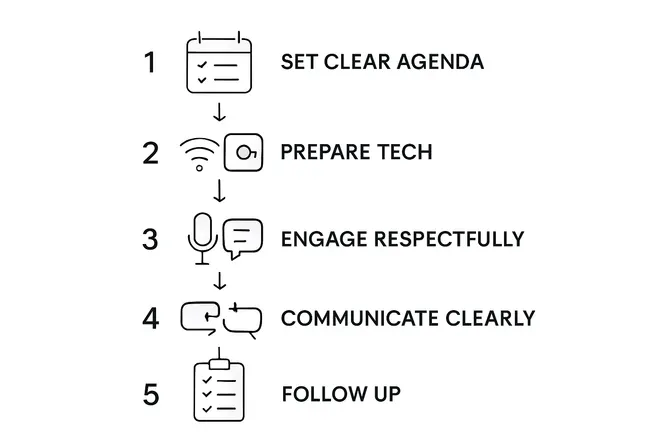
Over 80 percent of American professionals say online meetings are a regular part of their work routine. Yet technical challenges and unclear agendas still waste valuable time for countless teams. This guide breaks down each practical step you need for smoother, more productive virtual meetings—from setting up your environment to following up—all tailored for the fast-paced American workplace.
Table of Contents
- Step 1: Set Clear Expectations Before The Meeting
- Step 2: Prepare Your Environment And Technology
- Step 3: Engage Respectfully During The Call
- Step 4: Communicate Effectively And Concisely
- Step 5: Confirm Understanding And Follow Up
Step 1: Set Clear Expectations Before the Meeting
Preparing for an online meeting requires strategic groundwork that ensures everyone arrives informed and ready to collaborate effectively. Your goal in this step is to create crystal clear communication pathways before anyone joins the virtual room.
Start by crafting a comprehensive meeting agenda that outlines specific objectives, discussion topics, and expected outcomes. Share this document with all participants at least 24 hours in advance so they can review and come prepared. Include precise details like meeting duration, required pre-reading materials, and any specific contributions you expect from team members.
To maximize meeting efficiency, open the virtual session at least 20 minutes early and provide clear instructions for technical setup. This buffer time allows participants to troubleshoot potential connectivity issues, test audio and video settings, and settle in comfortably before the official start. Pro tip: Send a brief email reminder with login details, agenda, and any technical requirements to reduce last minute confusion.
With expectations clearly established, you are now ready to move into the actual meeting coordination phase.
Step 2: Prepare Your Environment and Technology
Successful online meetings depend on creating a professional and technically sound environment that allows smooth communication and minimizes potential disruptions. Your mission is to transform your physical space into an optimal virtual meeting zone.
Choose a quiet location with minimal background noise and ensure a stable internet connection. A strong Wi-Fi signal or direct ethernet connection will prevent frustrating technical glitches that can derail your meeting’s momentum. Position yourself in a well-lit area where natural light illuminates your face without creating harsh shadows or backlighting that could make you appear silhouetted.
Test all technology thoroughly before the meeting begins. This includes checking your camera angle, microphone clarity, screen sharing capabilities, and overall audio visual setup. Create a professional background that looks clean and uncluttered a neutral wall or a tasteful virtual background works well. Pro tip: Use headphones with a built in microphone to improve sound quality and reduce ambient noise. By investing just 10 minutes in technical preparation, you will significantly increase your chances of a seamless and productive online meeting.
With your environment and technology primed for success, you are now ready to focus on personal presentation and engagement strategies.
Step 3: Engage Respectfully During the Call
Mastering virtual meeting participation requires more than just showing up. Your goal is to demonstrate professionalism, attentiveness, and collaborative spirit through thoughtful digital communication and interaction.

Stay on mute when not speaking to minimize background noise that could disrupt the meeting flow. When you want to contribute, clearly state your name before speaking to help everyone identify who is talking, especially in larger group settings. Avoid the temptation to multitask during the call ensure your full attention is on the discussion and participants.
Turn off all notifications on your devices and place your cell phone on silent mode to prevent unexpected interruptions. Maintain eye contact by looking directly into your camera when speaking, which creates a sense of connection and engagement with other participants. Pro tip: If you need to step away momentarily, use the chat function to communicate your brief absence or use the platform’s away status. By practicing these respectful engagement techniques, you demonstrate professionalism and contribute to a more productive virtual meeting environment.
With these communication strategies in place, you are now prepared to navigate the nuanced world of online professional interactions.
Step 4: Communicate Effectively and Concisely
Successful online meetings demand strategic communication that balances clarity, brevity, and meaningful engagement. Your primary objective is to transform potentially rambling discussions into focused, productive conversations that respect everyone’s time and contributions.
Invite participants strategically to generate meaningful feedback by leveraging interactive tools like polling and chat functions. These engagement techniques help maintain participant attention and encourage contributions from team members who might be hesitant to speak up verbally. When contributing, aim to be direct and succinct articulate your key points with precision, avoiding unnecessary details that could derail the meeting’s momentum.
Prepare for effective communication by establishing clear roles including a meeting facilitator, timekeeper, and dedicated note taker. This structured approach ensures that discussions remain on track, time is used efficiently, and important insights are captured. Pro tip: Send a brief summary or meeting minutes immediately after the call to reinforce key decisions and action items. By implementing these communication strategies, you transform online meetings from potential time wasters into powerful collaboration opportunities.
With your communication skills finely tuned, you are now ready to master the art of virtual professional interactions.
Step 5: Confirm Understanding and Follow Up
The final stage of a successful online meeting transforms discussion into actionable outcomes. Your goal is to ensure every participant leaves with crystal clear understanding of decisions, responsibilities, and next steps.
Review next steps and establish clear accountability by systematically assigning action items to specific team members. Immediately after the meeting, send a concise summary email that outlines key decisions, individual responsibilities, and specific deadlines. This written documentation serves as an official record and prevents potential misunderstandings about what was discussed and agreed upon.
Prepare a structured follow up process that includes setting clear guidelines for tracking progress. Pro tip: Schedule a brief check in meeting within one week to ensure action items are being addressed and provide an opportunity for team members to discuss any emerging challenges. By implementing a systematic approach to meeting follow up, you transform conversations into tangible progress and demonstrate professional accountability.
With these final steps complete, you have successfully navigated the entire online meeting process from preparation to execution.
Boost Your Online Meeting Success with Smart Team Management
Mastering online meeting etiquette is crucial for any professional team seeking clear communication and efficiency. The article highlights challenges like setting clear expectations, minimizing disruptions, and maintaining engagement throughout virtual calls. If you often find yourself struggling with meeting follow-ups, task delegation, or keeping everyone aligned in real-time discussions, these pain points can slow down your team’s momentum and lead to wasted time.
Gammatica.com empowers teams to overcome these hurdles by integrating AI-driven task management, calendar coordination, and seamless collaboration tools. Imagine transforming your meetings with automated meeting summaries, smart checklists, and organized workflows that keep every member accountable. Whether you are preparing agendas, coordinating calendars, or ensuring follow-up actions are tracked, Gammatica creates a professional environment beyond the call itself.
Take control of your team’s productivity today by exploring Gammatica.com.

Optimize your online meetings and team operations now. Visit Gammatica.com to start saving hours every week and experience how smart automation enhances every step from preparation to follow-up. Don’t let inefficiencies slow your business down—act today for sharper meetings and stronger results.
Frequently Asked Questions
How can I prepare for an online meeting to ensure it is productive?
To prepare for an online meeting effectively, start by creating a comprehensive agenda outlining objectives and expected outcomes. Share this agenda with all participants at least 24 hours in advance to allow them to come prepared and engaged.
What should I do if I experience technical issues during an online meeting?
If you encounter technical issues during an online meeting, try to resolve them while the session is ongoing. Communicate your situation through the chat function if necessary, and have a backup plan, like using a phone for audio if your internet fails.
How can I engage participants effectively during an online meeting?
To engage participants, ask open-ended questions and make use of interactive tools such as polling or chat functions. Encourage all team members to contribute by directly inviting their input at appropriate moments throughout the discussion.
What are some best practices for communication during virtual meetings?
Best practices for communication include speaking clearly and concisely, staying focused on the agenda, and ensuring you mute yourself when not speaking. Position your camera at eye level to maintain eye contact and engagement with other participants.
How should I follow up after an online meeting?
After an online meeting, send a concise summary email that outlines key decisions and action items along with assigned responsibilities. Set a timeline for follow-up discussions, such as scheduling a check-in meeting within one week to track progress on action items.