More than 40 percent of American freelancers struggle to keep up with invoice management while balancing multiple tech projects. For professionals working internationally, choosing efficient billing solutions means less time spent on paperwork and more focus on growing your business. This guide reveals practical steps for selecting and customizing your invoice templates, adding branding and payment details, automating delivery, and verifying accuracy—helping you manage finances smoothly and present a professional image to every client.
Table of Contents
- Step 1: Choose The Right Invoice Billing Template
- Step 2: Customize Template Fields For Your Business
- Step 3: Integrate Payment Details And Branding
- Step 4: Automate Invoice Delivery And Tracking
- Step 5: Verify Invoice Accuracy Before Sending
Step 1: Choose the Right Invoice Billing Template
Selecting the perfect invoice billing template can dramatically streamline your financial workflow and boost your professional image. Your goal is finding a template that matches your specific business needs while ensuring clarity and ease of payment for your clients.
Start by evaluating your industry and service type. Invoice templates vary significantly across different professional domains, so understanding your specific requirements is crucial. A freelance graphic designer will need a different template compared to a consulting firm or software developer. Consider key factors like the level of detail required, your typical project scope, and the information your clients expect to see.
When reviewing potential templates, prioritize professional design and functional clarity. Look for layouts that clearly display essential information such as your business contact details, client information, itemized services, total amount due, and payment terms. A well-structured template helps prevent misunderstandings and ensures prompt payment. Choosing a template with strong integration capabilities can also support operational efficiency, allowing smoother connections with accounting software and payment platforms.
Here’s a comparison of invoice template needs by industry type:
| Industry Type | Key Template Feature | Typical Detail Level |
|---|---|---|
| Freelance Designer | Visual branding, portfolio | High |
| Consulting Firm | Project milestones, hourly | Detailed |
| Software Developer | Line items, technical notes | Moderate |
| Educational Services | Student info, course fees | High |
Pro tip: Always test your selected template with a few mock invoices to confirm it communicates information precisely and looks professional across different devices and screen sizes.
Step 2: Customize Template Fields for Your Business
Customizing your invoice template is essential for creating a professional and precise billing document that accurately represents your business. Your goal is to transform a generic template into a personalized tool that reflects your specific service offerings and brand identity.

Professional invoice templates offer extensive customization options that allow you to tailor every aspect of your billing document. Start by identifying the core fields you need to include such as your business name, contact information, tax identification number, and payment terms. Depending on your industry, you might need specialized sections for detailed service descriptions, hourly rates, project milestones, or specific line item breakdowns. Academic and professional templates demonstrate remarkable flexibility for different business models, ensuring you can adapt the format to your exact requirements.
When customizing, focus on clarity and professionalism. Arrange fields in a logical sequence that guides the client’s eye through the invoice, from your business details to itemized services and total amount due. Consider using consistent fonts, colors aligned with your brand, and clear section headers that make the document easy to read and understand. Remember that a well-designed invoice not only requests payment but also represents your business’s commitment to clear communication and professional standards.
Pro tip: Create a digital template library with 2-3 variations of your invoice for different client types or project scopes, allowing you to quickly generate accurate billing documents.
Step 3: Integrate Payment Details and Branding
Branding and payment details transform an ordinary invoice into a professional representation of your business identity. Your goal is to create a cohesive document that not only requests payment but also reinforces your company’s visual and operational credibility.
Professional invoice templates offer sophisticated branding integration strategies that go beyond simple logo placement. Start by selecting consistent visual elements that reflect your brand such as color schemes, fonts, and positioning of graphic elements. Include your company logo prominently, typically in the top left or center of the invoice. Specify clear payment terms including accepted payment methods like bank transfer, credit card, PayPal, or digital wallet options. Utilizing software placeholders can automatically populate client specific transaction information, ensuring accuracy and reducing manual data entry.
Prioritize clarity and professionalism when designing your payment section. List payment instructions in a straightforward manner, including bank account details, payment deadlines, and any early payment incentives or late payment penalties. Consider adding a personal touch like a brief thank you note or your company’s mission statement to reinforce your brand identity and build client trust. Your invoice is more than a financial document its a direct communication tool with your clients.
Pro tip: Create a digital signature or watermark that subtly reinforces your brand across all invoice documents, adding an extra layer of professional authenticity.
Step 4: Automate Invoice Delivery and Tracking
Automating invoice delivery and tracking can dramatically reduce administrative workload and improve your payment collection process. Your goal is to implement a system that sends invoices efficiently and provides real-time insights into payment status.
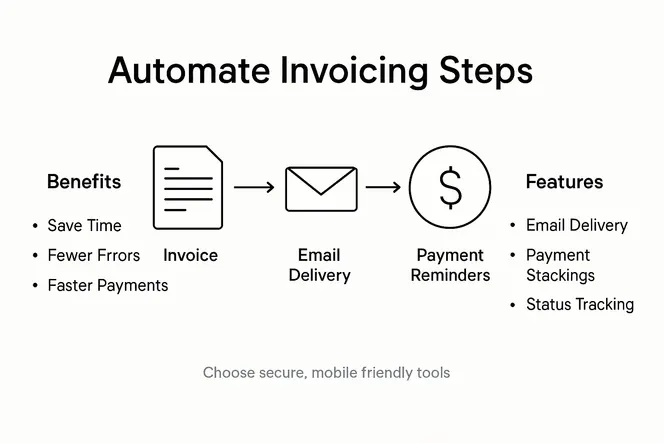
AI-driven invoice automation solutions offer comprehensive workflows that transform how businesses manage billing cycles. Start by selecting software that integrates optical character recognition and machine learning technologies to capture and validate invoice data automatically. These tools can electronically deliver invoices directly to client email addresses, track when documents are viewed, and provide notifications about pending or completed payments. Advanced invoice processing platforms can seamlessly integrate with enterprise resource planning systems, enabling you to track transactions across multiple channels and reduce manual data entry.
When implementing automation, prioritize user friendly interfaces and robust security protocols. Ensure your chosen system offers customizable notification settings that alert you about upcoming payment deadlines, late payments, and successful transactions. Configure automatic reminders for clients with outstanding balances and generate comprehensive reports that give you a clear view of your financial pipeline. By leveraging technology, you transform invoice management from a time consuming task into a streamlined, efficient process that supports your business growth.
Below is a quick summary of tools that strengthen invoice automation:
| Automation Tool | Primary Benefit | Business Impact |
|---|---|---|
| OCR/ML Data Capture | Extracts and validates fields | Reduces data entry errors |
| Email Delivery System | Tracks sent/viewed status | Speeds up payment cycle |
| ERP Integration | Centralizes financial workflows | Improves pipeline visibility |
| Mobile Accessibility | Invoice management on the go | Enables faster follow-up |
Pro tip: Select an automation platform that offers mobile accessibility, allowing you to monitor invoice status and send payment reminders from anywhere.
Step 5: Verify Invoice Accuracy Before Sending
Ensuring invoice accuracy is critical for maintaining professional relationships and preventing payment delays. Your goal is to create a systematic verification process that catches potential errors before they reach your client.
A comprehensive invoice verification process involves multiple critical validation steps to prevent costly mistakes. Start by cross-checking all numerical entries including service rates, total amounts, tax calculations, and individual line items. Verify that each service description matches exactly what was agreed upon with the client, and confirm that contact information and payment terms are current and correct. Global best practices recommend implementing both manual and automated validation workflows, which can dramatically reduce human error and streamline your billing process.
Develop a standardized checklist for invoice verification that includes key validation points. Review each invoice for mathematical accuracy, ensure all required fields are completed, and confirm that the invoice reflects the most recent pricing and service agreements. Pay special attention to unique details like project milestones, hourly rates, or any custom arrangements specific to individual clients. By establishing a rigorous verification protocol, you protect your business reputation and create a foundation of trust and professionalism with your clients.
Pro tip: Create a dedicated 15-minute review window before sending invoices where you step away and return with fresh eyes to catch any potential errors.
Streamline Your Invoicing and Get Paid Faster with Gammatica
Creating and customizing invoice billing templates is essential for fast payments and professional client communication as highlighted in the article. However managing invoices manually, verifying accuracy, and tracking payments can drain your valuable time and cause costly delays. Gammatica’s AI-driven platform directly tackles these challenges by automating task management, payment tracking, and document organization so you spend less time on administrative tasks and focus more on growing your business.

Take control of your billing process now by integrating your invoice templates with a powerful tool designed to reduce your workload and boost operational efficiency. With features like AI suggestions, automation, and seamless workflow management through Kanban boards and checklists, Gammatica helps you avoid errors, speed up invoice delivery, and keep client payments on schedule. Visit Gammatica and transform how your team collaborates around invoicing today.
Frequently Asked Questions
What should I look for in an invoice billing template?
To find the right invoice billing template, consider your industry and the specific details you typically include in your invoices. Look for professional designs that clearly display essential information like your business name, client information, itemized services, and total amount due.
How can I customize my invoice template to fit my business needs?
Customizing your invoice template involves adding fields that represent your specific services, such as hourly rates or project milestones. Make sure to arrange the information logically and maintain consistency with your brand’s visual identity by using related colors and fonts.
What payment details should I include in my invoice?
Include clear payment terms such as accepted payment methods, bank account details, and deadlines. Specify any incentives for early payments or penalties for late payments to encourage timely responses from clients.
How can I automate the delivery and tracking of invoices?
Automate your invoice delivery by selecting software that allows you to send invoices directly to clients’ email addresses and track the status of each invoice. Configure automatic reminders for outstanding payments and set up notifications to stay updated on payment timelines.
What steps can I take to ensure my invoices are accurate before sending?
Implement a verification checklist that includes cross-checking all amounts, confirming client details, and ensuring that contract terms match the invoice. Schedule a dedicated review period, such as 15 minutes, where you step away from the invoice for a fresh look before sending it out.