TL;DR:
- Most AI productivity tools transform entire workflows rather than just automating repetitive tasks, leading to more substantial efficiency gains.
- Their effectiveness depends on proper categorization, alignment with workflow structure, and human oversight to ensure security and quality.
Most business leaders assume AI tools are just fancy shortcuts for repetitive work. You plug them in, they handle the mundane tasks, and everyone magically gets more done. That picture is incomplete. The real transformation happens when AI reshapes entire workflows from start to finish, not just isolated steps within them. This guide explains what truly defines an AI productivity tool, how the most effective ones work under the hood, what real companies are experiencing in terms of ROI, and how to implement these tools in a way that actually sticks. You’ll walk away with a clear, practical framework you can start applying immediately.
Key Takeaways
| Point | Details |
|---|---|
| Workflow over tool | Success with AI depends on matching the right tool to a clear workflow, not just using popular apps. |
| Net productivity matters | Always measure the time saved after accounting for setup, corrections, and approval steps. |
| Start with oversight | Begin with a single process and a strong approval policy to maximize value and minimize risk. |
| Secure data access required | Ensure AI tools only access data they are permitted to use, protecting sensitive business information. |
| AI is not hands-off | Human input remains critical, from process design to verification, for real and safe productivity gains. |
What makes an AI productivity tool?
To understand how these tools work, let’s start by clarifying what counts as an AI productivity tool and what makes them different from regular automation.
At its core, an AI productivity tool uses artificial intelligence to connect, enhance, and automate workplace tasks in ways that go beyond static, rules-based software. Traditional automation follows fixed instructions: “If X happens, do Y.” AI tools, by contrast, can interpret context, adapt to changing inputs, and learn from outcomes over time. That’s a meaningful distinction.
There are four main categories you’ll encounter in the market today:
- Delegation bots: Handle specific, repeatable tasks like scheduling, email drafting, or data lookup. Think of them as smart assistants with narrow but reliable scopes.
- Workflow routers: Coordinate the movement of information and tasks between people and systems, deciding where something should go based on rules and context.
- Agent infrastructure: More autonomous systems that can plan and execute multi-step processes without constant human input. These are the closest thing to a self-directed digital employee.
- Browser automation tools: These interact with web interfaces, filling forms, extracting data, and navigating software just as a human would.
The danger? Teams often grab whatever tool sounds impressive and bolt it onto a workflow that hasn’t been clearly mapped. As one developer community pointed out, practical AI workflow automation can feel deeply fragmented when teams pick the wrong category for the job. You end up with automation that technically works but creates more confusion than it solves.
“Treating different AI workflow tools as interchangeable can cause frustration.” — DEV Community
This is one of the most underappreciated truths in AI adoption. The category of tool you choose must match the structure of the workflow you’re trying to improve. Getting that alignment right from the start saves you weeks of troubleshooting later.
How leading AI productivity tools actually work
With a foundation set, let’s dig into how the most effective AI tools actually operate behind the scenes.

Most AI productivity tools share a common architecture. You provide a prompt or trigger. The tool retrieves relevant context or data. An AI model processes the combined input and then delivers a result back to you, often within seconds. Simple on the surface, but what happens in the middle varies significantly between products.
Microsoft Copilot is a useful example. Its Copilot technical architecture works by taking your prompt, grounding it in your organization’s actual data via Microsoft Graph, sending that enriched prompt to a large language model, and returning the response inside the app you’re already using. Critically, Copilot only accesses data you are authorized to see. That’s not a small detail. For enterprise teams, security and data governance are just as important as speed.
OpenAI’s workspace agents take a slightly different approach. Workspace agents in ChatGPT can run tasks autonomously, operate while you’re away from your desk, and be shared across teams so that multiple people benefit from the same configured agent. They’re designed to improve over time and can follow team-defined processes, including approval gates. That scalability is what makes them particularly interesting for small to mid-sized business teams.
Here’s a side-by-side comparison to help you evaluate which tool type fits your needs:
| Feature | Microsoft Copilot | OpenAI Workspace Agents | Workflow Orchestrators |
|---|---|---|---|
| Context access | Organizational data via Microsoft Graph | Uploaded files and connected tools | Defined data sources and APIs |
| Automation level | Assisted (user-driven) | Semi-autonomous | Fully automated sequences |
| Approval gates | Manual review in app | Configurable per agent | Rule-based triggers |
| Security controls | Enterprise-grade IT controls | Organization-level permissions | Depends on platform |
| Team sharing | Licensed per user | Shareable across workspace | Depends on platform |
Pro Tip: Before deploying any AI productivity tool, map out exactly what data it will access. Then configure permission controls so the AI only reaches what it actually needs. This isn’t just a security step. It also makes the tool’s outputs more focused and relevant.
Understanding this architecture helps you ask better questions when evaluating tools. Don’t just ask “what can it do?” Ask “what does it access, who approves outputs, and how does it handle errors?”
What ROI can you expect? Real-world impact and caution signs
Now that we’ve covered how these tools work, let’s look at what real companies have experienced and where the numbers aren’t always what they seem.
The headline results are genuinely impressive. In one documented case, Copilot cutting proposal time by 80% allowed the company to avoid significant programming services costs while improving gross margins by 20%. Numbers like those get leadership excited. And rightly so.
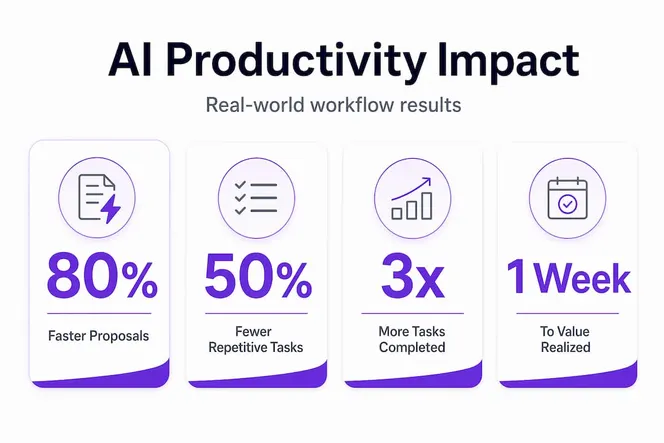
But here’s where it gets nuanced. Many productivity ROI claims measure raw generation speed rather than end-to-end output quality. The more honest measurement asks: how much time did the team spend editing, correcting, or verifying the AI’s output before it was usable? When you factor in that overhead, as testing real AI tool efficiency consistently shows, the net productivity gain is often lower than the headline claim. That doesn’t mean it isn’t worth pursuing. It means your measurement framework needs to be honest.
Think of end-to-end productivity like this: if an AI drafts a client proposal in 10 minutes instead of 60, but your team spends 40 minutes correcting errors and reformatting, you saved 10 minutes. That’s still a win, but not the 83% reduction you might advertise.
Here’s a practical four-step approach to measuring your actual ROI:
- Estimate setup and integration time before you go live. Factor this into your return calculation.
- Track time saved on routine tasks using a simple log during your pilot phase. Even a spreadsheet works.
- Measure editing and correction overhead. Assign someone to track how long post-AI editing takes per output type.
- Monitor impact on overall team workload. Are people spending saved time on higher-value work, or are they just filling that time with new admin tasks?
This framework keeps you grounded. The teams that report the highest sustainable ROI from AI tools are almost always the ones who tracked real net output from day one, not just the flashy generation metrics.
One more thing managers often miss: setup time is not one-time. Workflows evolve, integrations break, and AI behavior shifts with model updates. Budget for ongoing maintenance, even if it’s just a few hours per month per tool.
How to evaluate and implement AI productivity tools for your team
You’re convinced of the promise, but how do you choose and roll out AI tools in a way that’s manageable and secure?
The best advice is also the least glamorous: start small. Pick a single, high-friction workflow where your team is clearly losing time. Maybe it’s writing status reports. Maybe it’s responding to inbound inquiries. Maybe it’s compiling data from multiple sources into a weekly summary. Find that one painful bottleneck and focus your first AI pilot there.
A human-in-the-loop AI policy is essential for small to mid-sized businesses. This means building an approval or verification step before any AI output goes out the door, whether that’s an email to a client, a report to leadership, or a task assignment to a teammate. AI can hallucinate. It can miss context. Having a human checkpoint is not a limitation of the technology; it’s just good governance.
Here’s a practical checklist for evaluating, piloting, and scaling AI tools in your organization:
- Define the workflow you want to improve before you evaluate any tool. Know the inputs, outputs, and stakeholders.
- Shortlist tools based on the category that matches your workflow type (delegation bot, router, agent, etc.).
- Run a 30-day pilot with a small group of willing users, not your whole team. Collect structured feedback.
- Map permission controls so the AI only accesses the data it needs for that specific workflow.
- Set a human-in-the-loop checkpoint for any AI output that leaves your organization or influences a major decision.
- Review your pilot results using the four-step ROI framework from the previous section.
- Communicate clearly with your full team about what the tool does, what it doesn’t do, and how their role changes.
- Scale gradually, adding new workflows only after the first one is running smoothly and the team has adopted it.
Governance is not optional. Defining who can configure AI tools, what data they can access, and who reviews their outputs should be settled before you roll anything out broadly. Governance failures are one of the primary reasons AI implementations stall or get abandoned.
Pro Tip: Keep a simple log of every edit or correction your team makes to AI outputs during the pilot. Over 30 days, that log tells you exactly where the tool is adding value and where it still needs human refinement.
Why most teams misuse AI productivity tools (and how to do better)
Now that we’ve covered technical details and practical rollout, let’s talk about why most teams actually struggle and what matters most for sustainable success.
Here’s our honest take: most AI implementation failures aren’t caused by bad technology. They’re caused by poor process design and unrealistic expectations. Teams see a compelling demo, get approval to buy the tool, and then deploy it to general tasks across the organization before anyone has stopped to ask, “What exactly are we trying to improve, and how will we know if it’s working?”
The biggest failure point is confusing tool features with workflow fit. A tool with an impressive feature list means nothing if it doesn’t map cleanly onto how your team actually works. We’ve seen companies implement powerful agent infrastructure to handle tasks that a simple delegation bot would have solved in a quarter of the time, at a fraction of the cost.
The second failure point is skipping permission and approval design. AI tools are only as trustworthy as the guardrails you set around them. When governance is an afterthought, you end up with AI outputs going directly to clients without review, sensitive data being accessed by the wrong system, or team members unsure of what the tool is actually authorized to do. These problems erode trust in the technology fast.
The uncomfortable truth is this: automation is only as good as the process clarity behind it. If your workflow is messy and undefined before AI, adding AI just makes it messy and fast. Process design is not a technology problem. It’s a leadership problem.
The teams that succeed with AI are the ones that invest time upfront in workflow mapping, define clear approval gates, track net productivity from the start, and treat the first 90 days as a learning phase rather than a transformation phase. They also communicate with their teams openly, because people who understand why AI is being introduced are far more likely to use it well.
“AI’s real value comes not from hands-off automation but from targeted augmentation plus thoughtful governance.”
Expect a learning curve. Build time for it into your plan. The ROI is real and achievable, but it requires intentional setup, not just installation.
Ready to transform your team’s productivity with the right AI tools?
If you want to move from theory to action, here’s a solution built with your productivity challenges in mind.

Applying AI productivity best practices is a lot easier when you have a platform that connects your workflows, tracks team output, and keeps everything visible in one place. Gammatica is built specifically for business leaders and managers at growing companies who need more than a task list. You can see what your team’s doing across projects, automate routine workflows, manage permissions, and track progress without drowning in status updates. From Kanban boards to CRM to calendar coordination and team collaboration, Gammatica gives you the operational visibility you need to make AI-driven work actually manageable and scalable. It’s the kind of platform that makes the governance and measurement steps we described in this article genuinely practical rather than theoretical.
Frequently asked questions
What is the difference between AI workflow automation and traditional automation?
AI workflow automation can adapt and learn from context, connecting apps so tasks trigger and execute across tools without manual intervention, while traditional automation follows fixed, static rules that don’t adjust based on changing inputs.
How secure are AI productivity tools like Microsoft Copilot?
Microsoft Copilot is built with enterprise-grade security, accesses only data you are authorized to view, and supports IT controls with enterprise data protection built into its architecture. Security is enforced at the data access layer, not just the interface.
Can AI agents fully replace human employees?
AI agents can automate many tasks, but workspace agents are designed to work with human oversight, follow team processes, and include approval gates precisely because quality and compliance still require human judgment in most business contexts.
What ROI can I realistically expect from AI productivity tools?
ROI varies widely depending on the workflow and how carefully you measure it. Common productivity ROI claims depend on whether you account for end-to-end time, including editing and correction overhead, not just how fast the AI generates an initial output.
What’s the best way to start with AI productivity in a small business?
Begin with a single, high-friction workflow and build in a human approval step for all outputs. A practical methodology for small businesses recommends this focused approach before scaling to additional workflows, because it lets you learn and adjust with minimal disruption.