TL;DR:
- Burn charts provide an honest, visual view of project progress beyond software automation.
- Choosing between burndown and burnup charts depends on scope stability and change frequency.
- Consistent review and disciplined estimation are key for burn charts to improve team accountability.
Many managers assume that adding more AI-powered dashboards will fix their team’s visibility problems. But here’s the uncomfortable truth: most productivity gaps aren’t caused by a lack of software. They’re caused by a lack of clarity. Burn charts offer something that no amount of automation can replace on its own—an immediate, honest picture of where your project actually stands. Before you layer on advanced analytics or complex integrations, mastering burn charts gives you and your team a shared language around progress. This guide covers everything you need to know to use burn charts effectively and start seeing real productivity gains.
Key Takeaways
| Point | Details |
|---|---|
| Burn charts explained | Burn charts offer visual clarity for managers by tracking work progress over time. |
| Burndown vs. burnup | Use burndown for fixed projects and burnup for projects with changing scope. |
| Automate with care | Automation helps but visual reviews daily unlock real productivity gains. |
| Mind the pitfalls | Burn charts can mislead if not updated regularly or if scope frequently changes. |
| Start simple, scale smart | Mastering burn charts prepares your team for advanced AI-driven analytics later. |
What is a burn chart?
A burn chart is a visual tool that tracks your team’s progress over time against a plan. It plots work on the Y-axis and time on the X-axis, giving everyone an at-a-glance view of whether the project is on track, ahead, or falling behind. The concept is straightforward, but the impact is significant.
There are two main types:
- Burndown chart: Shows how much work remains. The line trends downward from a starting total toward zero as tasks are completed.
- Burnup chart: Shows how much work has been completed. The line trends upward toward the total scope, making it easy to see both progress and any scope additions.
As burndown and burnup charts are used in Agile and Scrum environments, they apply equally well to sprints, releases, and longer project cycles. Both types rely on a consistent unit of measurement, usually story points or task count, to make tracking meaningful and comparable across iterations.
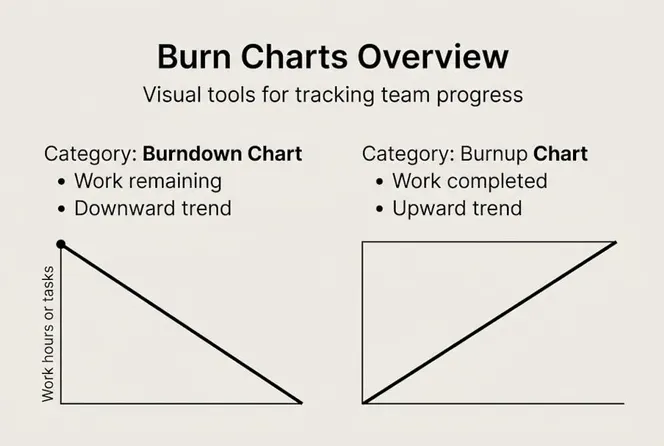
Here’s a quick comparison of how they’re typically structured:
| Feature | Burndown | Burnup |
|---|---|---|
| Tracks | Work remaining | Work completed |
| Direction | Downward | Upward |
| Best for | Fixed scope | Changing scope |
| Scope visibility | Limited | Clear |
Where burn charts really shine is accountability. When your team sees the actual line diverging from the ideal line, there’s no ambiguity. Everyone knows there’s a problem—and that creates the right kind of productive pressure.

Pro Tip: Use burn charts to focus your team on outcomes, not just activity. A long to-do list that never shrinks is a warning sign your chart will surface quickly.
How burn charts work: Mechanics and workflow
Knowing what burn charts are is one thing. Knowing how to keep them accurate and useful in your actual workflow is another. Let’s walk through the mechanics.
- Choose your metric. Decide whether you’ll track story points, number of tasks, or hours. Story points are most common in Agile, but task count works fine for simpler projects.
- Set your start and end points. Define the total scope at sprint kickoff. This becomes your baseline on the chart.
- Update daily. As tasks move from “To Do” to “In Progress” to “Done,” those status changes feed the chart. Scrum in Azure DevOps automates this process, pulling board data directly into burn charts without manual entry.
- Review in standups and retros. Don’t let the chart sit unexamined. Bring it to your daily standup. Ask: is the line where we expected it to be?
- Flag divergence early. When the actual line is consistently above the ideal line on a burndown, that’s a signal. Address it before it becomes a crisis.
Here’s a key insight many managers miss: automation matters, but the review habit matters more. Tools like Jira and Azure DevOps can handle the data updates, but they can’t facilitate the conversation that uncovers why the team is behind.
“The chart is only as useful as the conversation it starts.” If your standups gloss over burn chart data, you’re leaving the most valuable part of the tool unused.
Pro Tip: Only include well-estimated tasks in your burn chart. If half your backlog has no story points assigned, the chart will look fine even when your project is in trouble.
Burndown vs. burnup: Which chart should you use?
Once you understand how both charts work, the next decision is practical: which one fits your project?
The short answer: use burndown for fixed-scope sprints, and burnup when your requirements are likely to shift. But let’s go deeper.
Burndown works best when:
- Scope is locked for the duration of the sprint or release
- You want a simple, fast read on how much is left
- Your team is comfortable with Agile estimation
Burnup works best when:
- Stakeholders add or change requirements mid-sprint
- You need to show both progress and scope changes to leadership
- You want transparency around why a deadline might shift
The burnup chart advantage becomes clearest during scope creep. When new work is added, a burndown chart can look like the team is falling behind even when they’re performing well. A burnup chart, by contrast, shows both the completed work line and the total scope line moving upward together, making the impact of scope changes obvious.
“Teams with shifting priorities almost always benefit from burnup charts because they make scope changes visible, not invisible.”
Here’s a practical comparison to guide your choice:
| Situation | Recommended chart |
|---|---|
| Sprint with locked backlog | Burndown |
| Release with changing features | Burnup |
| Stakeholder reporting | Burnup |
| Internal team tracking | Either works |
The bottom line: don’t default to burndown just because it’s more familiar. If your team regularly deals with shifting priorities, burnup is the more honest chart.
Limitations, caveats, and advanced strategies
Burn charts are powerful, but they’re not perfect. Knowing where they fall short will help you use them more strategically.
Here are the most common pitfalls:
- They rely on estimates. If your team’s story point estimates are inconsistent, the chart will give you a misleading sense of control.
- They don’t show task-level detail. A flat line on a burndown could mean no one worked today—or it could mean the team is stuck on one massive blocker. Burn chart limitations like this make it easy to misread the situation without additional context.
- They can mislead during scope changes. As covered above, burndown charts absorb scope additions silently, which can make your team look underperforming.
- They measure completion, not quality. A task marked “Done” might still need rework.
Statistic to know: Only 25% of Agile teams are evaluated using burndown charts, which means the majority of teams may be missing a consistent metric for sprint accountability.
To get the most from burn charts, pair them with:
- Velocity tracking: Measure story points completed per sprint to spot trends over time.
- Cumulative flow diagrams: Visualize where work is piling up in your workflow stages.
- Team health checks: Surface morale and process issues that numbers alone can’t capture.
Pro Tip: Make burn charts a standing agenda item in your daily standup. A thirty-second review of the chart surfaces blockers before they snowball. When the line goes flat two days in a row, that’s your cue to dig deeper.
Know when to go beyond burn charts entirely. If your projects span multiple teams, involve complex dependencies, or require real-time resource balancing, you’ll need analytics that go beyond a simple X-Y plot.
Burn charts for team productivity: Real-world applications
Theory is one thing. Let’s talk about what actually happens when you integrate burn charts into your team’s daily rhythm.
Here’s a practical sequence that works well for mid-sized teams:
- Start every sprint with a clear chart. Before kickoff, make sure the total scope is entered and the ideal line is visible. This sets a shared expectation.
- Review the chart in every standup. Keep it brief—thirty seconds is enough. Is the actual line above or below ideal? Who owns the gap?
- Use annotations to mark blockers. When something delays progress, add a note directly on the chart at that point in time. This creates a record for retrospectives.
- Share the chart with stakeholders weekly. Burn charts translate technical progress into business language. Stakeholders don’t need to understand story points; they need to see if the project is on track.
- Debrief in retros using the chart as evidence. Patterns in the chart, such as a flat line in week two of every sprint, often reveal systemic issues your team can address.
The transparency that burn charts create becomes even more powerful when combined with AI-driven tools. Platforms that auto-update your charts based on task board status remove the manual burden, and AI forecasting can flag when your current velocity suggests you won’t hit your sprint goal—before it’s too late to adjust.
Pro Tip: Use annotated burn charts to flag blockers before they escalate. A note that says “API dependency unresolved” on day three of a sprint is far more actionable than a missed deadline at day ten.
The teams that get the most from burn charts are not the ones with the fanciest tools. They’re the ones who review them consistently and use what they see to make decisions.
Why visual basics beat AI overload: Our project tracking philosophy
We’ve seen a pattern with mid-sized companies: they invest in sophisticated AI tools before their teams have mastered the basics of visual tracking. The result is expensive software that nobody trusts because the underlying data is inconsistent, estimates are unreliable, and no one has built the habit of reviewing progress together.
AI-driven insights are only as good as the foundation they sit on. When your team is already in the habit of updating a burn chart daily and reviewing it in standups, plugging in AI forecasting delivers real value. The AI has clean, consistent data to work with. But when teams skip that foundation, automation just amplifies the noise.
Burn charts earn team buy-in faster than any dashboard because they’re visual and immediate. There’s no training required. Everyone can read a line trending in the wrong direction. That shared understanding is what makes later analytics feel meaningful rather than abstract.
Our take: don’t wait until you’ve found the perfect AI tool to start tracking progress clearly. Master burn charts first. They’ll surface the systemic issues that no automation can see—and they’ll make every advanced tool you add afterward significantly more effective.
See your team’s progress—smarter
Burn charts are a strong starting point, but the most productive teams don’t stop there. They connect visual tracking to AI-powered insights that help them forecast, adjust, and scale.

Gammatica brings burn chart logic together with advanced analytics in one platform, giving managers a single place to track sprint progress, team workload, and project health. Whether you’re a founder building operational processes or a sales leader needing clear pipeline visibility, Gammatica has purpose-built tools for managers and founders and sales team tracking designed to reduce admin time and increase accountability. If your team is ready to move from basic tracking to smart, automated project visibility, Gammatica is worth exploring.
Frequently asked questions
What’s the main difference between a burndown and a burnup chart?
A burndown chart tracks work remaining trending toward zero, while a burnup chart visualizes completed work growing toward the total scope, making burnup better for tracking changing requirements.
How often should burn charts be updated?
Update burn charts daily, ideally after standups or sprint reviews. Daily status updates ensure the data truly reflects team progress and surfaces blockers early.
Are burn charts useful for projects with lots of scope changes?
Yes. Burnup charts handle scope changes especially well because they clearly visualize both progress and any increases in total scope side by side.
Do burn charts require advanced AI or automation?
No. While modern platforms can automate chart updates, the core visual simplicity and disciplined team review habit deliver the essential benefit without any AI required.
What are common mistakes to avoid with burn charts?
The biggest mistakes are unreliable estimates, skipping daily updates, and ignoring visual clues. Flat lines and data gaps can make charts misleading if your team doesn’t review them carefully and consistently.