
TL;DR:
- Weekly HR planning involves setting goals, prioritizing tasks, and aligning weekly work with broader quarterly strategies. Automation reduces manual reporting from 90 minutes to as little as 10 minutes, freeing time for strategic tasks. Consistent review and clear communication foster team alignment and improve HR operational efficiency.
Weekly planning for HR managers is the process of organizing and prioritizing HR tasks each week to keep operations running, decisions timely, and goals aligned with the broader business. Without a structured weekly plan, HR work becomes reactive. You spend your days responding to fires instead of building the systems that prevent them. The good news is that a clear weekly agenda, paired with the right tools and a bit of automation, can change that entirely. This guide walks you through the tools, steps, and strategies that make weekly HR planning work in practice.
What does weekly planning for HR managers actually involve?
Weekly planning for HR managers covers far more than scheduling meetings. It means setting weekly goals tied to quarterly priorities, assigning tasks across recruitment, payroll, compliance, and engagement, and carving out time for focused work alongside team communication. The industry term for this broader practice is workforce planning, and it operates at both a strategic and operational level.

The weekly layer is where strategy meets execution. Reactive HR work often results from not mapping the year ahead with quarterly priorities, which creates last-minute strain and lower execution quality. When you plan each week inside a quarterly rhythm, you spread the workload evenly and stay ahead of predictable spikes like performance review cycles, open enrollment, or onboarding surges.
HR managers who treat weekly planning as a formal practice, not just a mental to-do list, consistently report better team alignment and fewer dropped tasks. The structure does not need to be rigid. It needs to be consistent.
What tools do you need for effective weekly HR planning?
The right tools make weekly planning faster and more reliable. Most HR managers pull data from at least three or four disconnected systems each week, which is where time gets lost. Consolidating employee lifecycle processes into one platform eliminates data silos and enables faster, more informed decisions.
| Tool Category | Core Function | Weekly Planning Use |
|---|---|---|
| HRIS (Human Resources Information System) | Employee records, org data | Headcount tracking, status updates |
| ATS (Applicant Tracking System) | Candidate pipeline management | Recruitment progress review |
| Payroll platform | Compensation and compliance | Payroll deadline tracking |
| Communication tool | Team messaging and updates | Stand-up prompts, async updates |
| Project and task manager | Task assignment and tracking | Weekly task list and goal setting |
| Calendar and scheduling tool | Meeting coordination | Time blocking and agenda sharing |
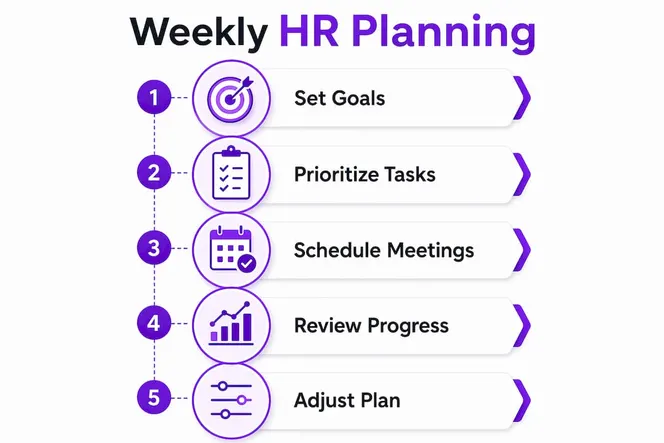
Automation platforms that connect these tools, such as Make.com, reduce the manual work of pulling data from each system separately. Gammatica integrates with tools like Make.com and supports calendar coordination, task management, and checklist creation in one place, which cuts the friction of switching between platforms.
Pro Tip: Set up your HRIS, ATS, and payroll tools to push weekly summary data to a single dashboard or digest. You will spend far less time hunting for numbers and far more time acting on them.
How do you build a step-by-step weekly plan for HR?
A repeatable process is the backbone of good HR manager time management. Here is a practical sequence you can run every week.
-
Review your quarterly HR calendar on Monday morning. Effective HR planning follows a quarterly rhythm covering hiring in Q1, performance calibration in Q2, retention focus in Q3, and annual reviews in Q4. Your weekly goals should map directly to whichever phase you are in.
-
Audit last week’s task list. Identify what carried over, what was completed, and what needs to be escalated. This takes 15 minutes and prevents tasks from disappearing into the backlog.
-
Set three to five weekly HR goals. Keep them specific and measurable. “Complete two first-round interviews for the operations role” beats “work on hiring.” Specificity drives accountability.
-
Block time for deep work. Schedule at least two 90-minute blocks per week for focused tasks like writing job descriptions, analyzing engagement data, or preparing compliance reports. Protect these blocks from meeting requests.
-
Schedule your recurring meetings in a cluster. Group stand-ups, one-on-ones, and team syncs on Tuesday and Thursday where possible. This protects Monday for planning and Friday for wrap-up and reflection.
-
Assign action items to team members by Tuesday. Clear ownership prevents duplication and keeps everyone moving in the same direction.
-
Run a Friday review. Spend 20 minutes checking what was completed, what needs to carry over, and what you learned. This feeds directly into next Monday’s planning session.
Pro Tip: Block your Monday morning planning session as a recurring calendar event and treat it as non-negotiable. HR managers who skip this step consistently report feeling behind by Wednesday.
How can automation reduce manual effort in weekly HR reporting?
Manual status reporting is one of the biggest time drains in HR. HR managers spend up to 90 minutes weekly manually aggregating status updates from disconnected systems. Automation can cut that to as little as 10 minutes. That is not a small efficiency gain. It is time you can redirect to work that actually requires human judgment.
Here is how to build automation into your weekly HR workflow:
- Automated weekly digests. Connect your HRIS, ATS, and payroll tools to an automation platform. Set it to compile a summary every Friday morning. You review, not rebuild.
- Email triage agents. Use rule-based filters or AI-assisted tools to sort common HR queries, such as PTO requests, policy questions, and onboarding checklists, into labeled folders. This cuts inbox management time significantly.
- Policy update reminders. Set automated calendar reminders tied to compliance deadlines, contract renewal dates, and review cycles. These run in the background and surface only when action is needed.
- Archived weekly reports. Store each week’s digest in a shared folder or wiki. This creates a searchable record for audits, leadership reviews, and onboarding new HR team members.
- Shift conflict alerts. Centralized real-time scheduling platforms detect rest-day violations and double assignments before they become problems. This is especially valuable for HR managers overseeing shift-based workforces.
Gammatica supports this kind of automation through its Make.com integration, AI-driven task suggestions, and built-in checklist and calendar tools. The platform is designed to reduce administrative load so you can focus on people, not paperwork.
Pro Tip: Start with one automated report before building a full system. Automate your weekly headcount update first. Once you see how much time it saves, you will want to automate everything else.
How do you manage team collaboration within your weekly HR agenda?
A weekly HR agenda only works if your team actually uses it. Sharing the agenda is step one. Building a culture where people engage with it is the real work. Workforce decisions affect every operational function, which means HR managers need their teams aligned and communicating clearly every week.
These practices make team collaboration inside a weekly plan consistent and effective:
- Share the weekly agenda by Monday at 10:00 AM. Include goals, key deadlines, and any blockers from last week. Transparency prevents confusion and duplicate effort.
- Use stand-up prompts for async teams. A simple three-question format works well: What did you complete? What are you working on today? What is blocking you? This replaces long status meetings with focused written updates.
- Track action items in a shared task board. Kanban boards work well for this. Each task has an owner, a due date, and a status. Everyone sees the same picture.
- Run a short pulse survey every two weeks. Ask two or three questions about workload, clarity, and team morale. The data feeds directly into your planning and helps you catch burnout before it becomes a crisis.
- Balance meetings and focus time. Labor is the largest operational cost in most organizations, and poorly scheduled meetings are a hidden drain on that cost. Protect your team’s deep work time the same way you protect your own.
The goal is a weekly rhythm where everyone knows what is happening, what they own, and where to ask for help. That clarity is what separates a high-functioning HR team from one that is always catching up. For context on common employer challenges that weekly planning helps address, the patterns are consistent across industries: communication gaps and unclear ownership are the top culprits.
What I have learned from years of weekly HR planning
The biggest mistake I see HR managers make is treating their weekly plan like a wish list. They load Monday with 20 tasks, get pulled into three unexpected situations by noon, and end the week feeling like they failed. The plan was never realistic to begin with.
The fix is not working harder. It is planning with constraints in mind. I always reserve 20% of my weekly capacity for unplanned work, because unplanned work always shows up. If it does not, that time becomes a bonus for deep work or strategic thinking.
The second thing I have learned is that quarterly alignment is not optional. When I know that Q3 is about retention and burnout prevention, my weekly priorities in July and August look completely different than they do in January. That context makes every weekly decision faster and more confident.
Resist the pull toward manual status reporting. Every minute you spend copying data from one system into a slide deck is a minute you are not spending on the work that actually requires an HR professional. Automate the reporting. Own the interpretation.
— Viktor
Gammatica makes your weekly HR planning easier
HR managers who want to spend less time on admin and more time on people need a platform built for that purpose. Gammatica is an AI-driven project and task management platform that handles the operational side of weekly HR planning so you can focus on decisions that matter.
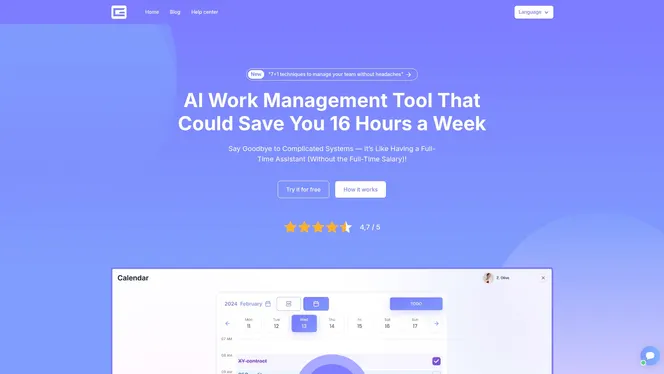
Gammatica automates weekly task tracking, generates checklists, and coordinates calendars across your team. Its Make.com integration connects your existing HR tools so your weekly digest builds itself. The platform claims users can free up to 16 hours weekly by replacing manual workflows with AI-assisted automation. If you want to see how it fits your specific HR workflow, book a demo call and walk through the platform with the Gammatica team directly.
FAQ
What is weekly planning for HR managers?
Weekly planning for HR managers is the practice of setting goals, prioritizing tasks, and scheduling work each week to align daily HR operations with broader quarterly and annual workforce strategies.
How much time can automation save in weekly HR reporting?
Automation can reduce weekly HR report preparation from 90 minutes to as little as 10 minutes per week, freeing significant time for higher-value work.
What should a weekly HR task list include?
A weekly HR task list should cover recruitment progress, payroll deadlines, compliance reminders, team one-on-ones, engagement follow-ups, and any open action items carried over from the previous week.
How do you align weekly HR goals with quarterly priorities?
Map your weekly goals to the current quarter’s focus. Q1 typically centers on hiring and goal setting, Q2 on performance reviews and calibration, Q3 on retention, and Q4 on annual reviews and planning.
How often should HR managers review their weekly plan?
Review your plan at the start and end of each week. A Monday planning session sets direction, and a Friday review captures what carried over and what you learned, feeding directly into the next week’s priorities.