
TL;DR:
- Project status reporting provides clear updates on project progress, risks, and decisions for stakeholders. Proper reports include structured sections, separate RAG ratings, and explicit asks to prompt action. Consistent reporting cadence and honest communication build stakeholder trust and project success.
Project status reporting is the process of delivering structured, concise updates on project progress, risks, and decisions to stakeholders for informed governance. Done well, it builds trust, surfaces problems early, and keeps everyone aligned on what matters. Done poorly, it wastes time and erodes confidence. This guide gives you a practical framework for writing reports that actually drive decisions, covering what to include, how often to report, common mistakes to avoid, and the tools that make the whole process easier.
What does a project status report include?

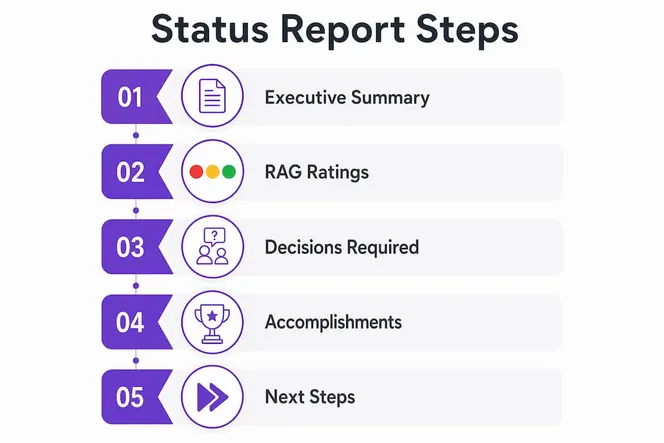
A strong project status report follows a structured 7–10 section format that covers the full picture of project health without burying readers in detail. Each section serves a specific purpose. Together, they give stakeholders everything they need to act.
| Section | Purpose |
|---|---|
| Executive Summary | One paragraph on current state, key wins, and asks |
| Overall RAG Status | Red/Amber/Green health indicator at a glance |
| Granular RAG Ratings | Separate ratings for Schedule, Budget, Scope, and Risk |
| Key Metrics | Schedule variance, budget burn, quality indicators |
| Accomplishments | 3–5 bullet points on what was completed this period |
| Upcoming Milestones | Next 2–4 deliverables with owners and due dates |
| Active Risks and Issues | Top risks with impact, likelihood, mitigation, and owner |
| Decisions Required | Explicit asks with deadlines and consequences of delay |
The granular RAG ratings deserve special attention. Separate RAG ratings for Schedule, Budget, Scope, and Risk prevent a single combined indicator from masking real problems. A project can be on budget but two weeks behind schedule. A single “Green” hides that entirely.
The Decisions Required section is where most reports fall short. A missing or vague Decisions Required section is the most common cause of avoidable project stalls. Stakeholders do not act on information. They act on explicit asks. Write each decision as a clear question with a deadline and a note on what happens if the decision slips.
Keep your accomplishments and next steps tight. Limit each list to 3–5 bullet points and push any additional detail to an appendix or a linked document. Stakeholders read the top of your report. They rarely scroll to the bottom.
Pro Tip: Write your Executive Summary last. Once you have drafted every other section, you will know exactly what the one-paragraph summary needs to say.
How often should you send project status reports?
Reporting frequency is not a one-size-fits-all decision. Weekly reporting suits fast-moving projects while monthly works for stable, low-risk programs. The wrong cadence creates real problems. Too infrequent and issues sit unaddressed for weeks. Too frequent and your team spends more time reporting than delivering.
Here is a practical framework for choosing your cadence:
- Assess project velocity. Active delivery phases with daily task movement need weekly updates. Planning or closeout phases can often drop to bi-weekly.
- Know your audience. Steering committees usually want monthly executive summaries. Delivery teams need weekly operational updates.
- Match the risk level. High-risk projects with external dependencies warrant more frequent check-ins, even if the pace of work is steady.
- Lock in a consistent schedule. Distributing reports on the same day and time each cycle builds stakeholder trust and cuts down on ad hoc status queries.
- Review cadence at phase gates. What works during build may not work during testing. Adjust frequency when the project moves into a new phase.
Tailoring content depth by audience is just as important as frequency. Your steering committee needs the Executive Summary, overall RAG status, and Decisions Required. Your delivery team needs the granular metrics, task-level milestones, and risk owners. Sending the same report to both groups wastes everyone’s time.
Pro Tip: Run a hybrid model. Send a short operational update to your delivery team every Friday and a polished executive summary to your steering committee on the first Monday of each month. You cover both audiences without doubling your workload.
How to create an effective project status report
Producing a report that informs and prompts action takes a repeatable process. Follow these steps every reporting cycle.
- Gather accurate data first. Pull your schedule variance from your project plan, your budget burn from finance, and your risk log from your last review. Never write a status report from memory.
- Set honest RAG status per category. Base each rating on real data and actual impact, not on how you want the project to look. A project that is two weeks behind schedule is Amber on Schedule, full stop.
- Write the Executive Summary last. Draft every other section first, then write a single paragraph that captures the current state, the top win, and the primary ask.
- Draft your risks with full context. Each risk entry needs a description, an impact rating, a likelihood rating, a mitigation action, and a named owner. A well-crafted risks section directly influences sponsor confidence and how quickly issues get escalated.
- List your decisions with deadlines. For each decision, state what is needed, who needs to decide, by when, and what happens if the decision slips past that date.
- Distribute on schedule. Send the report at the same time every cycle. Consistent report timing builds credibility and reduces the back-and-forth queries that eat into your week.
- Integrate reports into governance meetings. A report sent in isolation is easy to ignore. A report that anchors your weekly governance call becomes a decision-making tool.
Pro Tip: Build a status report template with pre-filled section headers and placeholder text. Filling in a template takes 20 minutes. Building a report from scratch takes two hours.
The difference between a good and a poor report often comes down to the metrics you choose. Selecting the right project KPIs for your report means stakeholders see what actually matters, not just what is easy to measure.
Common mistakes in project status reporting
Most reporting failures come from a handful of predictable habits. Recognizing them is the first step to fixing them.
- Status theater. Reports that declare “Green” across every category while hiding unresolved risks. Overly optimistic status reports undermine credibility and prevent the early interventions that save projects.
- Too much detail. Excessive detail causes stakeholders to skim or ignore reports entirely. If your report runs more than two pages, you have buried your key messages.
- Vague or missing Decisions Required. Without explicit asks, stakeholders read your report and move on. Nothing gets decided. The project stalls.
- Inconsistent structure. Changing your report format every few cycles forces stakeholders to relearn where to find information. Pick a template and stick to it.
- Irregular cadence. Sending reports whenever you get around to it trains stakeholders to ignore them. A predictable schedule signals that you are in control.
- No named owners on risks. A risk without an owner is a risk that nobody manages. Every entry in your risk section needs a person’s name next to it.
The hardest habit to break is optimistic reporting. Project managers often soften bad news to avoid difficult conversations. The result is that problems surface too late for anyone to help. Honest reporting, even when the news is uncomfortable, is what earns you credibility and support when you need it most.
Pro Tip: Build a stakeholder communication rhythm by pairing your report with a standing 15-minute governance call. The call creates accountability. The report creates the agenda.
Why disciplined reporting is the highest-leverage skill a PM has
Most project managers treat status reporting as administrative overhead. That is the wrong frame entirely. After years of working with project teams, I have come to see disciplined reporting as the single highest-leverage skill a project manager can develop.
Here is what I have observed: the PMs who report honestly, consistently, and with clear asks are the ones who get resources when they need them. Stakeholders trust them. Sponsors advocate for them. When a project hits trouble, those PMs get help. The ones who paper over problems with green dashboards get blindsided and blamed.
Transparent risk reporting is where the real value shows up. When you name a risk clearly, assign it an owner, and flag it in every report until it is resolved, you create a paper trail that protects you and prompts action. Sponsors who see a risk escalating over three consecutive reports will act. Sponsors who see “Green” every week have no reason to.
The discipline piece is harder than it sounds. Reporting consistently when a project is in trouble takes courage. It means admitting that things are not going to plan and asking for help. That is uncomfortable. But the alternative, hiding problems until they become crises, is far worse for your project and your reputation.
If you are building your reporting practice from scratch, start with the structure and the cadence. Get those right first. The quality of your writing and your risk analysis will improve with repetition. The habit is what matters most.
— Viktor
How Gammatica supports better project visibility
Gammatica gives project leads and founders real-time visibility into what their teams are working on, without the manual overhead of chasing updates. The platform’s task management, Kanban boards, and checklist tools mean your project data is always current, so pulling together your weekly or monthly report takes minutes instead of hours. Gammatica’s AI suggestions and pre-made templates help you structure updates consistently, and its automation features can handle report distribution on a set schedule. If you want to see how it works in practice, book a demo call or explore Gammatica for founders to see what your team is actually doing.
FAQ
What is a project status report?
A project status report is a structured document that summarizes project progress, health, risks, and decisions for stakeholders. It typically covers an executive summary, RAG status ratings, key metrics, accomplishments, upcoming milestones, active risks, and decisions required.
How is a status report different from a project dashboard?
A status report provides narrative context and explicit decision requests, while a dashboard displays real-time metrics visually. Both serve different purposes and work best when used together.
How often should project status reports be sent?
Weekly reporting suits fast-moving projects and monthly reporting fits stable, low-risk programs. The key is consistency: distribute reports on the same day and time each cycle to build stakeholder trust.
What is RAG status in a project report?
RAG status uses Red, Amber, and Green ratings to indicate project health. Assigning separate RAG ratings to Schedule, Budget, Scope, and Risk gives a clearer picture than a single combined indicator.
Why do project status reports fail to drive decisions?
Reports fail to drive decisions when the Decisions Required section is missing or vague. Explicit asks with deadlines are what convert a passive update into a tool that prompts stakeholder action.