
TL;DR:
- Voice to CRM enables real-time, voice-commanded updates to CRM records, drastically increasing data completeness. It relies on speech recognition, NLP, and API integration, with best practices including data normalization and confirmation flows. Teams see significant productivity gains, with automated notes and deal updates saving hours each week.
Voice to CRM is the practice of using spoken language commands to create, update, and retrieve CRM records in real time, without touching a keyboard. Companies that deploy voice AI agents have increased CRM data completeness from 30% to over 90% within a single month. That kind of jump does not come from working harder. It comes from removing the friction between a conversation and the CRM record that should document it. Natural language processing (NLP) and speech recognition technology now make it possible to capture deal stages, contact notes, and follow-up tasks the moment they happen, not hours later when details fade.
How does voice to CRM technology work?
Voice to CRM follows a clear, five-step workflow from the moment you speak to the moment your CRM record updates.
- Voice capture. A microphone on your phone, headset, or computer picks up your spoken input. The audio streams to a speech-to-text engine in real time or gets queued for post-call processing.
- Transcription. The engine converts audio to text. Real-time transcription achieves latencies as low as 200–300ms, which means the text appears almost as fast as you speak. That speed enables live, back-and-forth conversations with a voice AI agent.
- Intent recognition. An NLP model reads the transcript and identifies what you want to do. “Log a call with Sarah at Acme, deal value $50,000, follow up Friday” becomes structured data: contact name, company, deal value, and task date.
- CRM API call. The system sends the structured data to your CRM through a REST API. The API writes the values into the correct fields: deal stage, contact record, task queue.
- Confirmation loop. A well-designed voice system reads back what it recorded and asks you to confirm. This two-way feedback catches errors before they enter your CRM.
One detail most teams overlook: async transcription after a call produces higher entity extraction accuracy than real-time transcription. Real-time is great for quick updates during a call. Post-call async processing is better for detailed note enrichment, because the model can analyze the full audio context before writing to the CRM.
Pro Tip: Set up both modes. Use real-time voice commands for quick field updates during a call, and let async transcription handle the full meeting summary after the call ends.
What are the common methods to integrate voice commands into existing CRM platforms?
You have four practical paths to connect voice recognition to your CRM, and the right choice depends on your timeline and technical resources.
- Low-code platforms. Tools like Make.com connect telephony providers, transcription APIs, and your CRM without custom development. Low-code deployments go live in 2–4 weeks. That speed makes them the best starting point for most teams.
- Native integrations. Some CRM platforms offer built-in voice features or official connectors to transcription services. These require less configuration but offer less flexibility in how data gets mapped to fields.
- Middleware automation tools. Platforms like n8n or Zapier sit between your voice input and your CRM. You build a workflow: audio in, transcript out, CRM field updated. These tools work well when you need conditional logic, such as routing a hot lead to a different pipeline stage based on keywords detected in the call.
- Custom API development. Building directly against your CRM’s REST API gives you full control. This path takes longer and costs more, but it suits enterprise teams with unique field structures or compliance requirements.
Whichever path you choose, field mapping and consent handling are the two configuration steps that most often cause integration failures. Define exactly which voice-extracted entities map to which CRM fields before you write a single line of automation. Handle recording consent at the start of every call to stay legally compliant.
The productivity gains from getting this right are significant. Teams that automate voice-driven customer management workflows free up hours of admin time every week. For a deeper look at how AI automation translates to real business results, the AI productivity research from BabyLove Growth shows agencies achieving 3.2x ROI from AI-powered workflow changes.
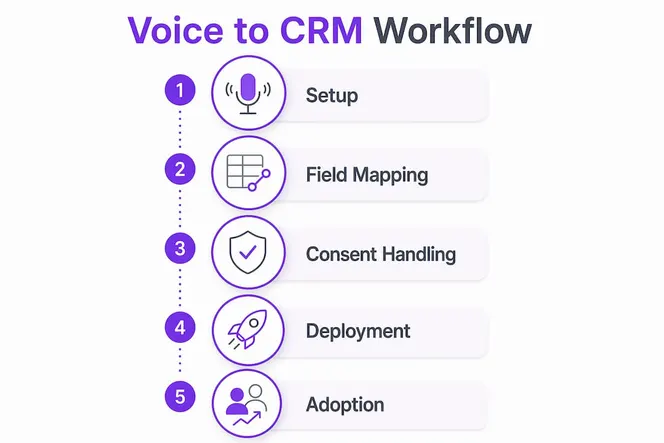
Pro Tip: Start with one simple workflow: voice input to contact note creation. Get that working reliably before adding deal stage updates or task creation. Complexity is the enemy of adoption.
What best practices and challenges should teams consider when adopting voice to CRM?
Getting voice commands into your CRM is the easy part. Keeping the data clean and useful is where most implementations struggle. These practices separate successful rollouts from abandoned ones.
- Map to active fields, not raw transcripts. Automated entity mapping writes extracted data directly into custom CRM fields like deal stage, qualification criteria, and next action. Storing raw transcripts without mapping them creates “dead data” that nobody reads and nobody acts on.
- Normalize data before it enters the CRM. Phone numbers should follow E.164 formatting before they write to a contact record. Without normalization, the same phone number entered three different ways creates three duplicate contacts.
- Enable two-way synchronization. Your voice AI agent needs read access to live CRM data, not just write access. Two-way CRM sync lets the agent pull up a contact’s history, last deal stage, and open tasks before it responds. That context makes every interaction more accurate and more useful.
- Design confirmation flows. After the AI extracts data from your voice input, it should read back what it captured. “I’ve logged a $50,000 deal with Acme, follow-up set for Friday. Is that correct?” One confirmation step prevents a week of data cleanup.
- Handle consent proactively. Record a consent disclosure at the start of every call. Store the consent timestamp in the CRM alongside the recording. This protects you legally and builds trust with clients.
- Train your team on voice command patterns. Users who speak in consistent, structured sentences get better extraction results. A short training session with example phrases cuts the AI error rate significantly and reduces change management resistance.
The marketing automation checklist from BabyLove Growth covers consent and data permission steps that apply directly to voice integration setups for SMB teams.
How can voice to CRM improve productivity and note-taking during meetings and calls?
The time math here is striking. Manual CRM entry takes field reps an average of 90 minutes per day. A voice-enabled CRM update takes 60 seconds. That is not a small efficiency gain. It is a fundamental change in how your team spends its working hours.
“Companies have cut daily CRM data entry from 90 minutes to 60 seconds using voice AI agents, while simultaneously improving CRM data completeness from 30% to over 90%.”
The productivity shift shows up in several concrete ways:
- Meeting notes captured instantly. With Gammatica AI, you can dictate your meeting notes by voice and add them instantly to the relevant contact record. No more typing up notes after the fact. No more forgotten details. The note lives in the CRM the moment the meeting ends.
- Deal updates without context switching. A sales rep driving between client visits can say, “Move Acme to proposal stage, note that they want a Q3 start date.” The CRM updates without the rep ever opening a laptop.
- Follow-up tasks created on the spot. Voice commands create tasks tied to specific contacts. “Remind me to send the contract to Sarah on Monday” becomes a CRM task, not a sticky note that gets lost.
- Pipeline health surfaced conversationally. A voice-enabled CRM can answer questions like, “What deals are stalled in the proposal stage?” The agent pulls live data and reads back the answer. Your pipeline review happens in the car, not in a conference room.
- Fewer errors in contact records. Spoken input processed by NLP is more consistent than manual typing under pressure. Reps who type notes between calls often abbreviate, skip fields, or enter data in the wrong record.
The result is a team that spends more time selling and less time administering. That shift in focus is where the real revenue impact lives.
What I’ve learned from watching teams adopt voice-driven CRM workflows

The biggest mistake I see is treating voice as a replacement for the CRM interface. It is not. Voice works best as an overlay, a fast input layer that sits on top of your existing CRM without replacing the screens your team already knows. When teams try to do everything by voice, they run into edge cases that slow them down and erode confidence in the system.
Start with low-code deployments. The 2–4 week deployment window is real, and it gives you something working fast enough to build momentum. Momentum matters more than perfection in the first 30 days.
The data consistency challenge is real and underestimated. I have seen implementations where the voice system wrote clean data for two weeks, then started creating duplicate contacts because nobody normalized the phone number format. Fix normalization before you go live, not after.
The teams that get the most value from voice-enabled CRM are the ones who link every voice note directly to a contact record. A note floating in a general log is nearly useless. A note attached to the Acme deal record, timestamped, and visible to the whole team is a business asset. Gammatica’s approach of instantly associating voice notes with the relevant contact is exactly the right design philosophy.
AI voice agents are improving fast. The accuracy gains from the past two years alone are significant. Teams that build the habit now will have a compounding advantage as the technology gets better.
— Viktor
Gammatica AI makes voice note-taking effortless for your team
With Gammatica AI, you can dictate meeting notes or any text by voice and add it instantly to the relevant contact in your CRM. No manual typing, no delayed entry, no lost details.
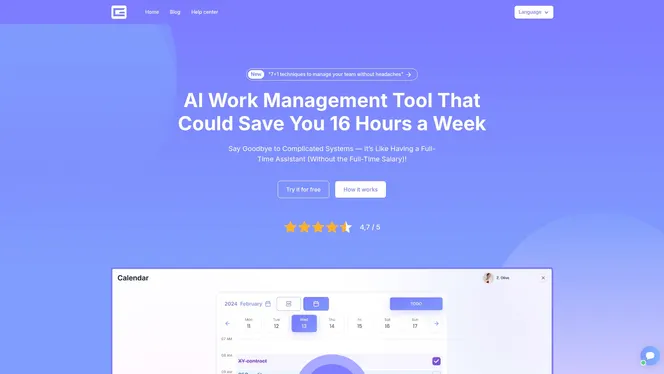
Gammatica claims users free up to 16 hours per week by replacing manual admin tasks with AI-assisted workflows. Voice dictation tied directly to contact records is one of the fastest ways to get there. Your team stays focused on the conversation, not the keyboard. If you want to see how Gammatica’s voice features work in practice, the demo call walks through the full platform in real time.
FAQ
What is voice to CRM?
Voice to CRM is the use of spoken language commands to create, update, and retrieve CRM records without manual data entry. AI processes the speech, extracts structured data, and writes it to the correct CRM fields automatically.
How fast does a voice to CRM system process speech?
Real-time speech-to-text systems achieve latencies as low as 200–300ms, making live voice interactions with a CRM feel nearly instant. Post-call async processing takes longer but delivers higher accuracy for detailed note enrichment.
What is the difference between real-time and async transcription for CRM updates?
Real-time transcription updates CRM fields during a call with minimal delay. Async transcription processes the full audio after the call ends and produces better entity extraction accuracy, making it the better choice for detailed meeting summaries.
How do I prevent duplicate contacts when using voice input?
Normalize all data formats before they write to the CRM. E.164 phone number formatting is the most common fix. Without it, the same number spoken three different ways creates three separate contact records.
How quickly can a team deploy a voice to CRM integration?
Low-code platforms can connect telephony, transcription, and CRM APIs in 2–4 weeks without custom development. Starting with a single workflow, such as voice input to contact note creation, accelerates the timeline further.