TL;DR:
- Manual repetitive tasks significantly drain time and mental energy in organizations.
- Automation can save up to 20 hours per user monthly, boosting productivity.
- Successful automation requires proper mapping, testing, and ongoing human oversight.
Most business leaders believe they have a good handle on where their team’s time goes. They track meetings, monitor project deadlines, and review output. But here’s the uncomfortable truth: the biggest time drains are almost never on anyone’s radar. They hide inside the small, repetitive moments that feel routine but compound into staggering losses across your entire organization. Automation is the most practical answer, and the data behind real time savings is both surprising and motivating. This guide walks you through the evidence, the mechanisms, the pitfalls, and the actionable steps to capture every hour that’s currently slipping away.
Key Takeaways
| Point | Details |
|---|---|
| Manual work hides big time drains | Leaders often underestimate how much time is lost to repetitive tasks and errors. |
| Automation yields measurable results | Evidence-backed studies show consistent time savings and productivity increases with automation. |
| Process fit and adoption matter | The magnitude of time savings depends on the right process choice and committed user adoption. |
| Beware edge cases | Systems can create hidden work through silent errors if exceptions and data issues aren’t addressed. |
| Combine technology with workflow change | True time gains come when automation is paired with workflow adaption and team buy-in. |
The hidden cost of manual processes
Manual work costs more than you think. Not just in salary dollars, but in cognitive load, error recovery, and missed opportunities. The problem is that these costs are largely invisible on a standard report.
Consider what actually happens when a team member switches from a spreadsheet to an email to a project board and back again. Each transition costs mental energy. Research on cognitive context-switching shows that it can take over 20 minutes to return to deep focus after an interruption. Multiply that across a team of 15, each switching tasks a dozen times a day, and you are looking at a staggering volume of lost productive hours every single week.
Beyond context-switching, there’s what operations professionals call shadow work: the untracked effort of checking other people’s work, re-entering data from one system to another, manually triggering workflows that could run themselves, and reformatting reports to match different stakeholder preferences. None of this shows up in a time-tracking tool. None of it gets flagged in a sprint review. But it is there, every day.
Some of the clearest evidence for this comes from enterprise-level research. AI copilot users in large organizations reported substantial monthly time savings specifically tied to drafting, summarization, and reporting workflows. These are not exotic use cases. They are the daily bread of every manager, coordinator, and team lead.
Here are the most commonly underestimated sources of manual time drain in modern teams:
- Data re-entry: Moving information between tools that don’t integrate automatically
- Status update requests: Asking for progress reports that could be auto-generated
- Manual reporting: Pulling numbers from multiple sources and building presentations by hand
- Error correction: Fixing mistakes introduced during manual data handling
- Approval routing: Chasing signatures and sign-offs through email threads
“Time lost to manual processes doesn’t just slow teams down. It quietly erodes morale, focus, and the capacity for creative problem-solving.”
The real danger is that leaders adapt to this friction. It starts to feel normal. When something feels normal, you stop questioning whether it has to be that way. And that’s exactly when automation delivers the biggest surprise: not just time back, but a fundamentally different quality of work.
Having highlighted the severe, often unnoticed costs of manual work, it’s clear why leaders look to automation as a solution. Next, we detail exactly how automation translates to measurable time savings.
How automation delivers measurable time savings
The mechanisms behind automation’s time-saving power are straightforward once you see them clearly. Automation removes the human from repetitive decisions, data transfers, and scheduled communications. It doesn’t just do things faster; it does them without waiting. There’s no inbox delay, no availability window, no cognitive warmup required.

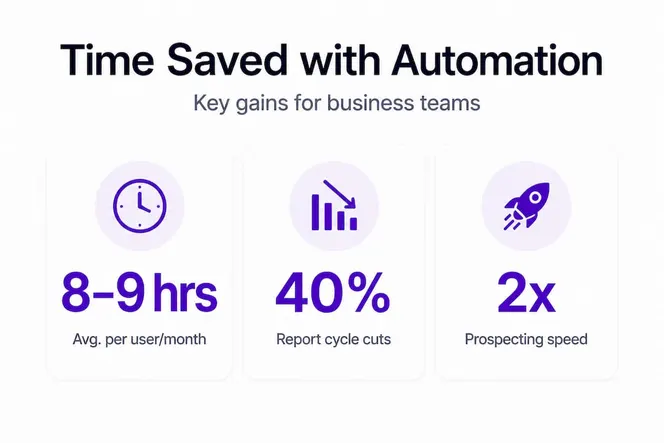
Let’s look at where the numbers actually come from. For organizations using AI-assisted tools, average time saved reaches 9 hours per user per month, with highly sophisticated users saving up to 20 hours monthly. That’s not marginal. For a team of 20 people, nine hours per person per month equals 180 hours returned to meaningful work every single month.
Finance and operations teams see some of the sharpest gains. Cycle time reductions tied to automation in financial reporting and data processing can be dramatic, with some organizations reporting 75% less time on monthly reporting and data loads completing up to 95% faster after process automation.
Here’s a table showing how automation impacts specific business functions:
| Business function | Manual time (weekly avg.) | Post-automation time | Time saved |
|---|---|---|---|
| Financial reporting | 6 hours | 1.5 hours | 75% |
| Data entry and sync | 4 hours | 0.2 hours | 95% |
| Status updates and comms | 3 hours | 0.5 hours | 83% |
| CRM and follow-up logging | 2.5 hours | 0.3 hours | 88% |
| Scheduling and calendar | 1.5 hours | 0.2 hours | 87% |
These numbers are real, and they’re achievable. But they don’t happen by accident. Here’s how the mechanism works step by step:
- Trigger identification: The automation system detects a defined event, like a form submission, a date, or a status change.
- Rule application: Pre-set logic determines what happens next, with no human decision required.
- Action execution: Tasks are completed instantly, such as sending a message, updating a record, or generating a report.
- Logging and audit: The system records what happened, creating a transparent trail without manual documentation.
- Exception flagging: Anything outside normal parameters is surfaced for human review, rather than silently failing.
Pro Tip: Start by automating just one high-frequency workflow and measure the before-and-after time carefully. A single win here builds confidence, proves ROI, and makes the case for scaling automation across your team.
Think about automation in sales prospecting as a concrete example. Manual prospecting requires a rep to research contacts, log data, draft outreach, schedule follow-ups, and update the CRM after each interaction. With automation handling data sync, follow-up sequencing, and activity logging, that same rep focuses purely on conversations and relationship building. The productivity boost can exceed 25% in sales environments alone.
With evidence-based insights into automation’s power, it’s important to understand the factors that affect these results in practice.
Why time savings vary: Key factors to consider
Not every automation project delivers the same results. Leaders who go in expecting universal gains are often disappointed, and that disappointment can kill momentum for future initiatives. The truth is that time savings depend heavily on three factors: process fit, user adoption, and data quality.
| Factor | High automation fit | Low automation fit |
|---|---|---|
| Task type | Repetitive, rule-based | Creative, judgment-heavy |
| Data quality | Clean, structured, consistent | Messy, inconsistent, siloed |
| Volume | High frequency, high volume | Occasional, low volume |
| Exceptions | Rare and well-defined | Frequent and unpredictable |
| Stakeholder buy-in | Strong adoption, clear ownership | Resistance, unclear ownership |
ROI and time savings challenges frequently stem from scaling difficulties, integration gaps, and the hard problem of quantifying soft time savings. McKinsey research echoes this: automation initiatives that don’t account for process variability often underperform projections by 30 to 50 percent.
One of the most common and costly mistakes is what engineers call happy path programming. This is when automation is designed to handle only the ideal scenario, the clean input, the expected sequence, the typical user. In reality, automation built on happy path assumptions can fail under dirty data, API outages, rate limits, and unusual inputs. These failures often create silent errors: tasks that appear complete but aren’t, records that get corrupted, and follow-ups that never fire. The investigation time required to catch and fix these issues can quietly erase the time savings you were counting on.
Here’s what to watch for when scoping your automation projects:
- Dirty data risk: Does your existing data have gaps, inconsistencies, or formatting issues?
- Exception frequency: How often does this process deviate from the expected path?
- Integration reliability: Are the APIs or systems involved stable and well-documented?
- Human handoff clarity: Is it clear when the automation should stop and a human should step in?
- Feedback loops: Do you have a way to catch errors before they compound?
Pro Tip: Before launching any automation, spend one week manually logging every exception and edge case in the target process. This maps the real landscape, not just the happy path, and makes your automation design dramatically more robust.
Adoption is just as important as technical design. Teams that don’t trust an automated system will work around it, creating shadow manual processes alongside the automation. This doubles effort rather than cutting it. Involve your team in the design process, show them the before-and-after time data, and give them a clear feedback channel to report problems.
Now that you see what determines actual time gains, let’s move to practical steps for selecting and scaling automation projects that maximize results.
How to implement automation for maximum impact
Great automation starts with great process visibility. You cannot automate what you haven’t mapped. The first step is always an honest audit of how your team actually spends its time, not how you think they spend it.
Follow these steps to build a strong automation implementation:
- Run a workflow audit: Have each team member track their tasks for two weeks at 30-minute granularity. You’ll quickly surface repetitive work that no one had formally identified.
- Score each process: Rate candidate workflows on three dimensions: frequency (how often it runs), effort per instance (how long it takes manually), and business value (what happens if it’s delayed or wrong).
- Prioritize quick wins: Target high-frequency, high-effort, low-exception-rate processes first. These deliver fast ROI and build team confidence.
- Map the full workflow: Document every step, every input, every decision point, and every exception. Include what happens when something goes wrong.
- Select the right tool: Match your automation platform to the complexity of the process. Simple triggers and actions need simple tools. Complex multi-step workflows need platforms with strong error handling and logging.
- Measure before and after: Collect baseline cycle time data before launch and track changes weekly for the first two months.
- Build feedback loops: Create a clear channel for team members to flag issues and a regular review cadence to assess performance.
Scaling automation successfully requires attention to integration quality and change management, not just the technical build. Many organizations find that their first automation succeeds but their second and third struggle because foundational issues, like data hygiene or unclear ownership, were never addressed.
Here are the pitfalls most leaders hit on their first attempt:
- Skipping the baseline measurement and having no way to prove results
- Automating a process that’s already poorly defined, making the automation reflect the chaos
- Launching without adequate testing across edge cases
- Failing to communicate changes to the team, creating confusion and workarounds
- Not assigning a clear owner for maintaining and improving the automation over time
The most successful automation programs treat deployment as the beginning of the process, not the end. They iterate, refine, and expand based on real performance data.
What most automation guides miss: The real human side of time savings
Here’s what we’ve observed that most purely technical automation guides completely overlook: the time you save is only half the story. The energy you free is the other half, and it’s arguably more valuable.
When a team member spends two hours a day on routine data entry, they don’t just lose two hours. They lose the mental sharpness that those two hours would have carried into their next challenge. Routine cognitive labor is exhausting in a way that’s hard to articulate on a time sheet. When automation absorbs that load, teams don’t just get hours back. They often report faster decision-making, better collaboration, and a surge in proactive problem-solving.
We’ve also seen a pattern that surprises almost every leader who adopts automation seriously: the strongest improvements frequently come not from the biggest automation projects, but from eliminating small, daily friction points. The one-click report that used to take 45 minutes. The auto-logged follow-up that no one had to remember. The status update that fires without anyone asking for it. These small wins stack, and they do something important to team culture. They signal that leadership values people’s time and attention.
But there’s a real danger worth naming directly. When automation creates silent errors, the human cost is significant. A team that discovers their automation has been quietly failing starts to distrust the entire system. They revert to manual processes. They build shadow workflows. You end up with more complexity, not less. This is why trust in the system is not a soft consideration. It’s a hard operational requirement.
The teams that extract the most time savings from automation are the ones that treat it as a living system, one that requires human attention, iteration, and honest feedback. Smart tech paired with workflow reality. That combination is where the real wins live.
Bringing automation and time savings to your team
You’ve seen the evidence: real time savings, measurable productivity gains, and a clear path to implementation. Now the question is, where do you start with the right tools?

Gammatica is built specifically for business leaders and managers who want to stop spending their team’s energy on tasks that a system should handle. Whether you’re a founder looking to streamline operations with automation for founders, a sales leader wanting to capture every lead and follow-up automatically with automation for sales teams, or a manager ready to eliminate manual reporting and task tracking, Gammatica brings together AI-driven task management, CRM, checklists, and workflow automation in one intuitive platform. Explore what’s possible with automate with Gammatica VEX and start reclaiming your team’s most valuable resource: focused, high-value time.
Frequently asked questions
How much time can a typical team expect to save with automation?
Teams often save 8 to 9 hours per user per month on average, and highly sophisticated automation users can recover up to 20 hours monthly per person.
What types of business tasks are best suited for automation?
Repetitive, high-volume tasks like reporting, data entry, and communication workflows yield the greatest and most consistent time savings across teams.
What are common pitfalls when deploying automation?
Happy path automation failures under dirty data or API outages can create silent errors that quietly consume more time than the automation was supposed to save.
How should leaders measure time savings after automation?
Collect baseline cycle time data before launch, then track the same metrics weekly after deployment to validate your ROI and time savings with concrete before-and-after evidence.