TL;DR:
- Workflow automation uses software to handle routine tasks, improving speed and reducing errors.
- Starting with mechanization and progressing to orchestration maximizes business transformation impact.
- Involving domain experts and following best technical practices ensures successful and sustainable automation.
Workflow automation is not reserved for Silicon Valley giants with armies of developers. Automation reduced execution time 151x and dropped error rates from 5% to zero in controlled tests, and mid-sized organizations are capturing those same gains right now. If your team still spends hours each week on manual approvals, data entry, or status update emails, you are leaving a significant competitive advantage on the table. This guide will show you exactly what workflow automation is, how it works, and how your organization can use it to drive real, measurable results without needing a dedicated engineering team.
Key Takeaways
| Point | Details |
|---|---|
| Dramatic efficiency gains | Automation can reduce process times over 100-fold and virtually eliminate human error. |
| Choose the right automation | Match rule-based, AI, or agentic methods to your workflow complexity and oversight needs. |
| Success needs more than tools | Domain expert involvement and process redesign drive sustainable gains, not just buying software. |
| Start small, scale smart | Begin with pilot projects in mid-sized organizations and expand horizontally. |
| Ongoing measurement is vital | Monitor and refine your automated workflows regularly for lasting results. |
Defining workflow automation: Components and core concepts
Let’s start with a clear definition, because this term gets used loosely. Workflow automation is the use of software to execute recurring business tasks, route information, and advance processes with minimal human intervention. That’s it. No magic. No black box. Just a set of rules and actions that your software follows so your people don’t have to.
Workflow automation typically has three core components working together:
- Rules (logic): Conditions that trigger an action. For example, “When a contract is signed, notify the onboarding team and create a project folder automatically.”
- Actions: The tasks the system performs. These can include sending emails, updating records, assigning tasks, generating reports, or moving data between systems.
- Monitoring: The system tracks progress, flags exceptions, and alerts the right person when something needs human attention.
Think of it like a well-trained operations coordinator who never sleeps, never forgets a step, and never sends the wrong file to the wrong client. Except this coordinator runs on software.
“Automation doesn’t replace your team. It frees your team to focus on the work that actually requires human judgment, creativity, and relationship-building.”
One common misconception is that workflow automation replaces people entirely. It doesn’t. What it does is eliminate the repetitive, low-value tasks that consume hours of your team’s week. When those tasks are handled automatically, your managers and specialists can focus on the work that truly moves the needle: strategic decisions, client relationships, and innovation.
Codified steps also dramatically reduce human error. When a process depends on someone remembering to send a follow-up email or update a CRM record, mistakes happen. When the system handles it, the process runs the same way every single time.
Mechanization vs orchestration: Comparing automation approaches
Once the core components are clear, it’s worth distinguishing between automation types, since not all workflow automation strategies deliver the same results. There are two broad approaches: mechanization and orchestration.
Mechanization is about automating individual, routine tasks. Think auto-routing support tickets, sending invoice reminders, or populating a spreadsheet from form submissions. These are discrete, repetitive actions with clear inputs and outputs.

Orchestration goes further. It coordinates complex, multi-step processes across teams, departments, or systems. A sales pipeline that automatically qualifies leads, routes them to the right rep, schedules a follow-up call, logs the outcome in the CRM, and triggers a proposal workflow is a good example of orchestration at work.
The difference in impact is substantial. Research shows that mechanization accelerates innovation by 7.8%, saving roughly 3 days per issue resolved. Orchestration, on the other hand, accelerates innovation by 16.6% and saves an average of 9.1 days per issue. That’s not a small gap. That’s the difference between incremental improvement and transformational change.
| Feature | Mechanization | Orchestration |
|---|---|---|
| Scope | Single, repetitive tasks | Multi-step, cross-functional processes |
| Complexity | Low to medium | Medium to high |
| Time saved per issue | ~3 days | ~9.1 days |
| Innovation acceleration | 7.8% | 16.6% |
| Best for | Quick wins, task efficiency | Process transformation, team coordination |
For mid-sized organizations, the smart move is to start with mechanization to build momentum and confidence, then progress toward orchestration as your team’s automation maturity grows. Many companies implementing workflow automation in SMEs find that beginning with simple, high-frequency tasks builds the internal expertise needed to tackle more complex process coordination later.
The practical takeaway? Don’t underestimate mechanization as a starting point, but set your sights on orchestration as the ultimate goal for maximum business impact.
When to use rule-based, AI-driven, or agentic automation
Understanding approach distinctions sets up the more granular decision: which automation type is right for each business situation? There are three main categories, and choosing the wrong one for the wrong process can create more problems than it solves.
Here’s a quick breakdown of when each approach shines:
-
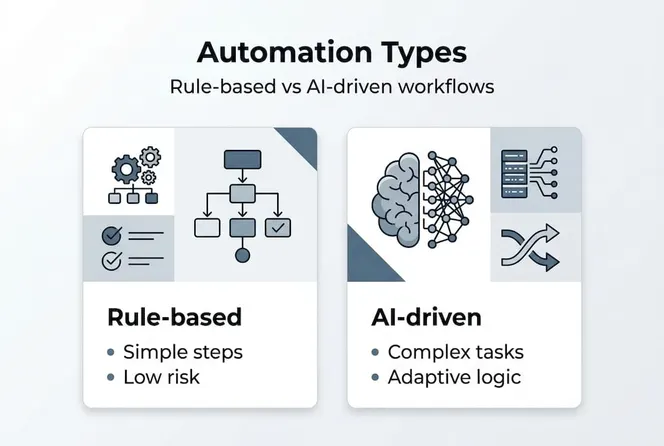
Rule-based automation: Best for predictable, well-defined processes with clear if/then logic. Invoice processing, employee onboarding checklists, and scheduled report generation are perfect candidates. These workflows have consistent inputs, no ambiguity, and a defined correct outcome every time.
-
AI-driven automation: Best for processes that involve variable inputs or require pattern recognition. Customer sentiment analysis, lead scoring based on behavioral data, or flagging unusual expense reports all benefit from AI’s ability to learn from context and data over time.
-
Agentic automation: Best for complex, dynamic workflows where the system needs to make sequential decisions without constant human input. Think of an AI agent that monitors project timelines, automatically reassigns overdue tasks, communicates status updates, and escalates to a manager only when a threshold is breached.
Research confirms that rule-based automation works best for clear, structured processes, while AI-driven and agentic methods suit complex or nuanced workflows but require meaningful human oversight to handle edge cases effectively.
| Process type | Recommended approach | Risk level |
|---|---|---|
| Repetitive, rule-clear tasks | Rule-based | Low |
| Variable inputs, pattern recognition | AI-driven | Medium |
| Complex, multi-decision workflows | Agentic | Medium to high |
Organizations exploring no-code and AI automation platforms will find that many modern tools offer all three approaches on a single platform, making it easier to match the right method to each process without switching tools.
Pro Tip: No matter how sophisticated your automation gets, always build in a human-in-the-loop checkpoint for exceptions, edge cases, and high-stakes decisions. Automation handles the routine beautifully. Humans handle the unexpected better than any algorithm.
Essential success factors for effective workflow automation
Knowing the approaches is only part of the puzzle. The real differentiator is deploying automation effectively and sustainably by applying expert best practices. Many organizations implement automation and still fall short of the results they expected. Here’s why that happens and how to avoid it.
The foundational success factor is domain expert involvement. The people who actually run your processes every day know where the exceptions live, where the bottlenecks hide, and where the official process documentation diverges from reality. Research confirms that success depends on domain expert control, rapid deployment capabilities, and intelligent handling of complexity through plain-English or AI interfaces. When domain experts design automation alongside technical teams, the results are dramatically better than when IT builds automation in isolation.
“Radical redesign of processes for agentic AI can yield 2 to 10x performance gains compared to simply automating existing workflows.”
That’s not a typo. Rethinking a process from scratch, rather than just automating what you already do, can multiply your results by an order of magnitude. It requires courage and collaboration, but the payoff is real.
Here are five must-have technical practices for robust workflow automation:
- Idempotency: Design tasks so they can run multiple times without causing duplicate actions or data corruption. If a step retries, the end result should be the same.
- Exponential backoff retries: When a task fails, the system should wait progressively longer before retrying rather than hammering the same failed endpoint repeatedly.
- Ledgers for partial failures: Track which steps completed successfully so that if a workflow fails midway, it can resume from the right point rather than starting over.
- Concurrency locks: Prevent multiple instances of the same workflow from running simultaneously and creating conflicting data updates.
- Chunking large payloads: Break large data transfers into smaller batches to avoid timeouts and memory issues.
These technical nuances are often where workflows break in production. As workflow engineers have documented, neglecting these details is exactly what breaks automation in real-world environments. You can build a beautiful automation diagram, but if it can’t handle a failed API call or a duplicate submission gracefully, it will create chaos in production.
Seeking expert workflow optimization advice early in your implementation process saves significant time and money compared to discovering these issues after you’ve already deployed.
Pro Tip: Redesigning a process for agentic automation is different from simply automating an existing one. Before you hand any complex workflow to an AI agent, map the process from scratch and question every step. What can be eliminated? What can be parallelized? What truly requires a decision? This redesign phase is where the biggest gains are found.
Getting started: Practical steps for mid-sized organizations
Armed with effective practices, mid-sized organizations are ready to put workflow automation into action. Here is how to start without overwhelming your team or burning your budget.
-
Identify high-impact, repeatable processes first. Look for processes that happen frequently, consume significant team time, and have a clear sequence of steps. Invoice approvals, new hire onboarding, lead follow-up sequences, and client status reporting are common starting points. If your team does something more than ten times a week and follows the same steps each time, it’s a strong automation candidate.
-
Engage the right stakeholders early. Bring in IT for technical requirements, operations for process knowledge, and the actual process owners who live with the current inefficiencies daily. Getting buy-in from all three groups early prevents the “this automation doesn’t match how we actually work” problem that kills many implementations.
-
Choose the right platform for your complexity level. Gartner recommends that mid-sized businesses use low-code DPA tools for medium-complexity workflows. Digital Process Automation (DPA) platforms offer visual workflow builders, pre-built connectors, and enough flexibility to handle real business complexity without requiring custom development for every step.
-
Pilot with one department, then scale horizontally. Pick a team with a motivated champion and a well-understood process. Run the automation in parallel with the manual process for a few weeks. Measure the results. Refine based on real feedback. Then roll it out to other departments with the lessons already learned.
-
Monitor, measure, and iterate continuously. Automation is not a set-it-and-forget-it solution. Business processes evolve, team structures change, and external integrations update. Build in a regular review cadence, at minimum quarterly, to assess whether your automations are still serving their intended purpose and where new opportunities exist.
The goal isn’t to automate everything at once. It’s to build a culture and capability for automation that grows over time, delivering increasingly larger returns as your team’s confidence and expertise develop.
Our take: Why automation alone won’t future-proof your business
Here’s an honest perspective that most automation vendors won’t give you: deploying automation tools is necessary, but it is not sufficient. We’ve seen organizations invest significantly in automation software, only to automate their existing broken processes faster. The chaos just moves at a higher speed.
The real transformation happens when automation is paired with genuine process redesign and a culture of continuous improvement. Your workflows need to be rethought, not just replicated in software. That requires business leaders who are willing to challenge long-standing assumptions about how work gets done, involve the people closest to the work in redesign efforts, and measure outcomes rather than just activity.
Mid-sized organizations have a structural advantage here that large enterprises often lose. You are nimble enough to actually implement change quickly. You don’t need eighteen months of stakeholder alignment before launching a new workflow. That agility is your competitive edge, and automation amplifies it dramatically.
The leaders who win in the next five years won’t be the ones who bought the most sophisticated automation tool. They’ll be the ones who built internal expertise, iterated relentlessly, and treated process excellence as a strategic capability rather than a one-time technology project. Automation gives you the time back. What you do with that time is what truly differentiates you.
How Gammatica helps you automate smarter
Workflow automation delivers its best results when your platform is built for transparency, control, and fast scaling across teams. That’s exactly what Gammatica is designed to provide.

Whether you’re a founder building operational infrastructure or a sales leader trying to eliminate manual follow-ups, Gammatica gives you the tools to automate workflows, manage tasks, coordinate your calendar, and keep your team aligned without the complexity of enterprise software. Integrations with Make.com bring additional automation power, while AI suggestions and pre-made templates get you moving fast. Gammatica for founders offers purpose-built workflows for early-stage and growing teams, while Gammatica Sales streamlines lead management, follow-ups, and client journeys so your sales team can focus on closing rather than admin.
Frequently asked questions
What are the main benefits of workflow automation?
Workflow automation reduces manual workload, minimizes errors, speeds up processes, and supports innovation. Automation cut execution time 151x in controlled tests, while research confirms it accelerates innovation and saves days per issue resolved across teams.
Is workflow automation suitable for all types of business processes?
Not all processes are equal candidates. Clear, repetitive tasks are ideal for rule-based automation, while complex or nuanced workflows benefit from AI-driven or agentic methods. Research confirms that AI and agentic approaches require human oversight to handle edge cases and exceptions effectively.
How can mid-sized organizations implement workflow automation affordably?
Start with low-code DPA tools for medium-complexity workflows, pilot in one department, and expand once you have proven results and team confidence. This approach minimizes risk and maximizes learning before you commit to broader rollout.
What are common pitfalls to avoid during workflow automation?
Neglecting process redesign, skipping exception handling, and leaving domain experts out of the design process are the top failure modes. Research confirms that domain expert control and complexity handling are essential success factors that most organizations underestimate until it’s too late.