TL;DR:
- AI proposal generators automatically create professional and compliant proposals from structured inputs in minutes. They improve efficiency, ensure requirements are met, and reduce manual drafting, especially when paired with a quality content library and compliance tracking. Human review remains essential to customize, verify accuracy, and protect sensitive data during the process.
An AI proposal generator is a software tool that automatically creates professional, compliant business proposals in minutes from structured inputs, saving you hours of manual writing. The industry term for this category is “proposal automation,” and tools like RFP360.ai, EZdoc, Manus, and SynkrAI have made it accessible to solo freelancers and large RFP teams alike. The core promise is simple: you provide the brief, and the AI produces a polished, on-brand draft ready for review. Speed, compliance tracking, and content reuse are the three pillars that separate good proposal automation from generic text generation.
What is an AI proposal generator and how does it work?
An AI proposal generator takes structured inputs, such as a client brief, RFP document, or discovery call notes, and produces a complete draft proposal. AI tools extract key requirements, deadlines, certifications, and mandatory terms, then organize them into a compliance matrix that tracks every “shall” and “must” in the source document. That compliance matrix becomes the backbone of the entire proposal. Every section of the draft maps back to a specific requirement, so nothing gets missed.

The generation speed varies by tool and complexity. EZdoc generates proposals in about 30 seconds for standard business proposals. Manus takes 5–10 minutes for standard work and longer for grant or technical RFPs. SynkrAI operates as a full agentic system: you fill out a 5-minute brief, and it generates a branded proposal plus contract, formatted and delivered within 5 days, with DocuSign and PandaDoc integration built in.
The quality difference between these tools comes down to what you feed them. Tools that pull from a centralized content library of approved answers, past performance data, and certifications consistently outperform tools generating generic text from scratch. That is the insight most professionals miss when they first try AI proposal software.
Which AI proposal tools are available and how do they compare?
The AI proposal software market splits into three categories: instant generators, agentic systems, and compliance-focused platforms. Each serves a different use case, and picking the wrong one wastes time rather than saving it.
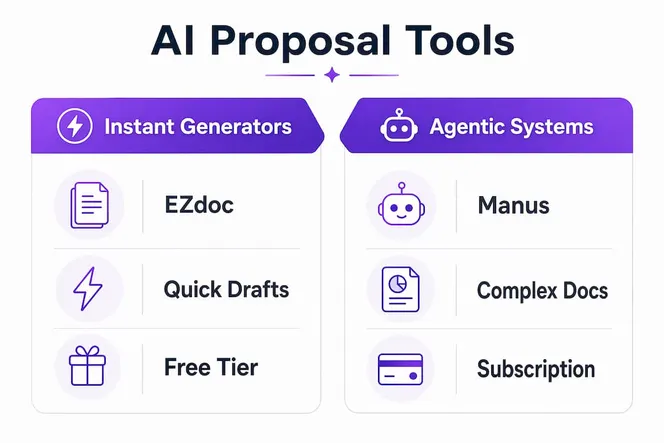
| Tool | Generation speed | Compliance matrix | Contract generation | Pricing model |
|---|---|---|---|---|
| EZdoc | ~30 seconds | No | No | Free tier available |
| Manus | 5–10 minutes | Limited | No | Subscription |
| RFP360.ai | Variable | Yes | No | Subscription |
| SynkrAI | 5 days (full cycle) | Yes | Yes | Fixed price per project |
Here is what each tool does best:
- EZdoc is the fastest option for simple business proposals. You enter project details, and it returns an editable document almost immediately. It works well for freelancers who need a clean starting draft fast.
- Manus handles more complex proposals and adjusts depth based on the type of document. Grant proposals and technical RFPs take longer because the AI researches industry context before drafting.
- RFP360.ai is built for teams managing multiple RFPs simultaneously. Its centralized content management and response reuse features make it the strongest choice for organizations with a proposal library already in place.
- SynkrAI is the only tool in this group that generates a legally structured contract alongside the proposal. It integrates with DocuSign and PandaDoc, so the signed document arrives without manual formatting work.
Pricing structures vary widely. EZdoc offers a free tier, making it a low-risk starting point. Manus and RFP360.ai use subscriptions. SynkrAI charges per project, which suits freelancers who send proposals occasionally rather than weekly.
Pro Tip: If you send more than five proposals per month, a subscription-based tool with a content library pays for itself quickly. If you send one or two per month, a free or per-project tool is the smarter choice.
What inputs do you need to generate effective AI proposals?
The quality of your AI output depends almost entirely on the quality of your inputs. AI proposal quality depends on structured inputs like proposal structure, brand voice, and proof assets, not on clever prompting. Skipping a system prompt with a locked-in voice is the most common mistake professionals make.
Before you generate anything, gather these inputs:
- Client brief or RFP document: The source of all requirements, deadlines, and evaluation criteria.
- Discovery call notes: Specific pain points, budget signals, and decision-maker priorities that generic AI cannot infer.
- Brand voice guide: A short document describing your tone, preferred terminology, and formatting rules.
- Approved content library: Past proposal sections, case studies, certifications, and boilerplate that have already been reviewed and approved.
- Winning proposal samples: Anonymized versions of past wins that the AI can use as structural reference.
Drafting section-by-section with detailed prompts produces better results than asking the AI to generate the entire proposal in one pass. Specify the format, word count, and tone for each section individually. This gives you more control and makes editing faster.
Privacy is a real concern when you paste client data into AI tools. PII redaction techniques mask personal data during the AI prompt flow and restore it in the output view. Secrets like API keys or credentials should be permanently replaced before submission to any AI system. For privacy-conscious professionals, this distinction matters: personal data can be masked and restored, but credentials should never enter the AI workflow at all.
Pro Tip: Build a living content library of your best proposal sections, certifications, and client results. Every time you win a deal, add the relevant sections to the library. This single habit cuts your generation time in half and raises output quality consistently.
How to generate a winning proposal with AI tools step by step
A structured process produces better proposals than ad hoc generation. Follow these six steps to get from brief to finalized document efficiently.
- Upload or enter client and project information. Paste the RFP, client brief, or discovery notes into your chosen tool. The more specific the input, the more relevant the output.
- Generate the initial draft. Use EZdoc for a fast first pass or Manus for a more researched draft. Do not treat this output as final. Treat it as a structured starting point.
- Review the compliance matrix. For RFP responses, check that every mandatory requirement maps to a specific section of the draft. A practical compliance matrix contains verbatim requirement text, source reference, status, owner, response location, and evidence.
- Edit and customize for relevance. Replace generic statements with specific client references, your own case studies, and quantified results. This step is where human judgment adds the most value.
- Route for approvals using integrated dashboards. RFP360.ai and SynkrAI both offer lifecycle management dashboards, so you can assign sections to subject matter experts and track review status without email chains.
- Export, brand, and send. Apply your visual brand template, run a final compliance check, and submit. If you need a contract alongside the proposal, SynkrAI generates both in the same workflow.
| Step | Key action | Common mistake |
|---|---|---|
| 1. Input | Paste full RFP or brief | Using vague or incomplete briefs |
| 2. Draft | Generate section-by-section | One-shot full generation |
| 3. Compliance | Map requirements verbatim | Paraphrasing mandatory terms |
| 4. Edit | Add specific client references | Accepting generic AI output |
| 5. Approve | Use dashboard routing | Email-based review loops |
| 6. Export | Apply brand template | Skipping final QA check |
Pro Tip: Never paraphrase mandatory terms like “shall” or “must” from an RFP. Copy them verbatim into your compliance matrix and your response. Evaluators check for exact language, and paraphrasing can disqualify an otherwise strong proposal.
For government or federal proposals, writing technical proposals requires additional structure and compliance rigor beyond standard business proposals. The same AI tools apply, but the input preparation and QA steps demand more attention.
Common challenges when using AI for proposals
AI proposal tools solve real problems, but they introduce new ones if you use them carelessly. Knowing the pitfalls in advance saves you from submitting a proposal that looks polished but misses the point.
- Incomplete inputs produce generic outputs. If your brief is vague, the AI fills gaps with generic industry language. That language rarely wins competitive bids.
- Compliance gaps are invisible without a matrix. AI drafts can miss requirements, especially in long RFPs with embedded sub-requirements. Always validate the draft against the original document.
- Generic tone signals low effort to evaluators. Reviewers read dozens of proposals. A draft that reads like it could apply to any client signals that you did not invest time in understanding their specific situation.
- Sensitive data leakage is a real risk. Pasting client contracts, financial data, or personal information into a public AI tool exposes that data. Use tools with built-in PII redaction or redact manually before input.
- Over-reliance on AI skips critical human review. AI tools do not know your client relationship, your competitive positioning, or the unspoken priorities that came up in a sales call. Human review is not optional.
“RFP teams increasingly use compliance matrices as live operational tools rather than static documents, updating the matrix to drive changes in the proposal content, not the other way around.” — qlows
Pro Tip: Treat your content library as a living document. After every proposal submission, add the sections that worked, update certifications, and remove outdated case studies. A current library makes every future generation faster and more accurate.
For professionals evaluating federal bid services, the same principles apply: structured inputs, compliance tracking, and human review determine outcomes more than the AI tool itself.
Why I think most professionals underuse their AI proposal tools
Most professionals use AI proposal generators as fancy autocomplete. They paste in a brief, accept the first draft, and send it with minor edits. That approach produces mediocre proposals at scale, which is worse than writing fewer, better proposals manually.
The real value of intelligent proposal generation is not speed alone. It is the combination of speed and a structured compliance process that forces you to think clearly about what the client actually requires. When you build a compliance matrix before you start writing, you often realize the RFP has requirements you would have missed in a manual draft. The AI did not catch that. The process did.
My recommendation for freelancers and small teams is to invest one hour building a proper content library before you generate your first proposal. Approved bios, case studies, service descriptions, and pricing rationale should all live in one place. Reusing approved content consistently outperforms generating new text every time, both in quality and in the time it takes to review and approve the final document.
The future of proposal automation is agentic workflows where the AI manages the entire lifecycle, from requirement extraction to contract signature. SynkrAI is already doing this for straightforward engagements. For complex technical or government proposals, human oversight will remain necessary for the foreseeable future. The professionals who win are the ones who use AI to handle structure and compliance, then apply their own expertise to strategy and client-specific insight.
— Viktor
How Gammatica fits into your proposal workflow
Proposal writing does not happen in isolation. It connects to client management, task tracking, approvals, and contract follow-up, and that is exactly where most teams lose time.

Gammatica is an AI-driven project and team management platform that ties these pieces together. Its CRM, Kanban boards, automation features, and checklist tools give you a single place to manage client briefs, route proposal drafts for approval, and track follow-ups after submission. Gammatica claims users free up to 16 hours weekly by replacing manual coordination with AI-assisted workflows. Teams using Make.com integrations can connect Gammatica directly to their proposal tools, so a new client record triggers the right proposal template automatically. If you want to see how it fits your specific workflow, the Gammatica founders page shows exactly what the platform does for growing teams.
FAQ
What is an AI proposal generator?
An AI proposal generator is a software tool that automatically drafts professional business proposals from structured inputs like client briefs, RFPs, and discovery notes. Tools like EZdoc, Manus, RFP360.ai, and SynkrAI each handle different proposal types and complexity levels.
How fast can AI generate a business proposal?
EZdoc generates standard proposals in about 30 seconds, and Manus takes 5–10 minutes for more complex documents. SynkrAI delivers a fully branded proposal plus contract within 5 days of brief submission.
What inputs produce the best AI proposal output?
Structured inputs produce the best results: a full RFP or client brief, discovery call notes, a brand voice guide, and an approved content library of past proposal sections and case studies. Vague inputs produce generic outputs that rarely win competitive bids.
How does a compliance matrix improve proposal quality?
A compliance matrix maps every mandatory requirement from the RFP to a specific section of your proposal, using verbatim language. It gives evaluators a clear audit trail and ensures nothing gets missed before submission.
Is it safe to use AI tools with sensitive client data?
It depends on the tool and your process. Use platforms with built-in PII redaction, or manually remove personal data and credentials before pasting anything into an AI system. Secrets and API keys should be permanently redacted, not just masked.