TL;DR:
- AI flyer creation allows users to generate professional promotional materials from brief text prompts quickly. The quality of the flyer depends more on a well-crafted prompt and defined brand assets than on the chosen AI tool. Effective design principles, including clear headlines and high contrast, are essential to ensure the flyer captures attention within seconds.
AI flyer creation is the process of generating professional, print and digital-ready promotional materials from a short text prompt, with no design skills required. You describe your event, audience, and style, and an AI flyer generator produces a polished layout in minutes. Gammatica lets you do exactly this: give it a few words and your flyer is ready fast. The gap between “I need a flyer” and “here it is” has collapsed to almost nothing, and that changes how businesses and individuals approach every promotion, event, or campaign.
How to create a flyer with AI using the right prompt
The single biggest factor in your flyer’s quality is not which tool you use. It is the quality of the brief you give it. Flyer success depends more on the brief than the AI tool itself. That means a well-written prompt is your most valuable asset before you click generate.
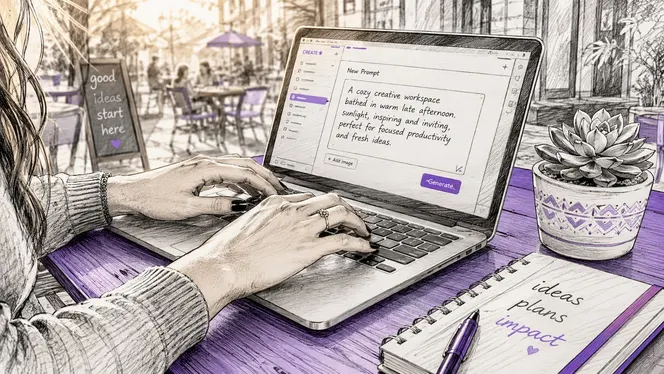
A high-converting AI flyer prompt has five parts: purpose, audience, event details, style or mood, and output format. Each part removes guesswork from the AI and reduces the number of edits you need afterward.
Here is what each part looks like in practice:
- Purpose: What is the flyer for? A grand opening, a concert, a product launch, a job fair? Be specific. “Promote our summer sale” beats “make a sale flyer.”
- Audience: Who will see it? College students, local families, corporate clients? The AI adjusts tone, imagery, and layout based on this.
- Event details: Date, time, location, price, and any key offer. Include every fact a viewer needs to act.
- Style or mood: Energetic and bold, clean and minimal, warm and friendly? Reference a color palette if you have one.
- Output format: Print or digital? Landscape or portrait? Standard US Letter (8.5x11 inches) or a social media square?
Pro Tip: Write your prompt as if you are briefing a designer over the phone. The more specific you are, the less back-and-forth you need.
Defining your brand assets upfront, including your logo, fonts, and brand colors, before you generate the flyer leads to consistent, professional output. Skipping this step is the most common reason AI flyers look generic. Think of it as giving the AI a style guide, not just a task.
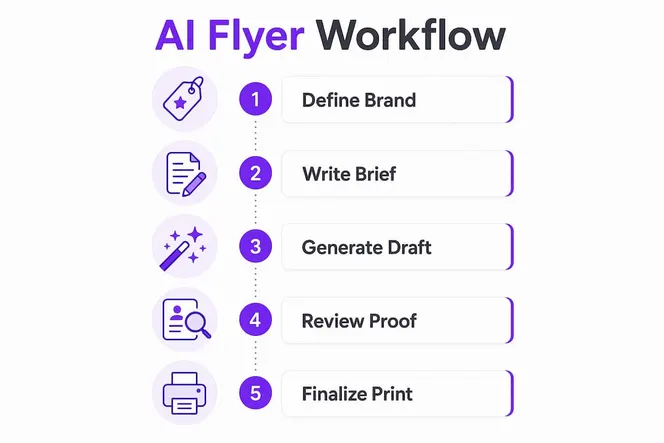
How does the AI flyer generation workflow actually work?
The process of designing flyers using AI follows a clear sequence. Understanding each step helps you move faster and avoid the most common mistakes.
- Write your prompt. Use the five-part structure above. Be specific about purpose, audience, details, style, and format.
- Generate the visual scene first. AI tools produce more unique results when you generate the background image or visual concept before adding text. Overlaying text on a custom visual scene avoids the generic template look that plagues most AI flyers.
- Review the initial output. Check layout, font readability, and whether the key message is visible at a glance. Most tools let you regenerate with a revised prompt if the first result misses the mark.
- Customize colors, fonts, and layout. Adjust brand colors, swap fonts, and reposition elements. Good AI flyer tools give you direct control over these without requiring design software knowledge.
- Add your logo and contact details. Brand identity elements go in last, after the visual and text hierarchy are set.
- Choose your export settings. Print flyers need 300 DPI resolution and CMYK color mode. Digital flyers need 72–150 DPI in RGB for fast loading and screen accuracy.
- Export and distribute. Download your file in the format your printer or platform requires.
Pro Tip: Always proof your flyer on the actual output medium before mass printing. Colors on screen look different from colors on paper, especially if you skip the CMYK export setting.
AI flyer generation can produce print-ready, editable flyers in under 30 seconds from a text prompt. That speed is real, but the best results still come from spending two extra minutes on a precise prompt rather than rushing straight to the generate button.
What flyer sizes and technical specs should you know?
Getting the size and resolution right before you generate saves you from reprinting or reformatting later. These are the industry-standard dimensions you should know.
| Format | Dimensions | Best use |
|---|---|---|
| US Letter | 8.5 x 11 inches | General events, business promotions |
| A5 | 5.8 x 8.3 inches | Handouts, retail promotions |
| Half-page | 5.5 x 8.5 inches | Cost-effective mass distribution |
| Social media square | 1080 x 1080 px | Instagram, Facebook posts |
| Story or vertical | 1080 x 1920 px | Instagram Stories, digital signage |
Standard flyer sizes include US Letter, A5, and half-page formats, with US Letter being the most common and half-page being the most cost-effective for mass distribution. Choosing the right size before you start prevents awkward cropping or rescaling at the end.
The most common mistake in automated flyer design is ignoring resolution and color mode for the intended output. Print flyers need CMYK color mode at 300 DPI. Digital flyers use RGB at 72–150 DPI. Sending an RGB file to a commercial printer causes color shifts that can make your brand colors look completely wrong on paper.
Most AI tools default to RGB and screen resolution. You need to manually select the correct export settings for print. Check this before you download your final file, not after.
What design principles make an AI flyer actually work?
A technically correct flyer can still fail if the design does not communicate fast enough. You have about 2–3 seconds to capture a viewer’s attention. Your headline must be readable from four feet away, and your call-to-action must be impossible to miss.
These principles separate effective flyers from forgettable ones:
- Lead with the headline. Your event name, offer, or key message goes at the top in the largest font. Everything else is secondary.
- Use high contrast. Dark text on a light background, or light text on a dark background. Never place text over a busy image without a contrast overlay.
- Limit your text. Limiting flyer text to core information and a single call-to-action maximizes reader engagement. Every extra line of text reduces the chance someone reads any of it.
- Make the CTA unmissable. “Register now,” “Call today,” or “Scan to book” should appear in a button or bold text near the bottom.
- Match your brand. Aligning AI-generated flyers with your brand identity and marketing campaigns increases their effectiveness across every channel.
“A flyer that tries to say everything ends up saying nothing. Pick one message, make it big, and let the design do the rest.”
The visual scene strategy matters here too. Generating a unique background image with AI, then placing your text on top, produces a flyer that looks custom-built rather than pulled from a stock template library. This approach reflects your brand and event mood in a way that generic layouts simply cannot.
One more thing: test legibility on a small screen. A large portion of digital flyers get viewed on phones first. If your headline is not readable on a 6-inch screen, resize it before you publish.
Why prompt quality beats tool choice every time
I have watched businesses spend hours comparing AI flyer tools, switching platforms, and chasing the “best” generator. Most of the time, the problem was never the tool. It was a vague, rushed prompt.
The teams that get the best results treat the prompt like a creative brief. They write down the purpose, the audience, the exact details, the mood, and the format before they open any tool. That two-minute investment produces a first-draft flyer that needs minimal editing. The teams that skip this step spend 45 minutes regenerating and tweaking because the AI had nothing specific to work with.
My personal rule: if I cannot explain the flyer to a stranger in three sentences, my prompt is not ready. Brand identity is the other piece most people underestimate. Feeding your brand colors, fonts, and logo into the process from the start is not optional if you want a flyer that looks like it belongs to your business. A flyer that looks off-brand does more damage than no flyer at all.
The good news is that AI flyer creation genuinely rewards experimentation. Try generating the visual scene first, then the text layout. Try a bold color palette you would not normally choose. The cost of a bad experiment is zero. The upside of a great one is a flyer that gets results.
— Viktor
Gammatica makes AI flyer creation part of your workflow
Creating professional flyers does not have to be a separate task that pulls you away from running your business.

Gammatica brings AI-powered creation directly into your team’s workflow. Give it a few words describing your event or promotion, and it generates a ready-to-use flyer in minutes. No design background needed. Beyond flyers, Gammatica connects your marketing output to task management, CRM, and team collaboration, so nothing falls through the cracks. Business owners using Gammatica for founders report freeing up to 16 hours weekly by combining AI creation with automated workflows. If you want to see how it fits your operation, book a demo and get a live walkthrough of the platform.
FAQ
What does it mean to create a flyer with AI?
Creating a flyer with AI means using an AI-powered tool to generate a designed, print or digital-ready flyer from a short text prompt. The AI handles layout, typography, and imagery based on your description.
How long does it take to make a flyer with AI?
AI flyer generation can produce a print-ready, editable flyer in under 30 seconds from a text prompt. Adding customization and brand elements typically brings total time to a few minutes.
What resolution do I need for a print flyer?
Print flyers require 300 DPI resolution and CMYK color mode to avoid color shifts. Digital flyers use 72–150 DPI in RGB for screen compatibility and fast loading.
What are the standard flyer sizes for print?
The most common print flyer sizes are US Letter (8.5x11 inches), A5 (5.8x8.3 inches), and half-page (5.5x8.5 inches). US Letter is the most widely used for general business and event promotions.
How do I make my AI flyer stand out from templates?
Generate the visual scene with AI first, then overlay your text elements on top. This approach creates a unique design that reflects your brand and event mood rather than a generic template layout.