
TL;DR:
- AI report writers automate the creation of professional reports by converting raw data into structured documents with minimal effort. They integrate multiple data sources and produce reports faster than manual methods, but success depends on clean data and precise prompts. Effective workflows involve structured prompt design, thorough data preparation, and human review to produce accurate, polished reports.
An AI report writer is software that transforms raw data, notes, and structured inputs into formatted, professional reports with minimal manual effort. Manual reporting costs teams 5–10 hours weekly per employee in data gathering alone, and financial errors from manual consolidation can cost organizations millions annually. That productivity loss is avoidable. Automated report generation now compresses what once took days into minutes, and professionals who adopt structured AI writing tools gain a measurable edge in speed, accuracy, and output quality. This guide covers how these tools work, what makes a great prompt, where adoption breaks down, and how expert users build boardroom-ready reports with advanced workflows.
What is an AI report writer and how does it work?
An AI report writer is the industry term for what many professionals call an intelligent report creator or automated report generation tool. The core function is simple: you feed the system data, and it produces a structured document. The real power is in how it handles that data at scale.

AI report tools pull data from CRM systems, analytics dashboards, spreadsheets, and project management platforms automatically. They compile that information into formatted reports and deliver them on a set schedule. You do not need to copy figures from five different tabs into a slide deck manually.
The generation speed is the most immediate benefit. Reports that once took days to compile now take minutes. Most professionals reach full proficiency with report writing software in 1–2 weeks. That is a short learning curve for a tool that reclaims hours every week.
The underlying technology uses machine learning to recognize patterns in your data, apply formatting rules, and generate narrative commentary that explains what the numbers mean. This is not a mail merge. The output reads like a document a skilled analyst wrote, not a template someone filled in.
How AI report writers pull from multiple data sources
The most underrated feature of modern report writing software is multi-source integration. A single report might draw from your CRM pipeline, a Google Analytics export, a project tracker, and a finance spreadsheet. Doing that manually means context-switching across four tools and hoping nothing gets misaligned.
AI report generation tools handle this automatically. Here is what a typical integration workflow looks like:
- CRM data: Contact records, deal stages, and revenue figures pull directly into sales reports.
- Analytics platforms: Traffic, conversion, and engagement metrics feed into marketing summaries.
- Project management tools: Task completion rates, milestone status, and blockers populate project status reports.
- Spreadsheets and CSVs: Raw financial or operational data gets parsed and formatted into tables and charts.
The output is a single, structured document that reflects all of those sources in a consistent format. Scheduling features let you set reports to generate daily, weekly, or monthly without any manual trigger.
Pro Tip: Before connecting your data sources, audit each one for completeness. Missing fields in your CRM or broken formulas in a spreadsheet will produce gaps in your AI-generated report. Clean inputs produce clean outputs.
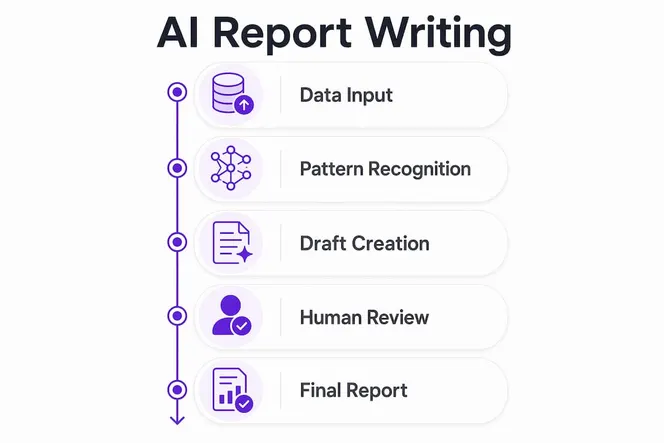
The proficiency timeline matters here. Most teams see full adoption within 1–2 weeks, but the first few days are critical. Set up your data connections carefully, define your report templates clearly, and run a test generation before going live with stakeholders.
What makes an effective AI report prompt?
The quality of your AI report output depends almost entirely on the quality of your prompt. High-quality prompts specify four elements: report type, source period, required content sections, and intended audience. Miss one of those, and the output will be generic or misaligned.
| Prompt element | Poor example | Strong example |
|---|---|---|
| Report type | “Write a report” | “Write a weekly sales performance report” |
| Source period | “Recent data” | “Data from March 1–31, 2026” |
| Content sections | “Include the important stuff” | “Include pipeline summary, closed deals, and top 3 risks” |
| Intended audience | “For my team” | “For the VP of Sales; use executive summary format” |
The audience specification is the element most professionals skip. A report for a CFO needs different language and emphasis than one for a project manager. Specifying the audience tells the AI to adjust tone, depth, and which data points to prioritize.
Defining content sections is equally critical. If you ask for a project status report without specifying that you need a risks section, the AI will not include one. The system generates what you ask for. Precision in the prompt equals precision in the output.
The source period prevents the AI from pulling in outdated or irrelevant data. “Q1 2026” is a better instruction than “this quarter” because it removes ambiguity. Structured, specific prompts are the difference between a usable first draft and a document you have to rewrite from scratch.
Common challenges when adopting AI report writers
Adoption of automated report generation tools fails more often because of data problems than technology problems. Data cleanliness is the critical barrier. Organizations that skip a data audit before deploying AI writing tools end up with reports full of gaps, inconsistencies, and figures that do not match what stakeholders expect.
The fix is establishing a single source of truth before you automate anything. That means deciding which system holds the authoritative version of each data type and making sure every team uses it consistently.
Here are the most common adoption challenges and how to address them:
- Inconsistent data entry: Sales reps logging deals differently creates mismatched pipeline reports. Standardize field formats and required fields in your CRM first.
- Multiple versions of the same data: Finance uses one spreadsheet, operations uses another. Consolidate before you automate.
- Resistance to structured workflows: Teams used to casual AI chat interactions resist the discipline of prompt engineering. Training on structured templates solves this.
- Unrealistic expectations: Professionals expect finished, polished documents immediately. AI-generated reports are best treated as drafts that require a structured review before distribution.
The biggest misconception in AI adoption is that professionals want to “chat” with the AI to get a report. What they actually want is a finished, audit-ready document produced by a structured workflow. That shift in thinking, from conversational AI to engineered document templates, is what separates teams that get real value from those that give up after a week.
For agencies and service firms, AI productivity gains come fastest when adoption is treated as a process change, not just a software installation. Change management matters as much as the tool itself.
Advanced workflows for expert AI report writing
Once you have mastered the basics, the gap between a competent AI report user and an expert one comes down to post-processing. Raw AI output is a starting point, not a finished product.
Expert users follow a structured workflow that looks like this:
- Define the report architecture first. Before prompting, map out every section the report needs. Think of it as a table of contents you write before the content exists.
- Use semantic sectioning in your prompt. Label each section explicitly in the prompt (“Executive Summary,” “Risk Analysis,” “Next Steps”) so the AI generates content with the correct hierarchy.
- Run the generation, then review for hallucinations. AI tools can fabricate figures if the source data is ambiguous. Every number in the output needs a check against the source.
- Apply visual hierarchy in post-processing. Add callout boxes for key insights, syntax highlighting for data tables, and a linked table of contents for longer documents.
- Export to your final format. Convert the structured document to HTML, Markdown, or PDF depending on your distribution channel.
Agentic workflows take this further. These are multi-step AI processes where the system handles semantic recognition, section formatting, and visual styling automatically, converting raw output into a scannable, professional document without manual intervention at each step.
Pro Tip: Write a short post-processing script that automatically adds your company’s header, a table of contents, and callout formatting to every AI-generated report. Run it once after generation and your output is distribution-ready in seconds.
The concept of the “zero-draft” is worth understanding here. AI-generated content is best treated as a zero-draft: a structured starting point that a human reviews, refines, and approves before it reaches a stakeholder. This framing removes the pressure of expecting perfection from the AI and puts the human reviewer in the right role.
For teams working in SEO and marketing, structured data preparation before automating reporting workflows produces significantly better outputs. The principle applies across every industry: the AI is only as good as the data you give it.
| Workflow stage | Basic user approach | Expert user approach |
|---|---|---|
| Prompt design | Single open-ended prompt | Structured prompt with labeled sections |
| Data preparation | Raw export from one source | Audited, consolidated multi-source data |
| Post-processing | None | Automated styling, callouts, table of contents |
| Review process | Quick read-through | Structured fact-check against source data |
| Output format | Copy-paste to document | Automated export to PDF or HTML |
Why I think most teams are using AI reports the wrong way
Most teams I see adopt AI report tools and immediately try to use them like a search engine. They type a vague request, get a mediocre output, and conclude the technology is not ready. That conclusion is wrong. The technology is ready. The workflow is not.
The teams that get real results treat the AI as a production system, not a conversation partner. They invest two or three days upfront in data preparation and prompt engineering. That investment pays back within the first week. Audit-ready financial reports with narrative commentary and real-time insights are achievable right now, but only if the inputs are clean and the prompts are structured.
The other mistake I see constantly is skipping the review step. An AI-generated report that goes straight to a board meeting without human review is a liability. The zero-draft model is not a limitation of the technology. It is the correct way to use any AI writing tool in a professional context. The AI handles the volume and structure. You handle the judgment and accountability.
Data preparation is the unglamorous work that determines whether your AI report program succeeds or fails. Most organizations underinvest in it. The teams that treat data cleanliness as a prerequisite, not an afterthought, are the ones reporting genuine productivity gains within the first month.
— Viktor
How Gammatica turns your data into polished reports
Gammatica gives you a direct path from raw data to a finished, exportable report. Upload your files or numbers directly to the platform, ask Gammatica’s AI to create slides from the data you provide, and your report is ready to export as a PDF.

The platform connects AI-powered report creation with task management, CRM, and team collaboration in one place. You are not switching between tools to gather data and then format a document. Gammatica handles the full workflow, from data input to polished output, so your team spends time on decisions, not document assembly. If you want to see the platform in action, a Gammatica demo call walks you through exactly how the AI handles your specific reporting needs.
FAQ
What is an AI report writer?
An AI report writer is software that processes raw data, notes, and structured inputs to produce formatted, professional reports automatically. It replaces manual data gathering and document assembly with an automated workflow.
How long does it take to generate a report with AI?
AI report generation compresses report creation from days to minutes. Most users reach full proficiency with the tool within 1–2 weeks of initial setup.
What are the four elements of a good AI report prompt?
Effective AI report prompts specify the report type, source data period, required content sections, and intended audience. Missing any one of these elements produces generic or misaligned output.
Why do AI-generated reports need human review?
AI tools can produce inaccurate figures if source data is ambiguous or incomplete. Treating AI output as a zero-draft and running a structured fact-check before distribution protects accuracy and stakeholder trust.
How does data quality affect AI report accuracy?
Data cleanliness determines the success of automated report generation more than the AI technology itself. Organizations must audit data and establish a single source of truth before deploying any report automation workflow.